IRS Form W-3 – Transmittal of Wage and Tax Statements – As a business owner or HR professional, navigating IRS payroll reporting requirements is essential for compliance and avoiding costly penalties. One key form in this process is IRS Form W-3, officially known as the Transmittal of Wage and Tax Statements. This form serves as a summary cover sheet for your employees’ Form W-2 submissions to the Social Security Administration (SSA). If you’re preparing for the 2025 tax year, understanding Form W-3 is crucial—especially with updated instructions released in February 2025.
In this comprehensive guide, we’ll break down everything you need to know about Form W-3: its purpose, who must file it, step-by-step completion instructions, deadlines, and common pitfalls to avoid. Whether you’re filing for the first time or refining your process, this article will help you stay compliant and efficient. Let’s dive in.
What Is IRS Form W-3?
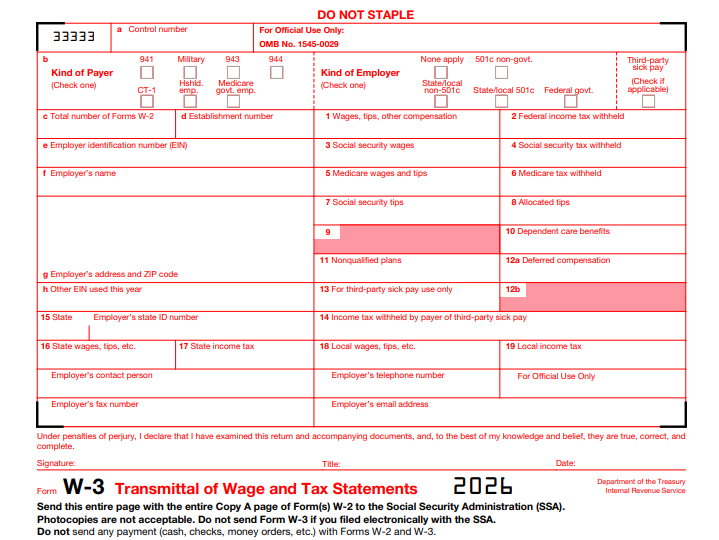
Form W-3 is a one-page transmittal form used by employers to submit Copy A of all Forms W-2 (Wage and Tax Statements) to the SSA. It aggregates the total wages paid, tips received, and taxes withheld across all your W-2s for the tax year, providing a high-level summary that the SSA uses to verify payroll data and track employee earnings for Social Security and Medicare benefits.
Unlike individual W-2 forms, which detail each employee’s compensation, Form W-3 acts as a “cover letter” ensuring the SSA can process your batch of W-2s accurately. It’s not sent to employees or state agencies—only to the SSA. For 2025, the form remains largely unchanged from prior years, but it includes new OMB control numbers and references to updated penalty structures for late filings.
Key Fact: Form W-3 is required only for paper filings. If you e-file your W-2s (mandatory for employers with 10 or more forms), the SSA’s system generates an electronic equivalent automatically—no separate W-3 needed.
Who Must File Form W-3?
Not every business needs to file Form W-3, but most employers who issue W-2s do. Here’s a breakdown:
- Employers Required to File W-2s: If you paid any employee $600 or more in wages during 2025 and withheld federal income tax, Social Security, or Medicare taxes (or paid the employer’s share of FICA taxes), you must file a W-2 for that employee—and thus a W-3 to transmit them.
- Exceptions:
- Household employers filing Schedule H (Form 1040) may not need a separate W-3 if totals align with their return.
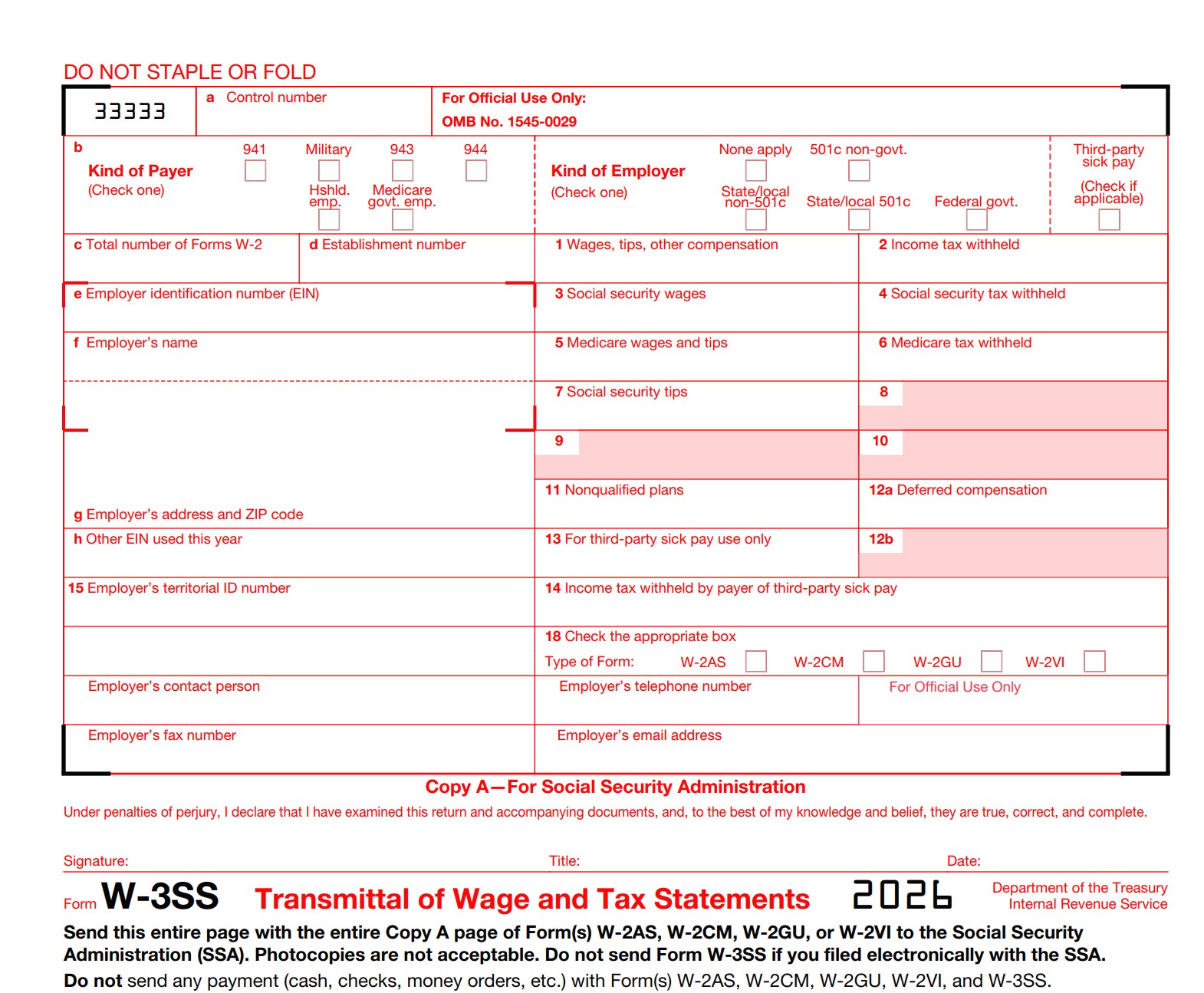
- Businesses in U.S. territories (e.g., Guam, American Samoa) use variants like Form W-3SS for W-2GU or W-2VI.
- Threshold for E-Filing: Employers filing 10 or more information returns (including W-2s) in 2025 must e-file, waiving the paper W-3 requirement. Smaller employers can choose paper but are encouraged to go electronic for accuracy.
In short: If you’re an employer with W-2-eligible staff, you’re likely filing Form W-3 (or its electronic proxy). Non-profits, corporations, partnerships, and even some government entities fall under this rule.
Step-by-Step Guide: How to Complete IRS Form W-3 for 2025
Completing Form W-3 is straightforward if your W-2 data is organized. Use payroll software to auto-populate totals, or tally manually. Always use the 2025 version—download from IRS.gov or order official red-ink forms for paper filing. Here’s how to fill it out:
1. Gather Your Data
- Sum totals from all W-2 Copy A forms: wages (Box 1), Social Security wages (Box 3), Medicare wages (Box 5), withheld taxes, tips, benefits, etc.
- Have your Employer Identification Number (EIN), business name, and address ready. Do not truncate EINs or SSNs.
2. Fill in the Header (Boxes a–e)
- Box a (Control Number): Optional; use a unique identifier to track your batch (e.g., from payroll software).
- Box b (Employer Identification Number): Enter your EIN (format: 00-0000000).
- Box c (Total Number of W-2s): Count all W-2s being transmitted.
- Box d (Establishment Number): Optional for multi-location businesses.
- Box e (Employer’s Name/Address): Full legal name, street address, city, state, ZIP. Check the appropriate box for employer type (e.g., 941 for quarterly filers, 944 for annual).
3. Enter Wage and Tax Totals (Boxes 1–20)
- Box 1 (Wages, Tips, Other Compensation): Total from W-2 Box 1.
- Box 2 (Social Security Tax Withheld): Total from W-2 Box 4 (max 6.2% of Box 3).
- Box 3 (Social Security Wages): Total from W-2 Box 3 (capped at $176,100 for 2025).
- Box 4 (Medicare Tax Withheld): Total from W-2 Box 6 (1.45% of Box 5).
- Box 5 (Medicare Wages and Tips): Total from W-2 Box 5 (no cap).
- Box 6 (Social Security Tips): Total from W-2 Box 7.
- Box 7 (Federal Income Tax Withheld): Total from W-2 Box 2.
- Box 8–9: Reserved; leave blank.
- Box 10 (Dependent Care Benefits): Total from W-2 Box 10 (max $5,000 per employee).
- Box 11 (Nonqualified Plans): Total deferred compensation from W-2 Box 11.
- Box 12: Totals for codes A–V (e.g., retirement contributions; see instructions).
- Box 13: Check boxes for retirement plan, third-party sick pay, statutory employee, etc.
- Box 14 (Other): Describe and total any state-specific items.
- Boxes 15–19: State/local totals (wages, withheld taxes, ID numbers). Not applicable for territorial forms.
4. Sign and Date (Bottom Section)
- Sign as the employer or authorized agent. Date it. Keep a copy with your W-2 Copy D for 4 years.
Pro Tip: Verify totals match your quarterly Forms 941/944 to avoid SSA mismatches. Use black ink on official forms—faint printouts get rejected.
When and Where to File Form W-3 for 2025
Timing is everything with tax forms. For the 2025 tax year:
- Deadline: File by January 31, 2026 (or the next business day if it falls on a weekend/holiday). This aligns with furnishing W-2 Copies B/C/2 to employees. Note: Some sources reference February 2, 2026, but IRS guidance confirms January 31 as the standard due date.
- Extensions: Request a 30-day extension via Form 8809 if extraordinary circumstances apply (e.g., disaster). Not automatic—file before the deadline. A new option: Fax Form 15397 for up to 30 extra days to furnish employee copies.
- How to File:
- Electronically (Recommended): Use SSA’s Business Services Online (BSO) at ssa.gov/bso. Free, secure, and generates W-3 automatically. Ideal for 10+ forms.
- By Mail (Paper Only): Send W-3 with W-2 Copy A to: Social Security Administration, Direct Operations Center, Wilkes-Barre, PA 18769-0001. Use flat envelopes—no folding.
- Payroll Providers: Many (e.g., OnPay) handle e-filing for you.
For territorial filers, addresses vary (e.g., Virgin Islands Bureau of Internal Revenue).
Common Mistakes to Avoid When Filing Form W-3
Even seasoned filers slip up—here are pitfalls from IRS data and expert insights:
| Mistake | Why It Happens | How to Fix/Avoid | Potential Penalty |
|---|---|---|---|
| Mismatched Totals | W-3 boxes don’t sum W-2s accurately. | Double-check against payroll reports and Forms 941. | $60–$680 per form (late/intentional). |
| Incorrect EIN/SSN | Typos or using SSN instead of EIN. | Verify via IRS EIN lookup; never truncate. | Notices like CP2100; correction required. |
| Wrong Tax Year Form | Using 2024 version for 2025 data. | Download fresh from IRS.gov each year. | Rejection and refiling delays. |
| Faint/Incorrect Ink | Printing on plain paper or light ink. | Use official red-ink forms or approved substitutes (Pub. 1141). | Scanning failures; manual processing fees. |
| Filing W-3 Alone | Forgetting attached W-2s. | Always bundle; e-file to automate. | Incomplete submission penalty. |
| Retirement Plan Code Errors | Misusing Box 12/13 codes (e.g., wrong deferral type). | Consult 2025 instructions for codes A–V. | IRS audits or benefit delays. |
| Late Filing | Missing Jan. 31 deadline. | Set calendar reminders; e-file early. | Up to $680 per form after Dec. 31, 2025. |
Corrections? File Form W-3c with W-2c forms promptly—no deadline, but delays increase risks.
2025 Updates and Special Considerations for Form W-3
The IRS released 2025 instructions on February 27, 2025, with these highlights:
- Health FSA Limit: Cafeteria plans cap salary reductions at $3,300 (up from prior years).
- Penalty Increases: Late filings after Dec. 31, 2025, face higher fines ($60–$680 per form based on delay).
- E-Filing Push: Mandatory for 10+ returns; BSO now requires updated credentials since March 2023.
- Death Benefits: Report post-death wages on W-2 if paid in 2025; use 1099-MISC for estates.
For third-party sick pay or fringe benefits, include in appropriate boxes and notify employees.
IRS Form W-3 Download and Printable
Download and Print: IRS Form W-3
Final Thoughts: Stay Compliant with Form W-3
IRS Form W-3 is a simple yet vital piece of payroll compliance, ensuring your wage data flows smoothly to the SSA. By filing accurately and on time—ideally electronically—you’ll avoid penalties, support employee benefits, and reconcile seamlessly with your tax returns. For the 2025 tax year, leverage free IRS resources like the General Instructions for Forms W-2 and W-3 (available at IRS.gov).
If you’re overwhelmed, consult a CPA or payroll expert. Questions? Download the 2025 Form W-3 PDF from IRS.gov and start early. Proper preparation today means peace of mind tomorrow.
This article is for informational purposes only and not tax advice. Always refer to official IRS guidance for your situation.