Table of Contents
IRS Form 14310-A – Potential Partner Referral from a Home Territory – Are you an IRS employee spotting a potential partner for volunteer tax assistance programs? IRS Form 14310-A, the Potential Partner Referral from a Home Territory, is your key tool for connecting community organizations with the VITA (Volunteer Income Tax Assistance) and TCE (Tax Counseling for the Elderly) initiatives. Revised in October 2025, this form streamlines referrals to expand free tax help nationwide. In this in-depth guide, we’ll cover the essentials of IRS Form 14310-A—its role, who uses it, and how to submit it effectively—to empower IRS staff and partners in boosting taxpayer access to essential services.
Whether you’re in the field or supporting IRS volunteer efforts, mastering Form 14310-A ensures seamless collaboration. Let’s explore how this referral form drives community impact during tax season.
What Is IRS Form 14310-A?
IRS Form 14310-A, titled Potential Partner Referral from a Home Territory, is a concise referral document used by IRS personnel to nominate organizations or groups as potential partners for VITA/TCE programs. With Catalog Number not publicly listed in standard IRS pubs but tied to Rev. 10-2025, it facilitates internal handoffs from “home territories” (local IRS offices or field reps) to program coordinators.
This form captures basic organizational details and referral rationale, feeding into the IRS’s broader volunteer network. It’s part of the suite supporting Form 14310 (Partner and Volunteer Sign Up), but specifically for inbound referrals rather than direct sign-ups. The OMB burden is minimal—under 15 minutes—aligning with IRS efforts to grow VITA/TCE sites, which assisted over 2.5 million taxpayers in 2024.
Who Needs to Use IRS Form 14310-A?
Primarily, IRS employees in stakeholder liaison roles, territory managers, or field representatives complete this form when identifying promising partners during outreach. It’s ideal for:
- Taxpayer Assistance Center (TAC) staff encountering community groups.
- Revenue agents or specialists noting organizations via events or audits.
- Volunteer coordinators referring leads from non-local territories.
Organizations themselves don’t fill it out; it’s an internal IRS tool for “home territory” referrals to ensure leads reach the right VITA/TCE sponsor. If you’re an external partner interested in joining, use Form 14310 instead.
Submit for new potentials only—existing partners should be directed to update via established channels.
Purpose and Benefits of IRS Form 14310-A
The primary purpose of Form 14310-A is to efficiently route potential partner leads, preventing lost opportunities in expanding free tax prep access. By referring organizations that can provide venues, volunteers, or resources, it:
- Strengthens VITA/TCE networks in underserved areas.
- Supports IRS goals for 2025, targeting a 10% site growth amid rising demand for low-income and elderly services.
Key benefits include:
- Faster Onboarding: Referrals trigger quick sponsor follow-up, often within weeks.
- Enhanced Outreach: Helps claim credits like EITC for millions, reducing unclaimed refunds estimated at $1.5 billion annually.
- Internal Efficiency: Integrates with IRS SPECTRM system for tracking and metrics.
- Community Ties: Builds IRS partnerships with nonprofits, libraries, and faith-based groups.
In 2025, with hybrid virtual sites on the rise, timely Potential Partner Referral submissions are crucial for scalable program growth.
Step-by-Step Guide: How to Fill Out IRS Form 14310-A
Access the PDF via IRS internal portals or stakeholder resources (public drafts may appear on IRS.gov under drafts). Use digital fillable fields or print for signatures. Estimated time: 10-15 minutes.
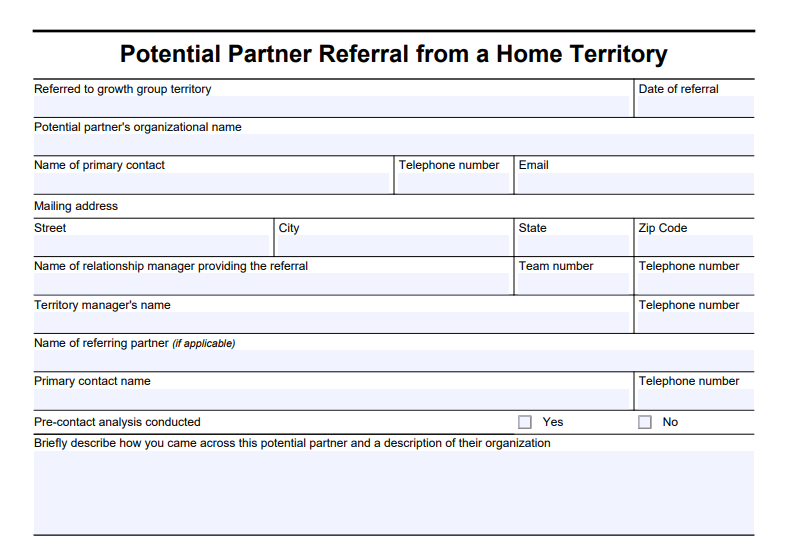
- Header Info: Enter date (MM/DD/YYYY) and your IRS employee details (name, ID, territory).
- Referral Source: Note how you identified the potential (e.g., community event, phone inquiry).
- Partner Details: Provide organization name, contact (name, phone, email), address, and website if known.
- Description: Summarize why they’re a fit (e.g., “Local library with 500+ low-income patrons, interested in hosting in-person site”).
- Services Interest: Check VITA, TCE, or both; note languages or special focuses.
- Attachments: Add any supporting docs (e.g., emails).
- Sign and Submit: Electronically sign and route via IRS secure email or portal to the VITA/TCE lead.
Tip: For 2025 updates, emphasize virtual capabilities if the partner mentions remote tools like TaxSlayer.
Key Sections of IRS Form 14310-A Explained
Though concise, Form 14310-A is structured for quick data capture:
Referral Header (Lines 1-3)
- Date of referral, referring employee’s name/title/territory, and contact info.
Potential Partner Information (Lines 4-8)
- Organization name, primary contact (name, role, phone, email), full address (street, city, state, ZIP), and website/URL.
Referral Details (Lines 9-12)
- How/where identified (e.g., “Met at chamber meeting”).
- Brief description of potential contributions (space, volunteers, etc.).
- Program interest: VITA (basic/low-income), TCE (seniors), or hybrid.
- Any notes on capacity (e.g., “Available Jan-Apr, multilingual staff”).
Submission and Privacy
- Signature line for referrer.
- Privacy notice: Data shared only for VITA/TCE matching, per 26 U.S.C. § 7801.
Leave no blanks—use “N/A” if needed to expedite processing.
Submission Process for Form 14310-A
Internal IRS users submit via secure channels: email to your territory’s VITA coordinator or upload to the IRS Volunteer Portal. External stakeholders can’t submit directly; encourage potentials to use Form 14310 at IRS.gov/individuals/irs-tax-volunteers.
Processing: Leads are assigned to local sponsors within 5-10 business days, with follow-up tracked in IRS systems. Confirm receipt and expect status updates. For changes, resubmit with “Update” noted.
IRS Form 14310-A Download and Printable
Download and Print: IRS Form 14310-A
Privacy, Security, and Important Notes
Submissions fall under IRS privacy protections (Privacy Act of 1974; 5 U.S.C. § 552a). Data is used solely for partner matching and not disclosed without consent. Routine uses include sponsor notifications.
Notes for 2025:
- Aligns with enhanced virtual referral fields.
- Requires PTIN for paid preparers transitioning to volunteers.
- Incomplete forms delay referrals—double-check contacts
Frequently Asked Questions (FAQs) About IRS Form 14310-A
What’s the difference between Form 14310-A and Form 14310?
Form 14310-A is for IRS internal referrals of potentials; Form 14310 is for direct partner/volunteer sign-ups.
Can organizations submit Form 14310-A themselves?
No—it’s IRS-only. Direct them to the volunteer sign-up page.
How long does follow-up take after submission?
Typically 1-2 weeks, depending on territory volume.
Where to find the 2025 version?
Check IRS.gov drafts or internal resources; look for Rev. 10-2025.
Does this help with IRS grant funding?
Indirectly—stronger networks improve program metrics for Matching Grant Program eligibility.
Conclusion: Leverage Form 14310-A to Build Stronger VITA/TCE Partnerships
IRS Form 14310-A is a vital bridge for turning potential into action, expanding free tax assistance through strategic referrals. By using this Potential Partner Referral from a Home Territory tool, IRS teams amplify community support and taxpayer success. Download the latest from IRS internal sites, refer confidently, and watch volunteer sites flourish.
For more, visit the IRS Volunteer Income Tax Assistance Page. IRS employees: Contact your stakeholder liaison for training.
This article is informational only and not official IRS guidance. Consult IRS.gov for authoritative details.