IRS Form 966 – Corporate Dissolution or Liquidation – When a corporation decides to wind down operations, whether through complete dissolution or partial liquidation, navigating the IRS requirements is crucial to ensure compliance and avoid potential complications. IRS Form 966, officially titled “Corporate Dissolution or Liquidation,” serves as a key notification tool for the Internal Revenue Service. This form alerts the IRS to a corporation’s plan to dissolve or liquidate assets, helping to tie up loose ends in tax reporting. In this comprehensive guide, we’ll cover everything you need to know about IRS Form 966, including who must file it, deadlines, step-by-step filing instructions, common pitfalls, and any relevant updates for 2025. Whether you’re a business owner, tax professional, or advisor handling corporate dissolution, understanding Form 966 can streamline the process and minimize risks.
What Is IRS Form 966?
IRS Form 966 is a one-page form required under Section 6043(a) of the Internal Revenue Code. Its primary purpose is to inform the IRS when a corporation adopts a resolution or plan for dissolution or liquidation of its stock—either complete or partial. This filing signals that the corporation is ending its business activities and may be preparing final tax returns. It’s not a tax return itself but a reporting document that helps the IRS track corporate changes and ensure proper tax treatment of distributions, gains, or losses.
For example, during liquidation, a corporation must recognize gains or losses on asset distributions at fair market value, with exceptions for subsidiary liquidations or reorganizations. This form applies to various scenarios, such as closing a C corporation, handling S corporation dissolutions, or managing foreign corporations with U.S. tax obligations. As of 2025, there have been no major revisions to the form, but businesses should always use the latest version from the IRS website to stay compliant.
Who Needs to File IRS Form 966?
Not every business entity is required to file Form 966. Here’s a breakdown of who must submit it:
- Domestic C Corporations: Any C corp adopting a plan for complete or partial liquidation.
- S Corporations: Often required to document compliance, especially when filing final returns.
- Farmer’s Cooperatives: If dissolving or liquidating stock.
- Foreign Corporations: Those filing U.S. tax returns (e.g., Form 1120-F) must file if undergoing dissolution or liquidation.
- LLCs Taxed as Corporations: If dissolving under state law and treated as a corporation for federal tax purposes.
- Corporations in Mergers or Reorganizations: If the process involves asset liquidation.
Exceptions include:
- Tax-exempt organizations (use Form 990 or 990-PF instead).
- Qualified Subchapter S subsidiaries (file Form 8869).
- Disregarded entities like single-member LLCs or sole proprietorships.
- Deemed liquidations, such as Section 338 elections or elections to be treated as a disregarded entity.
U.S. shareholders of foreign corporations may need to report via Form 5471 instead. If you’re unsure about your entity’s status, consulting a tax advisor is recommended to avoid unnecessary filings or oversights.
When to File IRS Form 966?
Timing is critical for Form 966 compliance. The form must be filed within 30 days after the board of directors or shareholders adopt the resolution or plan for dissolution or liquidation. This deadline applies to both complete dissolutions (where the entire corporation is wound up) and partial liquidations (e.g., distributing specific assets).
If the plan is amended or supplemented later, you must file an additional Form 966 within 30 days of the change. In such cases, reference the original filing date on Line 11 and attach the amendments. Missing this window can lead to increased IRS scrutiny, though specific penalties are not always enforced for small entities.
How to Fill Out IRS Form 966: Step-by-Step Instructions
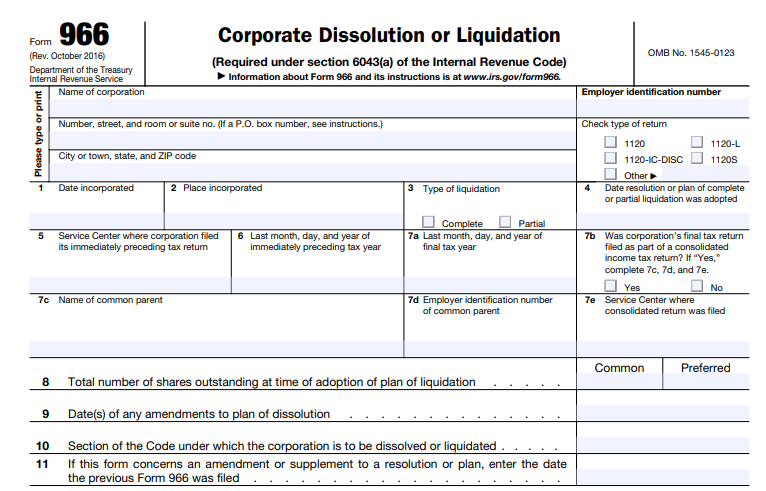
Form 966 is relatively simple, but accuracy is essential. Use the latest revision (October 2016 as of 2025, with no updates noted). Type or print clearly, and gather your corporation’s records beforehand. Here’s a line-by-line guide:
- Corporation Details: Enter the name, address (including P.O. box if applicable), employer identification number (EIN), and type of tax return filed (e.g., 1120, 1120S).
- Line 1: Date Incorporated – The original incorporation date.
- Line 2: Place Incorporated – State or country of incorporation.
- Line 3: Type of Liquidation – Check “Complete” or “Partial.”
- Line 4: Date Resolution or Plan Adopted – The adoption date of the dissolution plan.
- Line 5: Service Center for Preceding Tax Return – Where the last return was filed; enter “e-file” if electronic.
- Line 6: End of Preceding Tax Year – Month, day, and year.
- Line 7a: End of Final Tax Year – Month, day, and year of the final year.
- Line 7b-e: Consolidated Return Details – If the final return is consolidated, provide parent company info and filing center.
- Line 8: Shares Outstanding – Total common and preferred shares at adoption time.
- Line 9: Amendment Dates – Any changes to the plan.
- Line 10: Code Section – E.g., Section 331 for general liquidations or 332 for subsidiaries.
- Line 11: Previous Form 966 Date – If this is an amendment.
Finally, sign the form under penalties of perjury. An authorized officer (e.g., president or treasurer) or fiduciary must sign.
How to File IRS Form 966
Submit Form 966 to the IRS Service Center where your corporation files its income tax returns. Options include:
- Mail: Use the address for your tax return type (check IRS guidelines for specifics).
- Electronic Filing: If your returns are e-filed, note it on the form.
- For S Corps: Coordinate with final Form 1120S, Schedule K-1, and other forms like 940 or 941.
Always retain copies and related records for at least seven years.
IRS Form 966 Download and Printable
Download and Print: IRS Form 966
Required Attachments for IRS Form 966
Attach a certified copy of the resolution or plan of dissolution/liquidation, including any amendments not previously filed. This could be board minutes, shareholder votes, or state-filed documents. Failure to include this is a common error that can delay processing.
Common Mistakes to Avoid When Filing IRS Form 966
Even with a simple form, errors can occur. Here are frequent pitfalls:
- Missing the 30-day filing deadline.
- Omitting the certified plan copy.
- Entering incorrect dates (e.g., incorporation or adoption).
- Forgetting to report plan amendments.
- Using an outdated form version.
- Not linking to final tax returns, like Form 1120 or 4797 for asset sales.
Double-check all information and consider professional review to sidestep these issues.
Penalties for Not Filing or Late Filing IRS Form 966
While there’s no specific statutory penalty tied directly to late or non-filing of Form 966, the IRS may impose general penalties for non-compliance under Section 6043(a), potentially leading to audits, delays in closing tax accounts, or fines. For small S corps, penalties are often minimal if other returns are properly filed, but larger entities could face increased risks. To avoid issues, file on time and ensure all related tax obligations are met.
Additional Considerations for Corporate Dissolution in 2025
In 2025, no significant changes have been announced for Form 966, but stay alert for IRS updates on business closures. Coordinate with state dissolution requirements, creditor notifications, and asset distributions. For S corps, include a tax account closure statement with your EIN. If handling foreign entities, review Form 5471 obligations. Always consult a tax expert for complex scenarios, such as mergers or subsidiary liquidations.
Final Thoughts on IRS Form 966 and Corporate Liquidation
Filing IRS Form 966 is a straightforward yet essential step in properly dissolving or liquidating a corporation. By adhering to the 30-day deadline, providing accurate details, and attaching necessary documents, you can ensure a smooth wind-down process. For businesses in 2025, leveraging the latest IRS resources and professional advice will help maintain compliance and avoid unnecessary complications. If you’re planning a corporate dissolution, start by downloading Form 966 from the IRS website and reviewing your entity’s specific requirements today.