IRS Form W-8BEN-E – Certificate of Entities Status of Beneficial Owner for United States Tax Withholding and Reporting (Entities) – In an increasingly globalized economy, foreign entities engaging with U.S. businesses often encounter tax withholding requirements on income sourced from the United States. IRS Form W-8BEN-E, officially known as the Certificate of Entities Status of Beneficial Owner for United States Tax Withholding and Reporting (Entities), plays a crucial role in helping these entities certify their foreign status and potentially reduce or eliminate the standard 30% withholding tax. This comprehensive guide covers the purpose, requirements, step-by-step instructions, and best practices for completing Form W-8BEN-E, drawing from the latest official IRS guidelines as of 2025.
Whether you’re a foreign corporation, partnership, trust, or international organization receiving U.S.-sourced payments like dividends, interest, royalties, or compensation, understanding this form is essential for compliance and tax optimization.
What is IRS Form W-8BEN-E?
Form W-8BEN-E is a tax certification document used by foreign entities to document their status under Chapters 3 and 4 of the Internal Revenue Code. Chapter 3 deals with withholding on payments to nonresident aliens and foreign corporations, while Chapter 4 enforces the Foreign Account Tax Compliance Act (FATCA), which aims to prevent tax evasion by U.S. persons holding assets abroad.
The form certifies that the entity is not a U.S. person, establishes its foreign beneficial owner status, and allows claims for reduced withholding rates under applicable U.S. tax treaties. It also identifies the entity’s FATCA classification, such as whether it’s a participating foreign financial institution (FFI), an active non-financial foreign entity (NFFE), or another category. Without this form, payers may withhold taxes at the full 30% rate on withholdable payments, including U.S. source fixed or determinable annual or periodical (FDAP) income like interest, dividends, rents, and royalties.
As of October 2025, the latest revision of the form is from October 2021, with no major updates reported in recent IRS announcements. However, entities should always check the IRS website for any interim guidance or changes related to intergovernmental agreements (IGAs) or treaty updates.
Who Needs to File Form W-8BEN-E?
Foreign entities receiving U.S.-sourced income subject to withholding must provide Form W-8BEN-E to the withholding agent or payer before receiving payments. This includes:
- Foreign corporations, partnerships, estates, or trusts not engaged in a U.S. trade or business but receiving withholdable payments.
- Foreign sellers of life insurance contracts or recipients of reportable death benefits under section 6050Y.
- Foreign partners in U.S. partnerships for withholding under sections 1446(a) or 1446(f) on effectively connected income or transfers of partnership interests.
- Entities claiming tax treaty benefits to reduce withholding on U.S. source income.
- Flow-through or disregarded entities documenting as participating payees for section 6050W reporting on payment card transactions.
- Foreign financial institutions (FFIs) or non-financial foreign entities (NFFEs) maintaining accounts with FFIs that require chapter 4 status documentation.
Do not use this form if you are:
- A U.S. person (use Form W-9).
- A nonresident alien individual (use Form W-8BEN or Form 8233).
- Receiving effectively connected income (use Form W-8ECI, unless through a partnership).
- A foreign government or tax-exempt organization claiming specific exemptions (use Form W-8EXP, though W-8BEN-E can be used for treaty claims).
- An intermediary or flow-through entity (use Form W-8IMY).
Failure to submit the form can result in full 30% withholding, backup withholding, or penalties under sections 1446.
Key Differences Between W-8BEN and W-8BEN-E
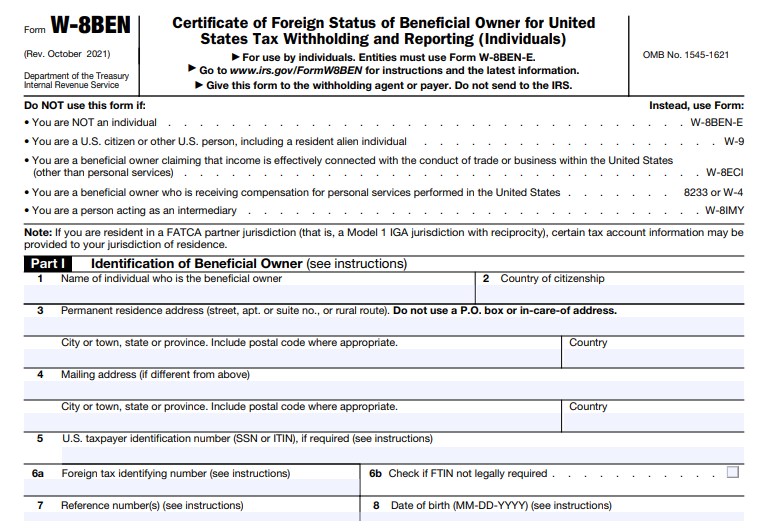
Form W-8BEN is for individuals or single-owner entities, while W-8BEN-E is specifically for entities with multiple owners or complex structures like corporations and partnerships. W-8BEN-E includes additional sections for FATCA classifications and entity types, making it more detailed. Individuals mistakenly using W-8BEN-E could invalidate their certification, leading to unnecessary withholding.
Step-by-Step Guide to Filling Out Form W-8BEN-E
Form W-8BEN-E consists of 30 parts, but most entities only complete relevant sections. Always refer to the official instructions for your specific situation. Here’s a breakdown:
Part I: Identification of Beneficial Owner
- Line 1: Enter the entity’s full legal name (e.g., “Global Tech Ltd.”). For disregarded entities, use the owner’s name.
- Line 2: Specify the country of incorporation or organization.
- Line 3: Name of disregarded entity (if applicable and it has its own GIIN).
- Line 4: Check the U.S. tax classification (e.g., corporation, partnership). For hybrids claiming treaty benefits, check “yes” for hybrid status.
- Line 5: Select chapter 4 (FATCA) status (e.g., active NFFE, participating FFI).
- Line 6: Permanent residence address (no P.O. boxes unless solely used).
- Line 7: Mailing address if different.
- Line 8: U.S. taxpayer identification number (TIN), such as EIN, if required (e.g., for treaty claims).
- Line 9a: Global Intermediary Identification Number (GIIN) if applicable.
- Line 9b/c: Foreign tax identification number (FTIN) or check if not required.
- Line 10: Reference information (e.g., account number).
Part II: Disregarded Entity or Branch Receiving Payment
Complete if the entity is a disregarded entity with its own GIIN or a branch outside the country in Line 2. Include chapter 4 status, address, and GIIN.
Part III: Claim of Tax Treaty Benefits
- Line 14: Country of residence and certification of treaty eligibility.
- Line 15: Specify treaty article, withholding rate, income type, and explanations for special rates or conditions.
Parts IV-XXVIII: Certification of Chapter 4 Status
Complete only the part matching your Line 5 selection (e.g., Part XXV for active NFFE, certifying active business and asset tests).
Part XXIX: Substantial U.S. Owners of Passive NFFE
List U.S. owners if applicable (for passive NFFEs).
Part XXX: Certification
Sign and date by an authorized representative, certifying accuracy under penalty of perjury.
Use electronic signatures if permitted, and attach any required documentation for IGAs or special statuses.
Common Mistakes to Avoid When Completing Form W-8BEN-E
- Using the wrong form: Individuals should use W-8BEN, not W-8BEN-E.
- Incomplete FATCA classification: Failing to select or certify chapter 4 status can lead to 30% withholding.
- Missing TIN or FTIN: Required for treaty claims; exemptions must be justified.
- Incorrect addresses: Use permanent residence, not U.S. or P.O. boxes.
- Not updating for changes: Resubmit within 30 days of any circumstance change.
- Assuming automatic treaty benefits: Must meet limitation on benefits (LOB) provisions.
- Submitting to IRS: Send only to the payer or withholding agent.
When and How to Submit Form W-8BEN-E
Submit the form to the U.S. payer before receiving income to avoid withholding. It’s not filed with the IRS but kept on record by the payer. Electronic submission is common, especially for platforms like Upwork or payment processors.
The form is valid from the signature date until the end of the third calendar year (e.g., signed in 2025, valid through December 31, 2028), unless circumstances change. Notify the payer within 30 days of changes and provide a new form.
If overwithholding occurs due to errors, file Form 1040-NR with Form 8833 to claim refunds.
IRS Form W-8BEN-E Download and Printable
Download and Print: IRS Form W-8BEN-E
FAQs About IRS Form W-8BEN-E
What happens if I don’t submit Form W-8BEN-E?
You may face 30% withholding on U.S.-sourced income.
Can I claim treaty benefits without a TIN?
It depends on the treaty; some require it, others allow alternatives like FTIN.
How often do I need to renew the form?
Every three years or upon changes in status.
Is Form W-8BEN-E required for all foreign entities?
Only those receiving withholdable U.S. income or documenting FATCA status.
Where can I download the latest Form W-8BEN-E?
From the IRS website: Form W-8BEN-E PDF.
Conclusion
Navigating U.S. tax withholding as a foreign entity can be complex, but properly completing IRS Form W-8BEN-E ensures compliance and potential tax savings under treaties and FATCA rules. Always consult a tax professional for personalized advice, and stay updated via the IRS website. By following this guide, you can avoid common pitfalls and streamline your international tax obligations in 2025 and beyond.