IRS Form W-4R – Withholding Certificate for Nonperiodic Payments and Eligible Rollover Distributions

IRS Form W-4R - Withholding Certificate for Nonperiodic Payments and Eligible Rollover Distributions

IRS Form W-4R – Withholding Certificate for Nonperiodic Payments and Eligible Rollover Distributions – IRS Form W-4R is a critical tax document for individuals receiving certain retirement distributions. This withholding certificate helps ensure the correct amount of federal income tax is deducted from nonperiodic payments and eligible rollover distributions from retirement plans, IRAs, or annuities.

As of December 2025, the latest version is the 2026 Form W-4R, released by the IRS for use starting in 2026. The form’s core rules remain consistent with prior years, with updates primarily to tax bracket thresholds for inflation.
IRS Form W-4R - Withholding Certificate for Nonperiodic Payments and Eligible Rollover Distributions
IRS Form W-4R – Withholding Certificate for Nonperiodic Payments and Eligible Rollover Distributions


What Is IRS Form W-4R and Its Purpose?

Form W-4R, officially titled “Withholding Certificate for Nonperiodic Payments and Eligible Rollover Distributions,” allows you to specify how much federal income tax your payer (such as a retirement plan administrator or IRA custodian) should withhold from specific types of distributions.

The primary purpose is to help avoid underpayment penalties or large tax bills at filing time by aligning withholding with your expected tax liability. You submit the form directly to your payer—not the IRS—and it applies to future payments from the same plan unless you update it.

Key note: Do not use Form W-4R for periodic payments (regular installments over more than one year, like monthly pension checks). Use Form W-4P instead.

When Should You Use Form W-4R?

Use Form W-4R for:

  • Nonperiodic payments — Lump-sum distributions, withdrawals on demand from IRAs, or other one-time/non-regular payments from employer retirement plans (e.g., 401(k)), annuities, or IRAs.
  • Eligible rollover distributions — Distributions from qualified plans (like 401(k)s or 403(b)s) that could be rolled over into another plan or IRA, but are paid directly to you.

Examples include:

  • A lump-sum payout from a retirement plan upon separation from service.
  • A direct IRA withdrawal (not on a scheduled basis).
  • Certain rollovers not directly transferred to another account.

Default Withholding Rates on Form W-4R

If you do not submit a Form W-4R (or provide invalid information), default rules apply:

  • Nonperiodic payments → 10% federal income tax withholding on the taxable portion.
  • Eligible rollover distributions → Mandatory 20% withholding on the taxable portion (you cannot opt out or reduce below 20%).

These defaults may not match your actual tax liability—leading to over- or under-withholding. Submitting Form W-4R lets you customize the rate.

How to Complete Form W-4R: Step-by-Step Guide

The 2026 Form W-4R is a simple two-page document. Here’s how to fill it out:

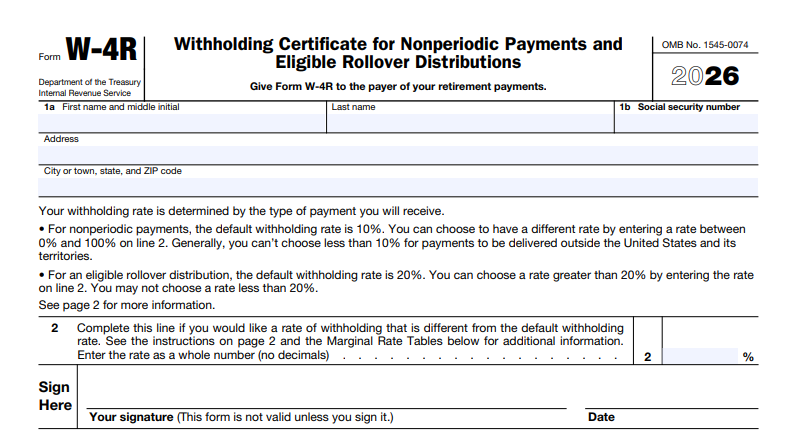
  1. Personal Information (Line 1):
    • Enter your name, address, and Social Security number (SSN).
    • For estates, use the employer identification number (EIN).
  2. Withholding Election (Line 2):
    • This is the key line. Enter a whole percentage rate (e.g., 15%) for withholding.
    • For nonperiodic payments: You can request any rate from 0% to 100% (enter “-0-” for no withholding, if eligible). Note: 0% is not allowed for payments delivered outside the U.S.
    • For eligible rollover distributions: You must withhold at least 20%; you can only request higher (e.g., 25%).
    • Leave blank for default rates (10% or 20%).
  3. Sign and Date:
    • The form is invalid without your signature and date.
    • Give the completed form to your payer.

Tip for Accurate Withholding: Use the IRS Tax Withholding Estimator at irs.gov/W4App or refer to Publication 505 for guidance. Consider your total expected income, deductions, and credits when choosing a rate.

IRS Form W-4R Download and Printable

Download and Print: IRS Form W-4R

Using the 2026 Marginal Rate Tables

The form includes suggested marginal rate tables to help select an appropriate withholding percentage. These tables show 2026 federal income tax brackets based on your filing status and total expected income (including the distribution).

Add the distribution amount to your other income, then choose the rate that covers the tax on the additional income.

2026 Marginal Rate Tables Summary

Filing Status Income Over Marginal Rate
Single or Married Filing Separately $0 0%
$16,100 10%
$28,500 12%
$66,500 22%
$121,800 24%
$217,875 32%
$272,325 35%
$656,700 37%
Married Filing Jointly or Qualifying Surviving Spouse $0 0%
$32,200 10%
$57,000 12%
$133,000 22%
$243,600 24%
$435,750 32%
$544,650 35%
$800,900 37%
Head of Household $0 0%
$24,150 10%
$41,850 12%
$91,600 22%
$129,850 24%
$225,900 32%
$280,350 35%
$664,750 37%

Examples provided on the form illustrate calculations for straddling brackets (e.g., a $20,000 distribution pushing income from 12% to 22% bracket might suggest 19% withholding).

Special Situations and Exceptions

  • Nonresident aliens — Do not use Form W-4R; follow rules in Publication 515.
  • Certain distributions exempt from 20% rule — Includes required minimum distributions (RMDs), hardship withdrawals, and others like emergency or disaster recoveries.
  • Disability payments from terrorist attacks — May qualify for 0% if nontaxable.
  • State tax withholding — Form W-4R is federal only; check with your payer for state rules.

Where to Download Form W-4R

Download the latest 2026 Form W-4R directly from the IRS website: irs.gov/pub/irs-pdf/fw4r.pdf. Prior versions are available for reference.

For more details, see Publication 505 (Tax Withholding and Estimated Tax).

Frequently Asked Questions About Form W-4R

Q: Can I change my withholding later?
A: Yes—submit a new Form W-4R to your payer anytime.

Q: What if I want no withholding?
A: Possible for nonperiodic payments (enter “-0-“), but not for eligible rollover distributions.

Q: Is Form W-4R required?
A: No, but defaults apply if not submitted.

Properly completing Form W-4R helps manage your tax obligations on retirement distributions effectively. Always consult a tax professional for personalized advice, especially with complex situations. For the most current information, visit irs.gov.
 

IRS Form 8879 – IRS e-file Signature Authorization

IRS Form 8879 - IRS e-file Signature Authorization

IRS Form 8879 – IRS e-file Signature Authorization – In the digital age of tax filing, electronic submission has become the norm for millions of Americans. If you’re e-filing your individual income tax return through a professional preparer, you may encounter IRS Form 8879, the IRS e-file Signature Authorization. This essential document allows taxpayers to authorize electronic filing and use a personal identification number (PIN) as their signature.

As of 2025, Form 8879 (Rev. January 2021) remains the current version for most individual returns, with no major revisions noted by the IRS. Understanding this form is crucial for smooth e-filing, avoiding delays, and ensuring compliance.

IRS Form 8879 - IRS e-file Signature Authorization
IRS Form 8879 – IRS e-file Signature Authorization


What Is IRS Form 8879?

IRS Form 8879, officially titled “IRS e-file Signature Authorization,” is a declaration and authorization document used when an Electronic Return Originator (ERO)—such as a tax professional or software provider—prepares and electronically files your tax return.

The form serves as your official permission for the ERO to:

  • Submit your return electronically to the IRS.
  • Enter or generate your PIN, which acts as your electronic signature.

It applies primarily to individual income tax returns, including Form 1040, 1040-SR, 1040-NR, 1040-SS, and amended returns (Form 1040-X) for tax years 2019 and later.

Note: There are specialized variants like Form 8879-S (for S corporations) or Form 8879-F (for fiduciaries), but this guide focuses on the standard Form 8879 for individual taxpayers.

Purpose of Form 8879

The primary purpose of Form 8879 is to:

  • Authorize the e-filing of your tax return.
  • Allow the use of a PIN as your electronic signature instead of a handwritten one.
  • Consent to electronic funds withdrawal for any taxes owed or direct deposit of refunds.

Without this signed authorization, your ERO cannot transmit your return to the IRS. It’s a safeguard ensuring you review and approve the return’s accuracy before submission.

Who Needs to Use IRS Form 8879?

You need Form 8879 if:

  • An ERO is e-filing your individual income tax return.
  • You’re using the Practitioner PIN method or authorizing the ERO to enter/generate your PIN.

You do not need it if:

  • You self-prepare and e-file directly (e.g., through IRS Free File or commercial software where you enter your own PIN).
  • The ERO is not involved in PIN entry.

For married filing jointly, both spouses generally sign, though specific rules apply for PIN entry.

IRS Form 8879 Download and Printable

Download and Print: IRS Form 8879

How to Complete IRS Form 8879: Step-by-Step

Completing Form 8879 is straightforward but requires attention to detail. The ERO typically prepares it, but taxpayers must review, sign, and return it before transmission.

Key Steps for Taxpayers

  1. Verify your tax return details for accuracy, including direct deposit information.
  2. Choose whether to enter your own PIN or authorize the ERO to do so.
  3. Sign and date the form (handwritten or electronic).
  4. Return it to your ERO via approved methods (hand delivery, mail, email, fax, etc.).

Key Steps for EROs

  • Enter taxpayer information and return amounts in Part I.
  • Obtain signed authorization before filing.
  • Retain the form for 3 years.

Parts of Form 8879 Explained

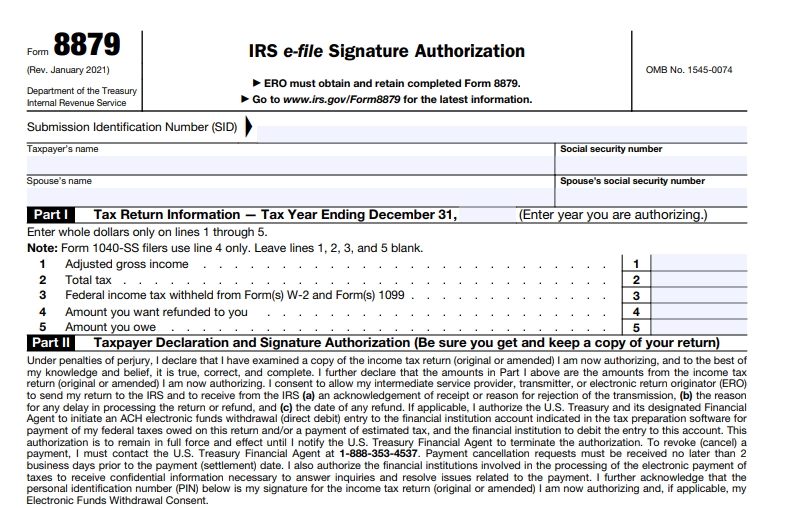
  • Part I: Tax Return Information – Includes key figures like adjusted gross income, total tax, withholding, refund, or amount owed (in whole dollars).
  • Part II: Taxpayer Declaration and Signature Authorization – Where you declare the return’s accuracy under penalty of perjury and authorize the PIN.
  • Part III: Certification and Authentication – Used only for the Practitioner PIN method; completed by the ERO.

PIN Rules: Your PIN must be five digits (not all zeros). It serves as your electronic signature.

E-Signature Options for Form 8879 (2025 Updates)

In 2025, taxpayers can use electronic signatures for Form 8879 when e-filing through an ERO with supporting software. Methods include:

  • Stylus on a screen.
  • Typed name.
  • PIN or password.
  • Digital signature.

ERO software verifies identity (often via knowledge-based questions). Handwritten signatures remain an option.

Retention and Submission Rules

  • Do not send Form 8879 to the IRS unless requested.
  • EROs retain completed forms for 3 years (electronically or paper).
  • Provide taxpayers a copy upon request.

Common FAQs About IRS Form 8879

Can I e-file without Form 8879?
Yes, if you self-prepare and enter your own PIN.

What if changes are made after signing?
Your ERO must provide a corrected Form 8879 for re-signature.

How do I check my refund status?
Use IRS.gov/Refunds or call 800-829-1954 after acknowledgment.

For the latest details, visit the official IRS page or download the form PDF.

Final Thoughts

IRS Form 8879 streamlines electronic tax filing while protecting your signature authority. Always review your return carefully before signing. Consult a tax professional or the IRS website for personalized advice.

This guide is based on official IRS information as of December 2025. Tax laws can change; verify with IRS.gov.


IRS Form 5695 Instructions for 2025

IRS Form 5695 Instructions for 2025

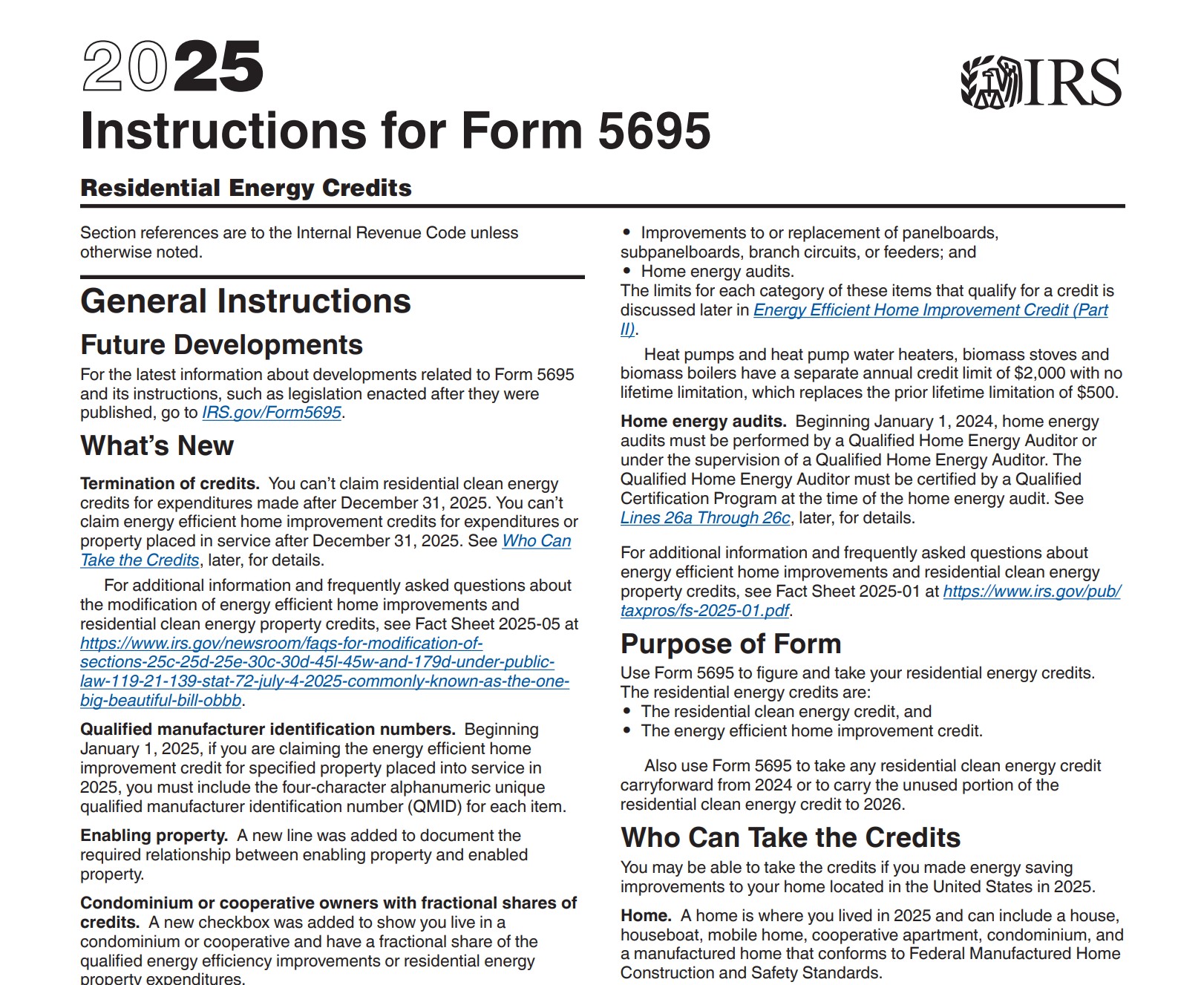
IRS Form 5695 Instructions for 2025 – If you’re a homeowner who made energy-efficient upgrades in 2025, you may qualify for valuable tax credits through IRS Form 5695. This form allows you to claim the Residential Clean Energy Credits and the Energy Efficient Home Improvement Credit. Importantly, 2025 is the final year to claim these credits for new expenditures or installations, as both terminate after December 31, 2025.

Form 5695 is attached to your Form 1040, 1040-SR, or 1040-NR. Understanding the 2025 instructions can help maximize your savings on qualified home improvements.

IRS Form 5695 Instructions for 2025

What’s New for Tax Year 2025?

The IRS introduced several updates for 2025:

  • Both credits end for expenditures or property placed in service after December 31, 2025.
  • Qualified Manufacturer Identification Numbers (QMID) are now required for many items under the Energy Efficient Home Improvement Credit.
  • New checkboxes and lines for condominium/cooperative owners and enabling property relationships.
  • Home energy audits require certification by a Qualified Home Energy Auditor.

Act quickly—2025 installations are your last opportunity for these incentives.

Residential Clean Energy Credit (Part I of Form 5695)

The Residential Clean Energy Credit provides a 30% credit on costs for installing clean energy property in your U.S. home. This applies to both main homes and second homes (except fuel cell property, limited to main homes).

Eligible Properties and Costs

Qualified items include:

  • Solar electric panels and solar water heating property
  • Small wind energy property
  • Geothermal heat pumps
  • Battery storage technology (≥3 kWh capacity)
  • Fuel cell property (limited, main home only)

Costs cover equipment, labor for installation, piping, and wiring. Solar roofing tiles that serve structural functions qualify.

Examples of qualified solar panel installations and home battery storage systems.

Credit Limits

  • 30% of qualified costs (no overall dollar limit except for fuel cells: $500 per 0.5 kW capacity).
  • Unused credit carries forward to future years (though limited post-2025 availability).

Energy Efficient Home Improvement Credit (Part II of Form 5695)

This credit offers 30% on qualified energy efficiency improvements to your main home (existing homes only, not new construction). The maximum annual credit can reach up to $3,200 ($1,200 general + $2,000 for certain heat pumps/biomass).

Qualified Improvements

  • Building envelope components: Insulation, air sealing, Energy Star exterior doors ($250/door, $500 total), windows/skylights ($600 total).
  • Residential energy property: Heat pumps, heat pump water heaters, central air conditioners, furnaces, water heaters, biomass stoves/boilers (various $600 limits), electrical panel upgrades.
  • Home energy audits: Up to $150.

Labor costs qualify for most items except envelope components. QMID required for 2025 installations on specified property.

Qualified heat pump installations, Energy Star windows/doors, and a home energy audit in progress.

Annual Limits

  • $1,200 overall for most improvements (with sub-limits).
  • $2,000 separate for heat pumps, heat pump water heaters, and biomass items.
  • No lifetime limit—claim annually through 2025.

How to Complete Form 5695?

  1. Complete Part I for clean energy credits (lines 1–16).
  2. Complete Part II for home improvement credits (lines 17–32).
  3. Transfer totals to your tax return.
  4. Attach statements for multiple homes, joint occupancy allocations, or additional items.

Keep manufacturer certifications, audit reports, and QMIDs—do not attach unless requested.

Important Reminders

  • Subtract rebates or subsidies from costs.
  • Special rules apply for joint occupants and condos.
  • Credits are nonrefundable (reduce tax liability but no refund if exceeding it).
  • Consult a tax professional for your situation.

Download the latest Form 5695 and instructions. With 2025 marking the end of these credits, review your 2025 upgrades now to ensure you claim what’s available.

IRS Form 7004 – Application for Automatic Extension of Time To File Certain Business Income Tax, Information, and Other Returns

IRS Form 7004 - Application for Automatic Extension of Time To File Certain Business Income Tax, Information, and Other Returns

IRS Form 7004 – Application for Automatic Extension of Time To File Certain Business Income Tax, Information, and Other Returns – Business owners and tax professionals often need extra time to prepare accurate tax returns. IRS Form 7004, Application for Automatic Extension of Time to File Certain Business Income Tax, Information, and Other Returns, provides an automatic extension for many business filings.

This guide explains everything you need to know about Form 7004 for the 2025 tax year, including eligibility, filing methods, deadlines, and key requirements. Information comes directly from official IRS sources as of December 2025.

IRS Form 7004 - Application for Automatic Extension of Time To File Certain Business Income Tax, Information, and Other Returns
IRS Form 7004 – Application for Automatic Extension of Time To File Certain Business Income Tax, Information, and Other Returns


What Is IRS Form 7004?

Form 7004 allows businesses, partnerships, estates, trusts, and other entities to request an automatic extension of time to file specific federal tax returns. The IRS grants the extension automatically if you file the form correctly and on time—no approval notice is sent unless the request is denied.

Important: Form 7004 extends only the filing deadline. It does not extend the time to pay any taxes owed. Pay any estimated balance due by the original return deadline to avoid penalties and interest.

Who Should File Form 7004?

File Form 7004 if your entity needs more time to file one of the eligible business returns. Common filers include:

  • Corporations (C corps, S corps)
  • Partnerships
  • Estates and certain trusts (except bankruptcy estates or Form 1041-A filers, who use Form 8868)
  • Real Estate Investment Trusts (REITs)
  • Regulated Investment Companies (RICs)
  • Foreign entities with U.S. filing requirements

Some entities qualify for automatic extensions without filing Form 7004 under specific regulations (e.g., certain foreign or domestic corporations/partnerships with books outside the U.S.).

Which Tax Returns Are Eligible for Extension with Form 7004?

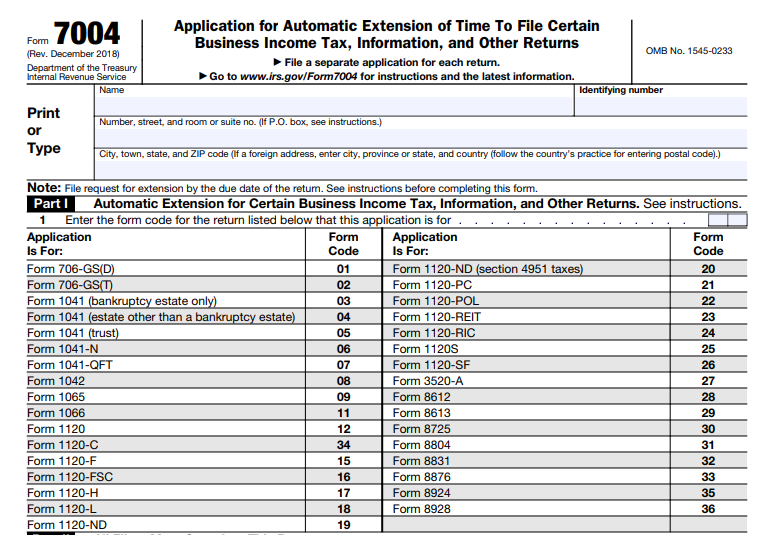
Form 7004 covers a wide range of business and information returns, including:

  • Form 1065 (U.S. Return of Partnership Income)
  • Form 1120 series (various corporate returns, including 1120, 1120-S, 1120-C, 1120-REIT, 1120-RIC, etc.)
  • Form 1041 (U.S. Income Tax Return for Estates and Trusts, excluding certain types)
  • Form 1042 (Annual Withholding Tax Return for U.S. Source Income of Foreign Persons)
  • Form 8804 (Annual Return for Partnership Withholding Tax)
  • Form 706-GS(D) and 706-GS(T) (Generation-Skipping Transfer Tax Returns)
  • Form 3520-A (Annual Information Return of Foreign Trust)
  • And others (see full list in Form 7004 instructions)

Enter the specific form code on line 1 of Form 7004 to indicate the return type.

File a separate Form 7004 for each different return type.

How Long Is the Extension?

The extension period varies by return type:

  • 6 months — Most returns (standard automatic extension)
  • 5½ months — Estates (other than bankruptcy) and certain trusts filing Form 1041
  • 7 months — C corporations with tax years ending June 30 (for years beginning before January 1, 2026)
  • Special cases — Additional 3-4 months for entities with books/records outside the U.S. and Puerto Rico

Check the specific instructions for your return type.

When to File Form 7004

File Form 7004 on or before the original due date of the tax return you’re extending. Due dates vary:

  • Calendar year corporations/partnerships: Typically March 15 or April 15
  • Fiscal year filers: 15th day of the 4th month after year-end (with variations)
  • Special rules apply for foreign entities or June 30 year-ends

Refer to the IRS due date charts or your return’s instructions for exact dates.

How to File Form 7004: E-Filing vs. Paper

Most returns qualify for e-filing through the IRS Modernized e-File (MeF) platform. Benefits include faster processing and immediate confirmation.

Exceptions: Certain forms (e.g., 706-GS(D), 8612, 8613, 8725, 8831, 8876) require paper filing.

Paper Filing

Mail to the appropriate IRS address based on your return type and location (e.g., Ogden, UT or Kansas City, MO). Use the IRS “Where to File” table for details.

Payment Requirements and Penalties

Form 7004 does not extend the payment deadline. Estimate and pay any tax due by the original return due date.

  • Use EFTPS for electronic payments
  • Corporations paying at least 90% on time may avoid late payment penalties
  • Interest accrues on unpaid amounts
  • Late payment penalty: 0.5% per month (up to 25%)

Pay as much as possible to minimize costs.

Step-by-Step: How to Complete Form 7004

  1. Enter your name, address, and EIN/SSN
  2. Enter the form code for the return being extended (line 1)
  3. Check applicable boxes (e.g., foreign corporation, consolidated return)
  4. Provide tax year dates if not calendar year
  5. Estimate total tax liability (line 6)
  6. Subtract payments/credits (line 7)
  7. Calculate balance due (line 8) and pay it
  8. Attach required schedules (e.g., for consolidated groups)

Round to whole dollars and ensure accuracy.

Common Mistakes to Avoid

  • Filing late → Extension denied
  • Using one form for multiple return types → Must file separately
  • Forgetting to pay estimated tax → Penalties and interest
  • Incorrect form code or EIN → Processing delays
  • Not updating address changes separately (use Form 8822-B)

Frequently Asked Questions About Form 7004

Q: Do I need to explain why I need an extension?
A: No. The extension is automatic—no reason required.

Q: Will I receive confirmation?
A: No approval notice is sent. Only denials are notified.

Q: Can I get more than one extension?
A: Generally, only one automatic extension per return.

Q: What if I file the return before the extended due date?
A: The return supersedes the extension.

Final Thoughts

Form 7004 provides valuable breathing room for preparing complex business tax returns, but remember: pay taxes on time to avoid costly penalties. Always download the latest form and instructions from IRS.gov.

For personalized advice, consult a tax professional. Visit IRS.gov for the current Form 7004 and instructions.

IRS Form 7004 Download and Printable

Download and Print: IRS Form 7004

IRS Form W-7 – Application for IRS Individual Taxpayer Identification Number

IRS Form W-7 - Application for IRS Individual Taxpayer Identification Number

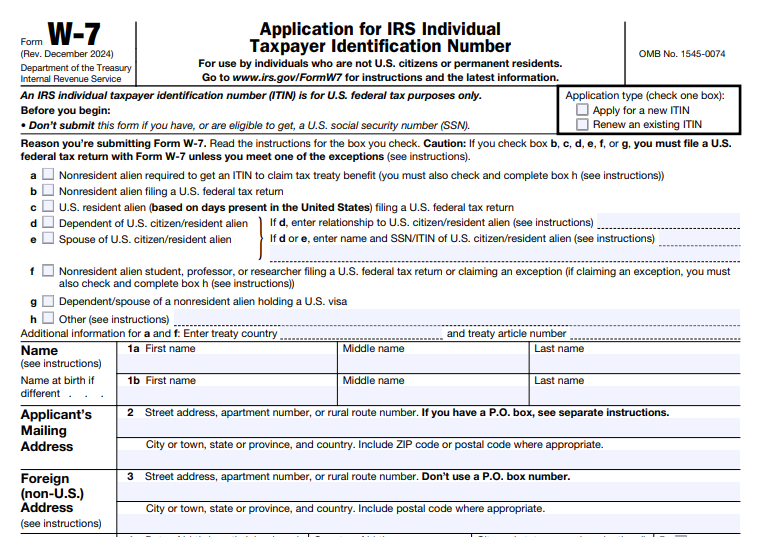
IRS Form W-7 – Application for IRS Individual Taxpayer Identification Number – IRS Form W-7, Application for IRS Individual Taxpayer Identification Number, allows individuals ineligible for a Social Security Number (SSN) to obtain an ITIN for U.S. federal tax purposes. An ITIN is a nine-digit number beginning with 9, issued by the IRS to process tax returns, claim refunds, or meet other tax reporting requirements.

This guide covers the latest information based on the December 2024 revision of Form W-7 and its instructions, applicable for 2025 tax filings. Whether applying for a new ITIN or renewing an expiring one, understanding the process helps avoid delays.

IRS Form W-7 - Application for IRS Individual Taxpayer Identification Number
IRS Form W-7 – Application for IRS Individual Taxpayer Identification Number


What Is an ITIN and Why Do You Need Form W-7?

The IRS issues an Individual Taxpayer Identification Number (ITIN) to ensure tax compliance for those who need a U.S. taxpayer identification number but cannot obtain an SSN. This includes:

  • Nonresident aliens filing U.S. tax returns
  • Resident aliens (based on substantial presence)
  • Spouses or dependents of U.S. citizens/residents
  • Nonresident alien students, professors, or researchers

An ITIN serves federal tax purposes only—it does not authorize work in the U.S., change immigration status, or qualify for Social Security benefits or certain credits like the Earned Income Tax Credit.

Form W-7 applies for a new ITIN or renews an expired one. ITINs expire if unused on a federal tax return for three consecutive years, or for specific middle-digit ranges (the IRS notifies affected holders).

Who Needs to Apply for an ITIN Using Form W-7?

You need an ITIN if you:

  • File a U.S. federal tax return (e.g., Form 1040 or 1040-NR) but lack an SSN.
  • Claim tax treaty benefits as a nonresident alien.
  • Act as a spouse or dependent on a U.S. taxpayer’s return for allowable benefits (e.g., joint filing, premium tax credit, credit for other dependents).
  • Receive taxable income subject to withholding or reporting (e.g., scholarships, gambling winnings, or passive income).

U.S. citizens, permanent residents (green card holders), or anyone eligible for an SSN should not apply for an ITIN.

Spouses and dependents qualify only if claimed for specific tax benefits or filing their own return.

Required Supporting Documents for Form W-7

Form W-7 requires proof of identity and foreign status. Submit original documents or certified copies (from the issuing agency—not notarized, except for overseas U.S. military families).

A valid passport stands alone as proof of both identity and foreign status. Otherwise, submit at least two documents (one with a photo, except for minors).

Acceptable Documents

  • Passport (preferred standalone).
  • National ID card (with photo, name, address, birth date, expiration).
  • U.S. or foreign driver’s license.
  • Birth certificate (required for dependents under 18 without passport; original only).
  • Visa issued by the U.S. Department of State.
  • U.S. Citizenship and Immigration Services (USCIS) photo ID.
  • Foreign military ID.
  • School records (for dependents under 24 if students; must be recent, within 12 months).
  • Medical records (for dependents under 6; recent and detailed).

Dependents often need additional proof of U.S. residency (e.g., U.S. school/medical records or utility bills), unless they have a passport with U.S. entry date or meet exceptions.

The IRS returns originals within 60 days.

How to Complete and Submit Form W-7

Step 1: Fill Out Form W-7

Download the latest Form W-7 (Rev. December 2024) from IRS.gov.

Key lines include:

  • Reason for applying (boxes a–h, e.g., dependent, nonresident filing return, tax treaty).
  • Personal details (name, foreign address, country of citizenship, birth date).
  • Previous ITIN (for renewals).
  • Supporting document details.

Each family member needs a separate Form W-7.

Step 2: Attach a Federal Tax Return (Usually Required)

Attach a completed U.S. tax return (e.g., Form 1040) unless you qualify for an exception, such as:

  • Third-party withholding on passive income.
  • Tax treaty benefits on scholarships or wages.
  • Mortgage interest reporting.
  • Real property dispositions.

See the Exceptions Tables in the instructions for details and required supplemental documents.

Step 3: Choose Submission Method

  • By Mail — Send to: Internal Revenue Service, ITIN Operation, P.O. Box 149342, Austin, TX 78714-9342.
  • In Person:
    • IRS Taxpayer Assistance Centers (TAC; free, appointment recommended).
    • Volunteer Income Tax Assistance (VITA) sites with ITIN services (free).
    • Certifying Acceptance Agents (CAA; fee-based, can certify most documents; available internationally).

Agents help with completion and may certify documents to avoid mailing originals.

IRS Form W-7 Download and Printable

Download and Print: IRS Form W-7

ITIN Processing Time and Status

Processing takes about 7 weeks, but 9–11 weeks during peak tax season (January 15–April 30) or for overseas applicants. The IRS sends a notice with your ITIN or requests more information.

Track status by calling 800-829-1040 (U.S.) or 267-941-1000 (international).

Common Mistakes to Avoid When Filing Form W-7

  • Submitting incomplete forms or insufficient documents.
  • Forgetting to attach a tax return when required.
  • Using expired or photocopied (non-certified) documents.
  • Applying too early or late relative to tax filing deadlines.
  • Not renewing expired ITINs before filing.

Frequently Asked Questions About Form W-7 and ITINs

Can I apply for an ITIN without filing a tax return?
Yes, if you meet one of the exceptions (e.g., tax treaty benefits or third-party reporting).

How do I renew an ITIN?
Use Form W-7, mark the renewal box, and follow the same process (tax return usually required).

Is an ITIN the same as an SSN?
No—an ITIN is for tax purposes only and provides no work authorization or benefits.

What if I later get an SSN?
Stop using the ITIN and notify the IRS to link records.

For the most current details, visit IRS.gov and review Publication 1915 or the Form W-7 instructions.

This guide is based on official IRS sources as of late 2025. Always check IRS.gov for any updates before applying.


IRS Form 9465 – Installment Agreement Request

IRS Form 9465 - Installment Agreement Request

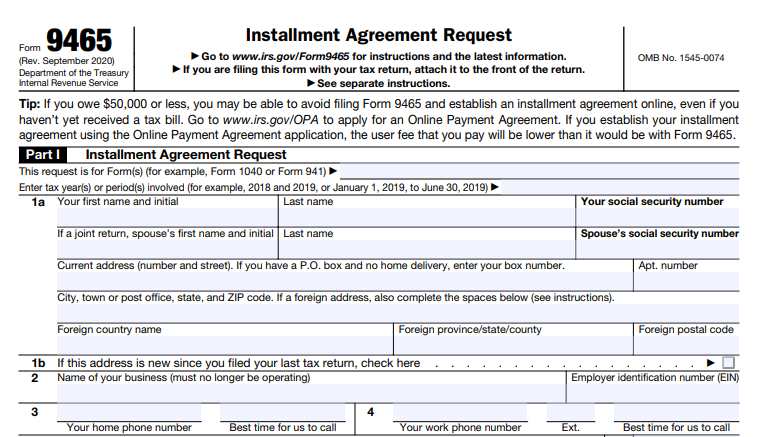
IRS Form 9465 – Installment Agreement Request – Struggling to pay your federal taxes in full? IRS Form 9465, the Installment Agreement Request, allows eligible taxpayers to set up a monthly payment plan. This option helps avoid aggressive collection actions while paying off your balance over time. As of 2025, the IRS encourages online applications for faster approval and lower fees, but Form 9465 remains essential for certain situations.

This comprehensive guide covers everything you need to know about IRS Form 9465, including eligibility, application steps, fees, and alternatives, based on the latest IRS guidelines.

IRS Form 9465 - Installment Agreement Request
IRS Form 9465 – Installment Agreement Request


What Is IRS Form 9465?

IRS Form 9465 is the official Installment Agreement Request form used to ask the IRS for a monthly payment plan when you cannot pay your full tax liability at once. It applies to amounts owed on your tax return or from an IRS notice.

The form is ideal for:

  • Individuals owing income taxes (Form 1040 or 1040-SR)
  • Those responsible for trust fund recovery penalties
  • Former sole proprietors with employment tax debts from closed businesses

Most requests qualify for streamlined processing, meaning no detailed financial statements are required if you meet specific criteria.

Note: If you can pay your balance within 180 days, consider a short-term payment plan instead—no setup fee applies.

When Should You Use Form 9465 vs. the Online Application?

The IRS strongly recommends applying online through the Online Payment Agreement (OPA) tool for eligible taxpayers. Benefits include:

  • Immediate approval notification
  • Lower setup fees
  • Easy revisions to your plan

Use the online tool if:

  • You’re an individual owing $50,000 or less (tax, penalties, and interest combined)
  • You’ve filed all required returns
  • You qualify for a short-term plan (less than $100,000 owed)

Use Form 9465 when:

  • Your balance exceeds online limits
  • The online tool rejects your proposed payment (it will direct you to Form 9465)
  • You need a partial payment plan or have complex circumstances
  • You’re applying by mail or phone

Businesses owing more than $25,000 generally cannot use the online tool and may need to call or mail Form 9465.

Eligibility for IRS Installment Agreements in 2025

To qualify for an installment agreement:

  • All required tax returns must be filed
  • You must propose payments that clear the debt within the collection statute expiration date (usually 10 years) or 72 months, whichever is shorter

Streamlined Installment Agreement Criteria (no financial info required):

  • Individuals: $50,000 or less owed
  • Certain cases up to $50,000 with direct debit or payroll deduction

Guaranteed Installment Agreement: Available if you owe $10,000 or less, have a strong compliance history, and can pay within 3 years.

For higher balances or financial hardship, you may need to submit Form 433-F (Collection Information Statement).

How to Apply Using IRS Form 9465

  1. Download the Form: Get the latest Form 9465 from IRS.gov.
  2. Complete Key Lines:
    • Personal/business information and SSN/EIN
    • Total amount owed
    • Proposed monthly payment (as much as you can afford)
    • Preferred payment date (1st–28th)
    • Payment method (direct debit recommended for lower fees)
  3. Attach Supporting Documents: Form 433-F if required, or Form 2159 for payroll deduction.
  4. Submit:
    • With your tax return: Attach to the front
    • Separately: Mail to the address listed on IRS.gov based on your location
    • By phone: Call 800-829-1040 (individuals)

The IRS typically responds within 30 days. Interest and penalties continue to accrue until the balance is paid in full.

Current IRS Installment Agreement Fees (Updated 2025)

Setup fees vary by application method and payment type (effective as of April 2025 updates):

Application Method Direct Debit Manual Payment (Check/Card) Low-Income Waiver/Reimbursement
Online $22 $69 Waived (direct debit) or $43 reimbursable
Phone/Mail/In-Person $107 $178 Reduced rates available
  • Short-term plans (180 days or less): $0 fee
  • Revision/reinstatement: $10 online (often reimbursable for low-income)
  • Low-income taxpayers (AGI ≤ 250% of federal poverty guidelines) qualify for waivers or reimbursements

Direct debit often qualifies for the lowest fees and is recommended to avoid default.

What Happens After Approval?

  • You’ll receive a confirmation letter with terms
  • Make timely monthly payments
  • File future returns and pay taxes on time
  • Refunds may be applied to your balance

If you default (miss payments or fail to file/pay future taxes), the IRS may terminate the agreement and resume collections, including levies or liens.

IRS Form 9465 Download and Printable

Download and Print: IRS Form 9465

Alternatives to Form 9465

  • Online Payment Agreement: Faster and cheaper for most
  • Offer in Compromise: Settle for less if you qualify
  • Currently Not Collectible Status: Temporary hardship delay
  • Bank Loan or Credit: Often lower interest than IRS penalties

Always pay as much as possible upfront to reduce interest.

Frequently Asked Questions About IRS Form 9465

Can I apply if I haven’t received a bill yet?
Yes, attach Form 9465 to your return.

Does the agreement stop penalties and interest?
No— they continue until paid in full.

Can I request lien withdrawal?
Yes, under certain conditions after setup.

What if I’m rejected?
You can appeal or explore other options.

Final Thoughts

IRS Form 9465 provides a reliable way to manage tax debt through affordable monthly payments. For the best experience in 2025, start with the online application if eligible. Always consult a tax professional for personalized advice, as this information is general and based on IRS guidelines from irs.gov.

Sources: IRS.gov pages on Form 9465, Instructions for Form 9465 (Rev. July 2024), Payment Plans (updated May 2025), and Online Payment Agreement Application (updated October 2025).


IRS Form 706 – United States Estate (and Generation-Skipping Transfer) Tax Return

IRS Form 706 - United States Estate (and Generation-Skipping Transfer) Tax Return

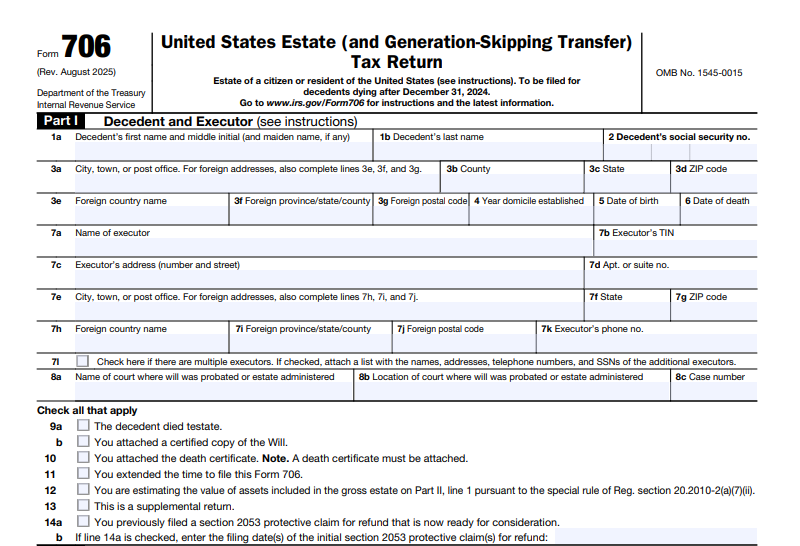
IRS Form 706 – United States Estate (and Generation-Skipping Transfer) Tax Return – Navigating federal estate taxes can be complex, especially with high-value estates. IRS Form 706, the United States Estate (and Generation-Skipping Transfer) Tax Return, is essential for reporting and calculating taxes on large estates. This guide explains what Form 706 is, who must file it, current exemptions, and key filing details based on the latest IRS information as of 2025.

IRS Form 706 - United States Estate (and Generation-Skipping Transfer) Tax Return
IRS Form 706 – United States Estate (and Generation-Skipping Transfer) Tax Return


What Is IRS Form 706?

IRS Form 706 is the official tax return used by the executor of a decedent’s estate to:

  • Compute the federal estate tax imposed under Chapter 11 of the Internal Revenue Code.
  • Calculate the generation-skipping transfer (GST) tax under Chapter 13 for direct skips (transfers to grandchildren or lower generations).

The form accounts for the decedent’s gross estate, including assets like real estate, stocks, cash, life insurance proceeds, annuities, trusts, and jointly owned property. Deductions (e.g., debts, marital transfers, charitable bequests) reduce the taxable estate. It also allows election of portability for unused exemption to a surviving spouse.

Form 706 applies only to estates of U.S. citizens or residents. Nonresident non-citizens use Form 706-NA.

Who Must File IRS Form 706 in 2025?

Not every estate requires Form 706. Filing is mandatory if:

  • The decedent was a U.S. citizen or resident.
  • The gross estate plus adjusted taxable gifts (post-1976) and specific exemptions exceeds the basic exclusion amount of $13,990,000 for decedents dying in 2025.

Even if the estate is below this threshold and no tax is due, filing is required to:

  • Elect portability of the deceased spousal unused exclusion (DSUE) amount to the surviving spouse.

The executor (or person in possession of property if no executor) files the return. Only one complete return is needed, even with multiple executors.

2025 Estate Tax Exemption and Rates

For decedents dying in 2025, the federal estate tax exemption (basic exclusion amount) is $13,990,000 per individual. Married couples can effectively shield up to $27,980,000 through portability.

Estates below this amount generally owe no federal estate tax. Above it, the tax rate is progressive, reaching a maximum of 40% on amounts over $1 million.

The GST tax exemption matches the estate tax exemption at $13,990,000 for 2025.

Note: Some sources indicate a potential increase to $15,000,000 for 2026 deaths due to recent legislation, but confirm with the IRS for deaths after 2025.

Understanding the Generation-Skipping Transfer (GST) Tax on Form 706

The GST tax is a flat 40% tax on transfers that skip generations (e.g., to grandchildren or great-grandchildren) to prevent avoiding estate taxes across generations.

Form 706 reports GST tax on direct skips at death via Schedules R and R-1. Executors can allocate the decedent’s GST exemption to reduce or eliminate this tax.

Filing Deadline and Extensions for Form 706

  • Due date: 9 months after the date of death.
  • Extensions: File Form 4768 for an automatic 6-month extension to file (not to pay). Special rules allow late portability elections in some cases.

Pay any tax due by the original deadline to avoid penalties. File at the IRS Kansas City processing center (or specified addresses for supplemental documents).

IRS Form 706 Download and Printable

Download and Print: IRS Form 706

How to Complete and File IRS Form 706

Form 706 is detailed, with multiple schedules:

  • Parts 1-6: Decedent info, tax computation, elections (e.g., alternate valuation, special-use valuation), and portability.
  • Schedules A-I: Itemize gross estate assets (real estate, stocks, insurance, etc.).
  • Schedules J-O: Deductions (funeral expenses, debts, marital/charitable bequests).
  • Schedules R/R-1: GST tax computation and exemption allocation.
  • Other schedules: For special valuations, credits, or protective claims.

Attach required documents: death certificate, will, appraisals, and prior gift tax returns (Form 709).

Value assets at fair market value on the date of death (or alternate 6-month date if elected). Professional appraisers are often needed for complex assets.

Recent Updates to Form 706 (2025)

The latest revision (September 2025) includes:

  • Confirmation of the $13,990,000 exemption for 2025 deaths.
  • Reduced estate tax closing letter fee to $56 (effective May 2025).
  • Guidance on digital assets and consistent basis reporting.

Always download the current form and instructions from IRS.gov.

Frequently Asked Questions About IRS Form 706

Do I need to file Form 706 if no tax is owed?
Yes, if electing portability or if the estate exceeds the filing threshold.

What if the estate qualifies for special valuations?
Elect special-use valuation (for farms/businesses) or conservation easements to reduce taxable value.

Can I pay estate tax in installments?
Yes, for closely held businesses (over 35% of adjusted gross estate) under section 6166.

For personalized advice, consult a tax professional or estate planning attorney. Visit IRS.gov for the latest Form 706 and instructions.

This guide is for informational purposes only and reflects IRS guidelines as of late 2025. Tax laws change, so verify current requirements.


IRS Form 5695 – Residential Energy Credits

IRS Form 5695 - Residential Energy Credits

IRS Form 5695 – Residential Energy Credits – As energy costs continue to rise and sustainability becomes a priority for homeowners, the IRS offers powerful incentives to offset the expense of green upgrades. In 2025, IRS Form 5695 remains your key tool for claiming the Residential Clean Energy Credit and Energy Efficient Home Improvement Credit—two non-refundable tax breaks expanded under the Inflation Reduction Act (IRA) of 2022. These credits can slash up to 30% off qualifying installations, potentially saving you thousands on solar panels, heat pumps, insulation, and more.

But with the Residential Clean Energy Credit set to expire after December 31, 2025, due to the One Big Beautiful Bill Act, now’s the time to act if you’re considering a home energy upgrade. This guide breaks down everything you need to know about Form 5695, eligibility, qualified expenses, and step-by-step filing instructions. Whether you’re a first-time filer or maximizing credits for multiple projects, we’ll help you navigate the process to reduce your 2025 tax bill.

IRS Form 5695 - Residential Energy Credits
IRS Form 5695 – Residential Energy Credits


What Is IRS Form 5695?

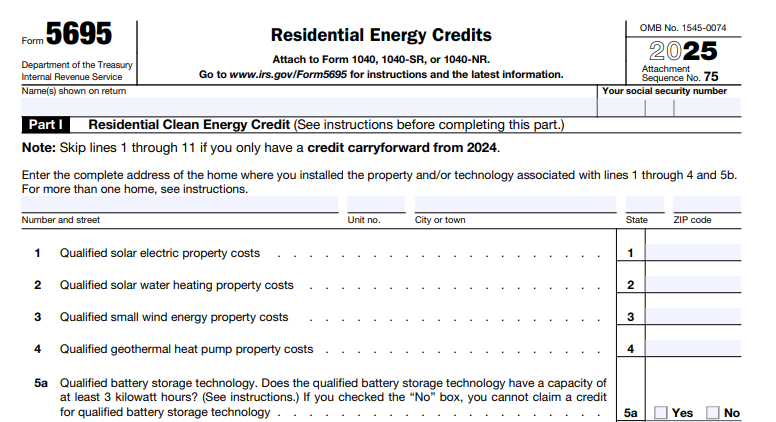
IRS Form 5695, titled “Residential Energy Credits,” is the official IRS worksheet used to calculate and claim federal tax incentives for energy-efficient home improvements and clean energy installations. Introduced in 2006, it was significantly enhanced by the IRA, renaming and expanding previous credits to encourage broader adoption of renewable technologies.

For tax year 2025, Form 5695 covers:

  • Part I: Residential Clean Energy Credit – For major renewable energy systems like solar panels or geothermal heat pumps.
  • Part II: Energy Efficient Home Improvement Credit – For smaller efficiency upgrades like windows, doors, or audits.

These are non-refundable credits, meaning they reduce your tax liability dollar-for-dollar but won’t result in a cash refund beyond what you owe. Any unused portion of the Residential Clean Energy Credit carries forward to future years (though post-2025 expiration limits this). Attach Form 5695 to your Form 1040 when filing.

Key 2025 update: Starting January 1, 2025, you’ll need to include a four-character Qualified Manufacturer Identification Number (QMID) or 17-character Product Identification Number (PIN) for certain items in Part II, verifiable via the IRS Energy Credits Online Portal. Manufacturers registering by April 30, 2025, qualify retroactively to December 31, 2024.

Residential Clean Energy Credit: Unlock 30% Savings on Renewables

The Residential Clean Energy Credit (formerly the Residential Energy Efficient Property Credit) offers a straightforward 30% credit on qualified costs for installing clean energy systems in your home. No lifetime cap applies, and it’s available for both your primary residence and secondary homes (e.g., vacation properties) in the U.S. This credit applies to property placed in service during 2025, including labor for onsite preparation, assembly, and installation.

Who Qualifies?

  • Homeowners (not renters) who own and use the property as a residence.
  • Joint occupants must prorate costs based on their payment shares; each files a separate Form 5695.
  • Excludes new construction costs but includes homes under reconstruction.
  • Subsidies (e.g., utility rebates) reduce qualifying costs unless included in your income.

What Qualifies for the Credit?

Eligible property must generate, store, or distribute clean energy for your home. Here’s a breakdown:

Qualified Property Description Key Requirements
Solar Electric Property Solar panels or photovoltaic systems generating electricity. Generates power for home use; includes multifunctional solar roofing tiles.
Solar Water Heating Property Systems heating water using solar energy. At least 50% solar-derived; certified by Solar Rating Certification Corporation or equivalent.
Small Wind Energy Property Turbines producing electricity. Home-connected; no size limit specified.
Geothermal Heat Pump Property Ground-source heat pumps for heating/cooling. Meets Energy Star criteria at purchase.
Battery Storage Technology Home batteries storing energy (e.g., from solar). Minimum 3 kWh capacity; connected to your home’s system.
Fuel Cell Property Electrochemical systems converting fuel to electricity. ≥0.5 kW capacity, >30% efficiency; $500 credit per 0.5 kW (max $1,000 for 1 kW). Excludes pools/hot tubs.

Credit Amount: 30% of total qualified costs, with no annual limit (except fuel cells). For example, a $20,000 solar system yields a $6,000 credit.

2025 Expiration Note: Claim before December 31, 2025, for full eligibility—systems must be fully installed and operational by year-end.

Energy Efficient Home Improvement Credit: Boost Efficiency with Annual Limits

The Energy Efficient Home Improvement Credit targets everyday upgrades to cut energy waste. It’s limited to your main U.S. home and offers 30% of costs, but with annual caps to prevent overuse. This credit replaced the prior $500 lifetime Nonbusiness Energy Property Credit starting in 2023.

Who Qualifies?

  • Owners of an existing primary residence (not new builds).
  • Property must last ≥5 years; original installation required.
  • Joint filers aggregate costs on one form; joint occupants prorate.

What Qualifies for the Credit?

Focus on building envelope improvements and efficient appliances. All must meet standards like Energy Star, Consortium for Energy Efficiency (CEE) highest tier, or International Energy Conservation Code (IECC) as of January 1, 2021.

Category Examples Annual Limit
Qualified Energy Efficiency Improvements Insulation/air sealing; exterior windows/skylights (Energy Star); exterior doors (Energy Star, $250 per door, $500 total). $1,200 overall (includes below).
Residential Energy Property Central AC (CEE highest tier, $600); natural gas/propane/oil water heaters/furnaces/boilers (CEE/2021 Energy Star, $600 each); electrical panel upgrades (NEC-compliant, $600); heat pumps/heat pump water heaters (CEE highest, combined with biomass); biomass stoves/boilers (≥75% efficiency, $2,000 combined). $1,200 overall ($600 per item for most); $2,000 for heat pumps/biomass.
Home Energy Audits Professional inspection by a certified auditor identifying savings. $150 per audit.

Credit Amount: 30% of costs, prorated if limits exceeded. For instance, $4,000 in windows and a $1,000 audit = $1,350 credit ($1,200 max for windows/doors + $150 audit).

2025 Requirement: Report QMID/PIN for items like windows, doors, and audits.

IRS Form 5695 Download and Printable

Download and Print: IRS Form 5695

Step-by-Step Guide: How to Fill Out IRS Form 5695 for 2025

Download the 2025 Form 5695 and instructions from IRS.gov. Gather receipts, manufacturer certifications, and audits—don’t attach them, but keep for records.

Part I: Residential Clean Energy Credit

  1. Header: Enter your home’s address (use the one with highest costs; attach a statement for multiples).
  2. Lines 1–6: Input costs for solar electric (1), solar water heating (2), wind (3), geothermal (4), battery storage (5b if ≥3 kWh), and fuel cell (8, after capacity check on 7).
  3. Line 9: Total costs (sum 1–6b, 8).
  4. Line 10: Multiply by 30% (0.30 × line 9).
  5. Line 13: Add carryforward from 2024 (line 16 of prior form).
  6. Line 14: Use the Residential Clean Energy Credit Limit Worksheet (subtract other credits from your tax liability on Form 1040, line 18).
  7. Line 15: Smaller of lines 13 or 14.
  8. Line 16: Carryforward (line 13 minus 15).

Part II: Energy Efficient Home Improvement Credit

  1. Lines 17a–17e: Confirm eligibility (U.S. main home, original use, etc.).
  2. Lines 18–20: Costs for insulation (18), doors (19), windows/skylights (20); note 2025 QMID/PIN.
  3. Lines 21–25: Confirm U.S. property; costs for AC (22), water heaters (23), furnaces (24), panels (25).
  4. Lines 26–27: Audit costs (26c, max $150).
  5. Lines 28–29: Heat pumps (29a–b), biomass (29c–e, max $2,000).
  6. Line 30: Total qualified costs.
  7. Line 31: Use the Energy Efficient Home Improvement Credit Limit Worksheet (similar to Part I).
  8. Line 32: Credit amount (30% of line 30, limited by 31).

Transfer totals from lines 15 and 32 to Schedule 3 (Form 1040), line 5. File by April 15, 2026.

Common Mistakes to Avoid When Filing Form 5695

  • Forgetting Documentation: No certifications? No credit. Rely on manufacturer statements but retain them.
  • Ignoring Limits: Overclaim on Part II? Prorate or lose excess.
  • New Construction Confusion: Part II excludes builds; use Part I for clean energy in new homes.
  • Joint Filers/Occupants: Prorate correctly—spouses combine, others allocate by payment.
  • Subsidies: Deduct rebates from costs.
  • 2025 PIN Oversight: Missing QMID/PIN invalidates Part II claims.

Why Claim Residential Energy Credits in 2025? The Bigger Picture

Over 3.4 million households claimed $8 billion in these credits through 2024, with averages of $5,000 for clean energy and $880 for efficiency. Beyond taxes, expect lower utility bills (e.g., solar ROI in 6–10 years) and increased home value. With the Residential Clean Energy Credit ending post-2025, installations must wrap by year-end for eligibility.

Consult a tax pro for complex setups, like multiple homes or business-use portions. For state incentives, check DSIREusa.org.

Ready to go green and save? Download Form 5695 today and turn your home into a tax-advantaged powerhouse. Questions? The IRS helpline (800-829-1040) or Energy.gov’s Savings Hub has more.

This article is for informational purposes only and not tax advice. Verify with the IRS for your situation.


IRS Form 3911 – Taxpayer Statement Regarding Refund

IRS Form 3911 - Taxpayer Statement Regarding Refund

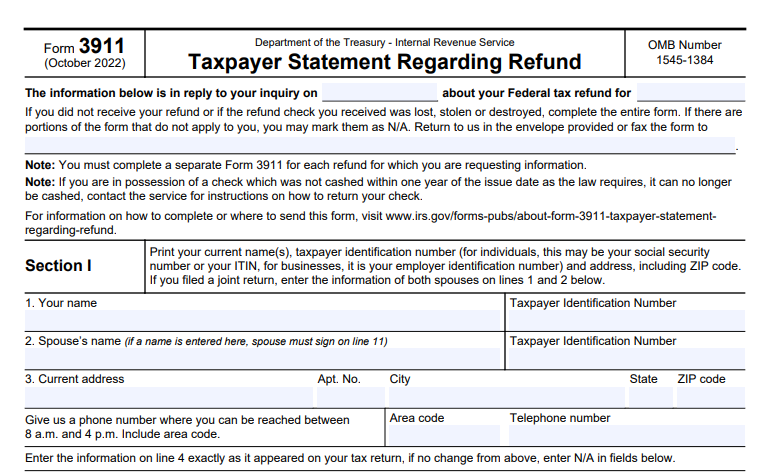
IRS Form 3911 – Taxpayer Statement Regarding Refund – If you’re waiting for a tax refund that never arrived, IRS Form 3911, officially titled Taxpayer Statement Regarding Refund, is the key tool to initiate a refund trace. This form helps the IRS locate lost, stolen, destroyed, or undelivered refunds issued by check or direct deposit. Whether your refund check went missing in the mail or a direct deposit failed, filing Form 3911 starts the process for a replacement.

As of 2025, Form 3911 remains essential for resolving missing refund issues, especially when online tools like “Where’s My Refund?” confirm the IRS issued your payment but you never received it.

IRS Form 3911 - Taxpayer Statement Regarding Refund
IRS Form 3911 – Taxpayer Statement Regarding Refund


What Is IRS Form 3911?

IRS Form 3911 is a simple one-page document that provides the information needed to trace a non-received or problematic refund. It applies to:

  • Refunds never received
  • Lost, stolen, or destroyed checks
  • Issues with direct deposits (e.g., wrong account)
  • Expired uncashed checks (valid for one year from issue date)

Note: This form is not for disputing refund amounts or eligibility—use it only after the IRS has issued the refund.

When Should You File Form 3911?

Before filing, confirm your refund status:

  1. Use the IRS “Where’s My Refund?” tool or IRS2Go app.
  2. Wait appropriate times:
    • Direct deposit: At least 5 days after issuance
    • Mailed check: 4–9 weeks depending on location
  3. For joint returns or complex cases, automated traces may not work—go straight to Form 3911 or call the IRS.

File if:

  • The refund was issued but never arrived
  • Your check was lost/stolen/destroyed
  • A direct deposit went to the wrong account (contact your bank first; wait 2 weeks if no resolution)

Alternatives: Call 800-829-1954 (automated) or 800-829-1040 (representative) for non-joint filers.

How to Download IRS Form 3911

Download the latest version (Rev. 10-2022, current as of 2025) directly from the IRS website: Form 3911 PDF.

The IRS may mail you the form with a prepaid envelope if they detect an issue.

IRS Form 3911 Download and Printable

Download and Print: IRS Form 3911

Step-by-Step Guide: How to Fill Out Form 3911

Complete a separate form for each tax year/refund. Mark “N/A” for non-applicable sections.

Section I: Taxpayer Information

  • Lines 1–2: Enter current name(s), SSN/ITIN (or EIN for businesses), and spouse info if joint return.
  • Line 3: Current address and phone number (reachable 8 a.m.–4 p.m.).
  • Line 4: Name/address as on original return (or N/A if unchanged).
  • Lines 5–6: Representative info if someone was authorized to receive the refund.
  • Additional details: Return type, refund method (check/direct deposit), amount, bank info, tax period, and filing date.

Section II: Refund Status

  • Check boxes for: Didn’t receive refund, or received but lost/stolen/destroyed.
  • If endorsed and cashed by someone else: No replacement possible (no forgery).

Section III: Signature

  • Sign and date (both spouses for joint returns).
  • Declare under penalty of perjury and agree to return duplicate if received.

Where to Submit Form 3911

Mail or fax the completed form. Use the address/fax number based on your state or the IRS center where you filed your return. Visit the official page for the full list: About Form 3911.

Do not send other documents to fax numbers—Form 3911 only.

What Happens After Filing Form 3911?

The IRS and Bureau of the Fiscal Service trace the refund:

  • Uncashed: Replacement issued after cancellation.
  • Cashed: Claim package sent with check copy; review takes up to 6 weeks.
  • Processing: Typically 6+ weeks; longer during peak seasons.

You’ll receive notification by mail.

Frequently Asked Questions About Form 3911

Can I file Form 3911 online?
No—mail or fax only.

How long does a refund trace take?
6–8 weeks typically, but varies.

What if my check expired?
Return it to IRS for reissue instructions.

Is Form 3911 for stimulus payments?
Yes, if treated as a refund.

For the most current details, always check IRS.gov. If your missing tax refund has you stressed, acting quickly with Form 3911 can get your money back on track.


IRS Form 2210 – Underpayment of Estimated Tax by Individuals, Estates and Trusts

IRS Form 2210 - Underpayment of Estimated Tax by Individuals, Estates and Trusts

IRS Form 2210 – Underpayment of Estimated Tax by Individuals, Estates and Trusts – IRS Form 2210, Underpayment of Estimated Tax by Individuals, Estates, and Trusts, helps determine if you owe a penalty for not paying enough estimated tax during the year. Many self-employed individuals, freelancers, investors, retirees, estates, and trusts face this issue when income isn’t subject to regular withholding.

The U.S. tax system requires paying taxes as you earn income. If you underpay estimated taxes quarterly, the IRS may charge a penalty—even if you get a refund or owe little when filing. This guide covers 2025 rules, based on official IRS sources.

IRS Form 2210 - Underpayment of Estimated Tax by Individuals, Estates and Trusts
IRS Form 2210 – Underpayment of Estimated Tax by Individuals, Estates and Trusts


What Is IRS Form 2210?

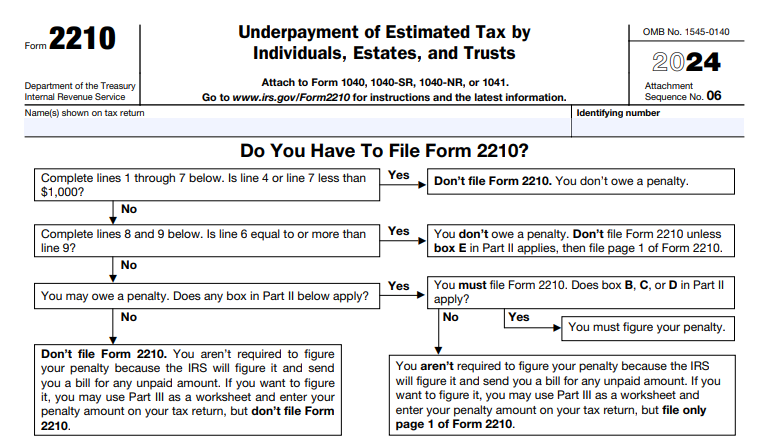
Form 2210 calculates the underpayment penalty for individuals, estates, and trusts. The IRS often computes the penalty and sends a bill, so you don’t always need to file the form. However, file it if you want to calculate the penalty yourself, use special methods like the annualized income installment method, or request a waiver.

The form includes:

  • Part I: Required annual payment
  • Part II: Reasons for filing (e.g., waiver or annualized method)
  • Part III: Short/regular method for penalty calculation
  • Part IV: Regular method details
  • Schedule AI: Annualized income installment method for uneven income

Who Needs to Pay Estimated Taxes?

You generally need to make estimated tax payments if you expect to owe at least $1,000 in tax for 2025 (after withholding and credits) and withholding/credits cover less than 90% of your 2025 tax or 100% of your 2024 tax.

This applies to:

  • Self-employed individuals
  • Investors with capital gains/dividends
  • Retirees with pension/IRA distributions
  • Estates and trusts

Estimated payments are due quarterly: April 15, June 15, September 15, 2025, and January 15, 2026.

When Do You Owe an Underpayment Penalty?

The penalty applies if you don’t pay enough tax through withholding or estimated payments on time. It’s calculated on the underpaid amount for each quarter, using the applicable interest rate.

For 2025, the underpayment penalty rate is 7% (compounded daily on the unpaid amount until paid).

Exceptions: No Penalty Applies If

  • You owed no tax in 2024 (and were a U.S. citizen/resident for the full year)
  • Your 2025 tax liability (after withholding) is less than $1,000
  • Special rules for estates/trusts within 2 years of decedent’s death
  • Farmers/fishermen with at least 2/3 income from those activities (use Form 2210-F instead)

Safe Harbor Rules to Avoid the Penalty

Meet one of these “safe harbor” rules to avoid the penalty, even if you underpay relative to 2025 tax:

  • Pay at least 90% of your 2025 tax liability through withholding/estimated payments
  • Pay 100% of your 2024 tax liability (or 110% if your 2024 AGI exceeded $150,000—or $75,000 if married filing separately)

The safe harbor uses the smaller of these amounts.

IRS Form 2210 Download and Printable

Download and Print: IRS Form 2210

How Is the Underpayment Penalty Calculated?

The penalty is interest charged on each underpaid installment from its due date until paid. Use Form 2210’s regular method (equal quarterly installments) or short method if eligible.

If income varies (e.g., seasonal business or large year-end bonus), use Schedule AI (annualized income installment method) to potentially reduce or eliminate the penalty by showing lower required payments earlier in the year.

Waivers and Penalty Relief

The IRS may waive the penalty if:

  • Underpayment was due to casualty, disaster, or unusual circumstances
  • You retired (after age 62) or became disabled in 2024/2025, with reasonable cause
  • You live/work in a federally declared disaster area (often automatic relief)

To request a waiver, check the appropriate box in Part II, attach Form 2210, and include a statement with supporting documentation.

Do You Need to File Form 2210?

Most taxpayers don’t need to file— the IRS will calculate and bill any penalty. However, you must file if:

  • Using the annualized method (check box C)
  • Requesting a waiver due to retirement/disability (box B)
  • Income varied and you want to show lower penalty

Otherwise, leave the penalty line blank on your return.

Tips to Avoid the Underpayment Penalty in 2025 and Beyond

  1. Use safe harbor: Base payments on 100% (or 110%) of prior year’s tax.
  2. Adjust withholding from wages/pensions to cover other income.
  3. If income is uneven, use the annualized method on Form 2210.
  4. Make timely quarterly payments via IRS Direct Pay or EFTPS.
  5. Monitor income changes and adjust estimates mid-year.
  6. Use IRS Form 1040-ES for estimated payment vouchers.

For the latest Form 2210 and instructions, visit IRS.gov. Always consult a tax professional for your specific situation, as rules can be complex.

This article is for informational purposes only and based on IRS guidance as of December 2025. Tax laws may change.