IRS Form 14039 – Identity Theft Affidavit

IRS Form 14039 - Identity Theft Affidavit

IRS Form 14039 – Identity Theft Affidavit – Tax-related identity theft occurs when someone uses your Social Security Number (SSN) or Individual Taxpayer Identification Number (ITIN) to file a fraudulent tax return, often to claim a refund. IRS Form 14039, the Identity Theft Affidavit, allows you to officially report this to the IRS and protect your tax account.

In 2025, the IRS encourages online submission where possible, and many victims receive automatic protections like an Identity Protection PIN (IP PIN). This guide explains what Form 14039 is, when to file it, how to complete and submit it, and steps to prevent future issues—all based on official IRS guidance.
IRS Form 14039 - Identity Theft Affidavit
IRS Form 14039 – Identity Theft Affidavit


What Is IRS Form 14039?

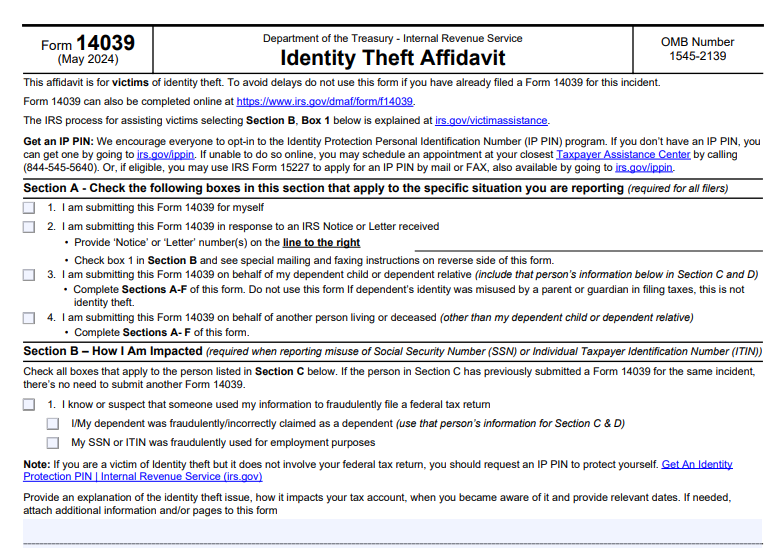
Form 14039 serves as an official declaration that you are (or may be) a victim of identity theft affecting your federal tax matters. The IRS uses it to:

  • Mark your account with an identity theft indicator.
  • Investigate fraudulent returns.
  • Process your legitimate tax return and issue refunds if applicable.

The form is free and available as a fillable PDF or online version. It applies to individuals, dependents, or deceased persons (filed by representatives).

Note: Businesses use Form 14039-B instead.

IRS Form 14039 Download and Printable

Download and Print: IRS Form 14039

When Should You File Form 14039?

File Form 14039 only in specific tax-related identity theft situations. Many cases are handled automatically by the IRS without this form.

File If:

  • Your e-filed return is rejected because a duplicate return was already filed using your SSN/ITIN (after checking for errors).
  • A dependent’s SSN/ITIN was used on another return without your permission.
  • You receive an unexpected tax transcript you didn’t request.
  • You get IRS notices about owed taxes, offsets, or collection actions for a year you didn’t file or had no income.
  • You receive income reporting (e.g., W-2 or 1099) from an unknown employer.
  • An Employer Identification Number (EIN) was assigned without your request.

Do NOT File If:

  • You received IRS Letter 5071C, 4883C, or 5747C—these require identity verification (online, phone, or in-person) instead.
  • The identity theft is non-tax-related (e.g., fraudulent credit cards or unemployment claims)—report to the FTC at IdentityTheft.gov and credit bureaus.
  • You’ve already submitted Form 14039 for the same incident.

How to Complete IRS Form 14039 Step by Step

You can fill it out online (recommended) or download the PDF.

  1. Section A: Who Is Filing
    Check boxes for yourself, in response to an IRS notice, or on behalf of a dependent/other person.
  2. Section B: Impact Description
    Check applicable boxes (e.g., fraudulent tax return filed, dependent claimed incorrectly, SSN used for employment). Provide a detailed explanation, including dates and how you discovered the issue.
  3. Section C: Victim Information
    Enter the victim’s name, SSN/ITIN, current and prior addresses, phone, and preferred language.
  4. Section D: Tax Account Details
    Note the last tax year filed and impacted years (or “Unknown”).
  5. Section E: Signature
    Sign under penalty of perjury.
  6. Section F: Representative Info (if applicable)
    Provide details and attach required documents (e.g., death certificate, power of attorney).

No supporting ID copy is generally required unless specified.

How to Submit Form 14039

Choose one method only:

  • Online (Preferred) → Go to irs.gov and complete the guided form.
  • Fax → Use 855-807-5720 (toll-free) or the number on your IRS notice.
  • Mail → Send to Fresno, CA 93888-0025 (or address on notice). If attaching to a paper tax return (e.g., after e-file rejection), mail to your normal filing location.

What Happens After Filing Form 14039?

The IRS assigns your case to the Identity Theft Victim Assistance (IDTVA) team. They:

  • Review affected tax years.
  • Remove fraudulent returns.
  • Process your legitimate return/refund.
  • Add an identity theft marker to your account.

You’ll typically be enrolled in the IP PIN program—a unique six-digit PIN mailed annually for secure filing.

Resolution usually takes 120 days, though backlogs may extend it (current average ~582 days, improving). Avoid duplicate submissions or status inquiries, as they cause delays.

  • Get an IP PIN proactively at irs.gov/ippin.
  • File your tax return early.
  • Use secure networks for e-filing.
  • Monitor your credit reports and IRS account.
  • Report non-tax issues to the FTC and place fraud alerts.

For more resources, visit IRS Identity Theft Central at irs.gov/identity-theft-central.

If you suspect identity theft, act quickly—filing Form 14039 correctly can resolve issues and protect your future refunds. Always use official IRS sources for the latest updates.
 

IRS Form 433-D – Installment Agreement

IRS Form 433-D - Installment Agreement

IRS Form 433-D – Installment Agreement – If you’re facing a tax bill you can’t pay in full, an IRS installment agreement (also called a payment plan) allows you to pay your debt over time in manageable monthly payments. IRS Form 433-D, titled “Installment Agreement,” is the official document that formalizes this arrangement between you and the IRS.

This SEO-optimized guide explains what Form 433-D is, when it’s used, how to complete it, eligibility requirements, fees, and alternatives like online applications. Information is based on current IRS guidelines as of late 2025.

IRS Form 433-D - Installment Agreement
IRS Form 433-D – Installment Agreement


What Is IRS Form 433-D?

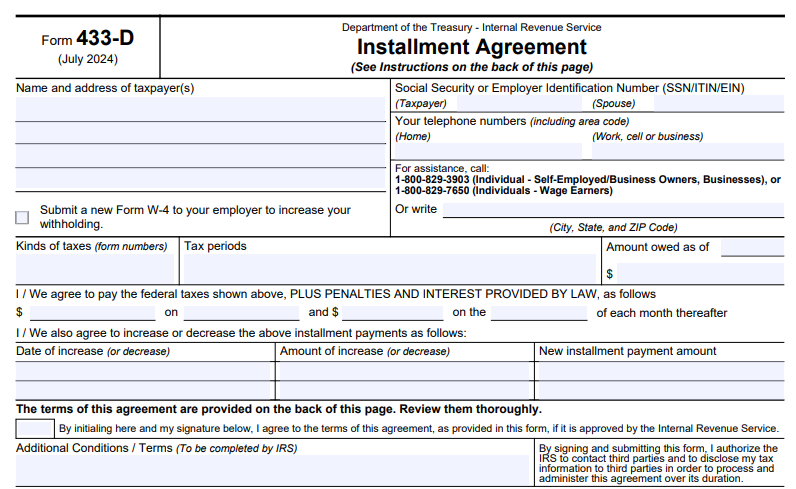
IRS Form 433-D is the Installment Agreement form that establishes a formal payment plan for federal taxes owed, including penalties and interest. It outlines:

  • The taxes and periods covered
  • Monthly payment amounts
  • Due dates
  • Payment methods (often direct debit)

Taxpayers sign the form to agree to the terms, and the IRS approves it to make the plan official.

Unlike Form 9465 (Installment Agreement Request), which you use to apply for a plan, Form 433-D is the binding agreement document. The IRS often prepares and sends it for signature in certain cases, especially for direct debit or payroll deduction plans.

When Is Form 433-D Used?

The IRS uses Form 433-D primarily in these situations:

  • Direct Debit Installment Agreements (DDIA) → Payments automatically withdraw from your bank account.
  • Payroll Deduction Agreements → Payments deduct directly from your wages.
  • Manually processed agreements → When the IRS proposes specific terms based on your financial information (e.g., via Collection Information Statement).
  • Agreements secured through phone, mail, or in-person contact (rather than fully online).

Many taxpayers never see Form 433-D because they apply online and get instant approval without a signed document. However, if your case requires manual review or direct debit setup, you may receive Form 433-D to sign and return.

Types of IRS Installment Agreements

The IRS offers several payment plan options:

  • Short-term payment plan — Pay in full within 180 days (no setup fee for individuals owing less than $100,000).
  • Long-term payment plan — Monthly installments for larger balances or longer periods.
    • Simple/Streamlined — For individuals owing $50,000 or less (tax, penalties, interest combined).
    • Partial Payment Installment Agreement (PPIA) — Payments less than full ability if financial hardship exists.
    • Direct Debit — Required for some higher-balance plans; often lower fees.

Businesses can qualify for plans owing $25,000 or less online.

Eligibility Requirements for Installment Agreements

To qualify:

  • File all required tax returns.
  • Be current on estimated tax payments (if applicable).
  • Owe within limits for streamlined plans ($50,000 or less for individuals).
  • Demonstrate ability to pay over time.

The IRS may request financial statements (Forms 433-F or 433-A/B) for non-streamlined cases.

IRS Form 433-D Download and Printable

Download and Print: IRS Form 433-D

How to Apply for an IRS Payment Plan

Most taxpayers apply online via the IRS Online Payment Agreement tool for fastest approval.

Alternatives:

  • Submit Form 9465 (Installment Agreement Request) by mail or with your tax return.
  • Call the IRS (800-829-1040 for individuals).
  • Work with an IRS revenue officer if already in collections.

If approved manually, you may receive Form 433-D to sign.

How to Complete IRS Form 433-D (Step-by-Step)

If you receive Form 433-D:

  1. Enter taxpayer name(s), address, SSN/EIN, and contact info.
  2. List tax types, periods, and amounts owed.
  3. Specify proposed monthly payment and due date (1st–28th).
  4. Provide bank details for direct debit (recommended for lower fees).
  5. Review terms on the back, initial, and sign.
  6. Attach a voided check if using direct debit.
  7. Mail to the address provided by the IRS.

Key Terms and Conditions of Form 433-D

By signing:

  • Agree to make timely payments.
  • File all future returns and pay taxes on time.
  • Allow IRS to apply refunds to your debt.
  • Accept potential filing of a Federal Tax Lien.
  • Permit changes if your financial situation improves.

The agreement stays in effect until paid in full or the collection statute expires. Default can lead to termination and collection actions like levies.

Installment Agreement Fees (2025)

Setup fees vary by method and payment type:

  • Online Direct Debit — $22 (often waived for low-income).
  • Online non-direct debit — $69.
  • Phone/mail/in-person — Up to $178 (non-direct debit) or $107 (direct debit).
  • Low-income taxpayers (≤250% federal poverty guidelines) — Reduced to $43 or waived/reimbursed.
  • Reinstatement after default — Additional fees may apply.

Interest and penalties continue accruing until the balance is zero.

Tips for Getting Your Installment Agreement Approved

  • Apply online if eligible for lower fees and faster processing.
  • Propose a realistic payment amount.
  • Set up direct debit to avoid higher fees.
  • Stay compliant with future filings and payments.
  • Provide requested financial info promptly.

Frequently Asked Questions About Form 433-D and Installment Agreements

Do I need to file Form 433-D to get a payment plan?
No—most use the online tool or Form 9465. Form 433-D is for formalizing certain agreements.

Can I change my payment amount later?
Yes, revise online or contact the IRS.

What if I default on the agreement?
The IRS may terminate it and resume collection actions. Reinstatement is possible with fees.

Is a tax lien filed automatically?
Not always, but possible for larger balances.

For the latest details, visit IRS.gov/payments or download Form 433-D (Rev. July 2024).

Setting up an installment agreement can provide peace of mind and prevent aggressive collection actions. Apply today if you owe taxes you can’t pay immediately. Always consult a tax professional for personalized advice.


IRS Form 8283 – Noncash Charitable Contributions

IRS Form 8283 - Noncash Charitable Contributions

IRS Form 8283 – Noncash Charitable Contributions – Donating clothing, vehicles, artwork, or other property to charity can provide valuable tax deductions while supporting causes you care about. However, to claim a deduction for noncash charitable contributions exceeding $500, you must file IRS Form 8283 with your tax return.

This SEO-optimized guide explains everything you need to know about Form 8283, including when to file, key requirements, and how to avoid common pitfalls. Based on the latest IRS instructions (Revised December 2024) and Publication 526, this information is current as of 2025.

IRS Form 8283 - Noncash Charitable Contributions
IRS Form 8283 – Noncash Charitable Contributions


What Is IRS Form 8283?

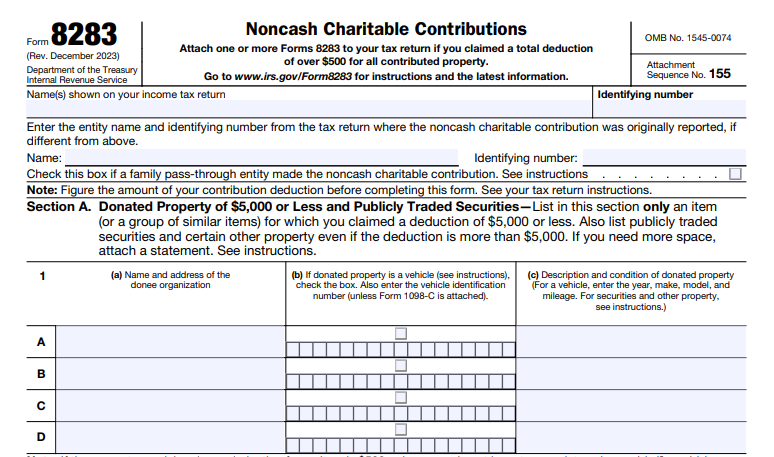
IRS Form 8283, titled Noncash Charitable Contributions, is the official document used to report details about donated property (noncash gifts) to substantiate your charitable deduction on Schedule A (Form 1040) or other returns.

It applies to individuals, partnerships, S corporations, and C corporations. The form helps the IRS verify the fair market value (FMV) of donated items and ensures compliance with substantiation rules.

You do not use Form 8283 for cash donations, payroll deductions, or out-of-pocket volunteer expenses.

When Do You Need to File Form 8283?

You must file Form 8283 if your total deduction for all noncash contributions exceeds $500 in a tax year.

Key thresholds:

  • Over $500 total: File the form (Section A or B depending on value).
  • Over $5,000 per item or group of similar items: Use Section B, which requires a qualified appraisal.
  • Over $500,000: Additional reporting and appraisal attachment required.

File with your tax return for the year you claim the deduction, including carryover years.

Pass-through entities (like partnerships) file with their return, and partners/shareholders attach copies to personal returns.

Section A vs. Section B: Understanding the Differences

Form 8283 divides into two sections based on donation value and type.

Section A: Donations of $5,000 or Less (and Certain Other Property)

Use for:

  • Items or groups of similar items valued at $5,000 or less.
  • Publicly traded securities.
  • Qualified vehicles (with acknowledgment).
  • Intellectual property or certain inventory.

Required details include donee name/address, property description, date acquired, cost basis, FMV, and valuation method. No appraisal needed.

Section B: Donations Over $5,000

Use for most items exceeding $5,000 (except exceptions above). Requires:

  • A qualified appraisal by an independent appraiser.
  • Donee organization signature (acknowledging receipt and intended use).
  • Separate form for each item/group and each donee.

Special checkboxes for art ($20,000+ requires attached appraisal), qualified conservation contributions, digital assets, and more.

Qualified Appraisal Requirements

For Section B donations:

  • Obtain a qualified appraisal no earlier than 60 days before the contribution.
  • Appraiser must meet IRS standards (education, experience, no conflicts).
  • Appraisal must include detailed property description, valuation method, and FMV.

Exceptions: Publicly traded securities, certain vehicles, inventory.

Attach the full appraisal for art ≥$20,000, non-good condition household items >$500, or deductions >$500,000.

Common Types of Noncash Contributions

Clothing and Household Items

Must be in “good used condition or better.” Items not meeting this standard over $500 require appraisal and Section B.

Vehicles (Cars, Boats, Airplanes)

Deduction often limited to sale proceeds by the charity. Attach Form 1098-C.

Artwork and Collectibles

High-value art (≥$20,000) needs attached appraisal. Digital assets (non-publicly traded) go in Section B.

Qualified Conservation Contributions

Special rules apply, including potential disallowance if exceeding 2.5x basis in pass-through entities (with exceptions for 3-year holds or certified historic structures).

IRS Form 8283 Download and Printable

Download and Print: IRS Form 8283

How to Fill Out Form 8283 Step-by-Step

  1. Identify donor and tax year.
  2. Choose Section A or B.
  3. List donee organizations.
  4. Describe property in detail (condition, VIN for vehicles, etc.).
  5. Provide acquisition date, cost basis, FMV, and valuation method.
  6. For Section B: Include appraiser info and obtain donee signature.
  7. Attach appraisals/statements as required.

Incomplete forms (e.g., “available upon request”) can lead to denied deductions.

Common Mistakes to Avoid

  • Failing to get donee signature (Section B).
  • No qualified appraisal for >$5,000 items.
  • Overvaluing items (penalties for substantial overstatements).
  • Not grouping similar items properly.
  • Forgetting contemporaneous written acknowledgment for ≥$250 donations.

FAQs About IRS Form 8283

Q: Can I file Form 8283 electronically?
Yes, but include signed PDFs for appraisals and signatures.

Q: What if the charity sells the property soon after?
They may need to file Form 8282, and you could face recapture.

Q: Are there limits on charitable deductions?
Yes – generally 60% of AGI, with variations by property type and organization.

Always consult a tax professional for your situation, as rules can change. Download the latest Form 8283 and instructions from IRS.gov.


IRS Form 8832 – Entity Classification Election

IRS Form 8832 - Entity Classification Election

IRS Form 8832 – Entity Classification Election – IRS Form 8832, known as the Entity Classification Election, allows eligible business entities to choose their federal tax classification. Many businesses, especially limited liability companies (LLCs), use this form to opt out of default tax rules and select a more advantageous treatment, such as being taxed as a corporation or partnership.

Understanding Form 8832 is crucial for business owners who want to optimize their tax strategy. This guide covers everything you need to know, including eligibility, filing process, default rules, and key considerations based on official IRS guidelines as of 2025.

IRS Form 8832 - Entity Classification Election
IRS Form 8832 – Entity Classification Election


What Is IRS Form 8832?

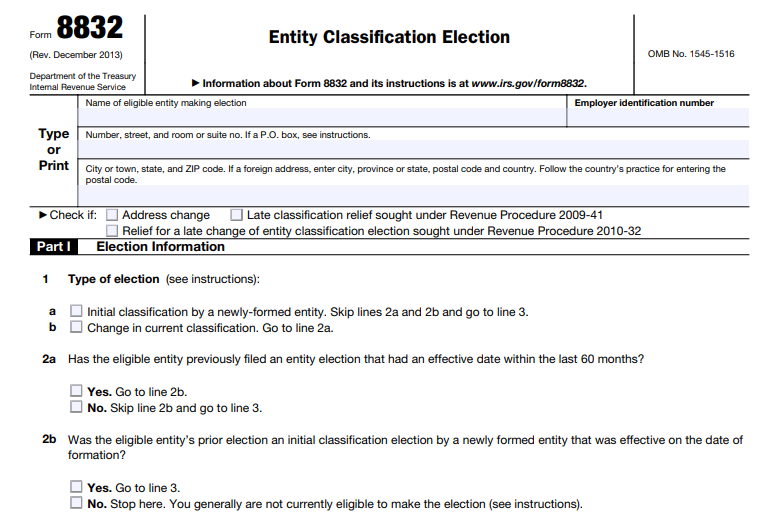
Form 8832 enables an eligible entity to elect how the IRS classifies it for federal tax purposes. The available options are:

  • Association taxable as a corporation
  • Partnership (for entities with two or more members)
  • Disregarded entity (for single-member entities)

Without filing Form 8832, entities follow the IRS’s default classification rules.

The form is particularly popular among LLCs, which can use it to change their tax status without altering their legal structure.

Who Is Eligible to File Form 8832?

Not all business entities can use Form 8832. Eligible entities are generally domestic or foreign business organizations that are not automatically classified as corporations under IRS regulations (Treas. Reg. § 301.7701-2).

Common eligible entities include:

  • Limited liability companies (LLCs)
  • Partnerships
  • Certain foreign entities

Ineligible entities include:

  • Corporations by default (e.g., those incorporated under state law)
  • Tax-exempt organizations under section 501(a)
  • Real estate investment trusts (REITs)

Certain entities that previously elected corporate status via Form 8832 may file again, subject to limitations.

Default Tax Classification Rules

If no election is made, the IRS applies these default rules:

Domestic entities:

  • Single-member → disregarded entity (taxed as sole proprietorship)
  • Two or more members → partnership

Foreign entities:

  • Single owner with limited liability → disregarded entity
  • Single owner without limited liability → association (corporation)
  • Multiple owners, all with limited liability → association (corporation)
  • Multiple owners, at least one without limited liability → partnership

Many LLCs file Form 8832 to elect corporate taxation for benefits like self-employment tax savings or eligibility for certain deductions.

How to File IRS Form 8832: Step-by-Step

  1. Obtain the Form — Download the latest Form 8832 (Rev. December 2013) from the IRS website.
  2. Complete Part I — Provide entity name, EIN (required; apply via Form SS-4 if needed), address, type of election (initial or change), and desired classification.
  3. Specify Effective Date — On Line 8 (see rules below).
  4. Sign the Consent Statement — All owners (or authorized representatives) must sign under penalties of perjury.
  5. Mail the Form — Send to the appropriate IRS service center based on your location (see addresses below). Attach a copy to the entity’s (or owners’) federal income tax return for the election year.

The IRS generally accepts the election if properly completed, and may send notification within 60 days.

Where to Mail Form 8832

Location Mailing Address
Connecticut, Delaware, District of Columbia, Georgia, Illinois, Indiana, Kentucky, Maine, Maryland, Massachusetts, Michigan, New Hampshire, New Jersey, New York, North Carolina, Ohio, Pennsylvania, Rhode Island, South Carolina, Vermont, Virginia, West Virginia, Wisconsin Department of the Treasury, Internal Revenue Service, Kansas City, MO 64999
Alabama, Alaska, Arizona, Arkansas, California, Colorado, Florida, Hawaii, Idaho, Iowa, Kansas, Louisiana, Minnesota, Mississippi, Missouri, Montana, Nebraska, Nevada, New Mexico, North Dakota, Oklahoma, Oregon, South Dakota, Tennessee, Texas, Utah, Washington, Wyoming Department of the Treasury, Internal Revenue Service, Ogden, UT 84201
Foreign country or U.S. possession Department of the Treasury, Internal Revenue Service, Ogden, UT 84201-0023

Effective Date of the Election

The election can be effective:

  • Up to 75 days before the filing date
  • Up to 12 months after the filing date

If no date is specified or it’s outside this window, the election defaults to the filing date.

IRS Form 8832 Download and Printable

Download and Print: IRS Form 8832

The 60-Month Limitation Rule

Once an entity changes its classification via Form 8832, it generally cannot make another election for 60 months. Exceptions apply for initial elections by newly formed entities or when more than 50% ownership changes (requires private letter ruling).

Late Election Relief

If you miss the timely filing deadline, relief may be available:

  • Under Revenue Procedure 2009-41 — For reasonable cause and within 3 years and 75 days of the requested effective date.
  • Under Revenue Procedure 2010-32 — For certain foreign entity ownership changes.

Complete Part II of the form and provide an explanation.

Common Reasons to File Form 8832

  • Single-member LLC → Elect corporate status for potential tax advantages
  • Multi-member LLC → Switch from partnership to corporate taxation
  • Foreign entities → Align classification with business needs

Note: To elect S corporation status, file Form 2553 instead (which includes a deemed corporate election).

Key Cautions and Considerations

  • Elections trigger deemed tax events (e.g., asset contributions or liquidations), which may have tax consequences.
  • Disregarded entities remain separate for employment and certain excise taxes.
  • Always consult a tax professional, as elections are irrevocable for 60 months in most cases.

For the most current information, visit the official IRS page on Form 8832 or download the form directly.

This guide is based on IRS publications and forms as of December 2025. Tax rules can be complex—professional advice is recommended for your specific situation.


IRS Form 8822-B – Change of Address or Responsible Party – Business

IRS Form 8822-B - Change of Address or Responsible Party - Business

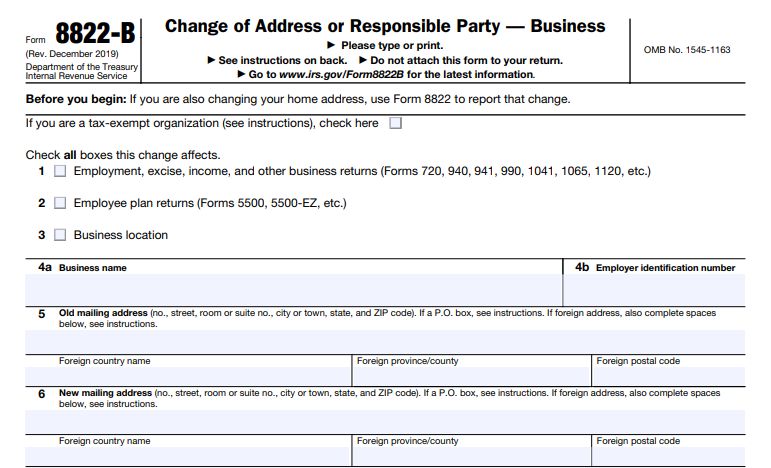
IRS Form 8822-B – Change of Address or Responsible Party – Business – Businesses must keep the IRS informed of key changes to ensure smooth tax compliance. IRS Form 8822-B, titled Change of Address or Responsible Party — Business, allows entities with an Employer Identification Number (EIN) to report updates to their mailing address, business location, or responsible party.

Failing to update this information can lead to missed notices, delayed refunds, or compliance issues. This 2025 guide explains the form’s purpose, filing requirements, and step-by-step instructions based on official IRS guidelines.

IRS Form 8822-B - Change of Address or Responsible Party - Business
IRS Form 8822-B – Change of Address or Responsible Party – Business


What Is IRS Form 8822-B?

IRS Form 8822-B notifies the IRS of changes affecting business tax correspondence and accountability. Use it to report:

  • A new business mailing address
  • A new business location (physical address)
  • A change in the identity of the “responsible party” (the individual who controls or manages the entity)

The form applies to any entity with an EIN, including corporations, partnerships, LLCs, nonprofits, estates, and trusts—whether actively operating or not.

Note: Do not confuse this with Form 8822, which is for individual or personal address changes. Businesses must use Form 8822-B specifically.

The current version is Revision December 2019, with no updates reported as of December 2025.

When Do You Need to File Form 8822-B?

File Form 8822-B whenever:

  • Your business moves to a new mailing address or physical location
  • The responsible party changes (e.g., new owner, principal officer, or fiduciary)

You must report responsible party changes within 60 days of the effective date.

While no strict deadline applies to address changes, update promptly to avoid disruptions in IRS communications. Processing typically takes 4-6 weeks.

Who Is the Responsible Party?

The responsible party is the individual who ultimately owns, controls, or exercises effective control over the entity and its assets. This must be a real person (with an SSN or ITIN), not another entity (except for government entities).

Examples include:

  • President, CEO, or principal officer for corporations and tax-exempt organizations
  • General partner for partnerships
  • Grantor, owner, or trustor for trusts
  • Fiduciary for estates

Nominees (temporary stand-ins with limited authority) should not be listed—correct any prior nominee listings using Form 8822-B.

IRS Form 8822-B Download and Printable

Download and Print: IRS Form 8822-B

How to Fill Out IRS Form 8822-B: Step-by-Step

Download the latest Form 8822-B from the IRS website (irs.gov/pub/irs-pdf/f8822b.pdf).

  1. Check applicable boxes (top section): Indicate what the change affects (e.g., business returns, employee plan returns, business location).
  2. Lines 1-4: Enter your business name, EIN, old mailing address, and any prior name or EIN changes if applicable.
  3. Line 5: Old mailing address.
  4. Line 6: New mailing address (include foreign details if applicable).
  5. Line 7: New business location (if different from mailing address).
  6. Lines 8-9: New responsible party’s full name and SSN/ITIN (or EIN in limited cases—refer to Form SS-4 instructions).
  7. Line 10: Signature of an authorized person (officer, owner, partner, fiduciary) with title, date, and optional daytime phone number. Attach power of attorney (Form 2848) if signing as a representative.

The form must be signed under penalties of perjury. Unsigned forms will not be processed.

Where to Mail Form 8822-B

Mail the completed form based on your old business address location:

  • Connecticut, Delaware, District of Columbia, Georgia, Illinois, Indiana, Kentucky, Maine, Maryland, Massachusetts, Michigan, New Hampshire, New Jersey, New York, North Carolina, Ohio, Pennsylvania, Rhode Island, South Carolina, Vermont, Virginia, West Virginia, Wisconsin:Department of the Treasury
    Internal Revenue Service
    Kansas City, MO 64999
  • Alabama, Alaska, Arizona, Arkansas, California, Colorado, Florida, Hawaii, Idaho, Iowa, Kansas, Louisiana, Minnesota, Mississippi, Missouri, Montana, Nebraska, Nevada, New Mexico, North Dakota, Oklahoma, Oregon, South Dakota, Tennessee, Texas, Utah, Washington, Wyoming, or outside the U.S.:Department of the Treasury
    Internal Revenue Service
    Ogden, UT 84201

No electronic filing option exists—mail only.

Common Mistakes to Avoid When Filing Form 8822-B

  • Using Form 8822 instead of 8822-B for business changes
  • Forgetting to sign or date the form
  • Reporting a nominee as the responsible party
  • Mailing to the wrong IRS center
  • Missing the 60-day deadline for responsible party updates

Keep a copy of the filed form and note the mailing date for your records.

Frequently Asked Questions About Form 8822-B

Is there a penalty for not filing Form 8822-B?
No direct penalty exists, but outdated information can cause missed notices, delayed processing, or compliance problems.

Can I file Form 8822-B online?
No, the IRS requires mailing the paper form.

Do I need to file if I’m also changing my personal address?
Use Form 8822 for personal changes in addition to 8822-B for business.

How do I know if the IRS processed my form?
The IRS does not send confirmation, but allow 4-6 weeks. If concerned, follow up by phone.

For the most current details, visit the official IRS page: irs.gov/forms-pubs/about-form-8822-b.

Keeping your IRS records accurate with Form 8822-B helps avoid unnecessary complications and ensures your business stays in good standing. File promptly when changes occur!


IRS Form SS-4 – Application for Employer Identification Number

IRS Form SS-4 - Application for Employer Identification Number

IRS Form SS-4 – Application for Employer Identification Number – An Employer Identification Number (EIN) serves as a unique nine-digit federal tax ID for businesses and organizations in the United States. Often called a Federal Tax Identification Number, it works like a Social Security Number for entities. Many businesses, nonprofits, trusts, and estates need an EIN for tax filing, hiring employees, opening bank accounts, and other purposes.

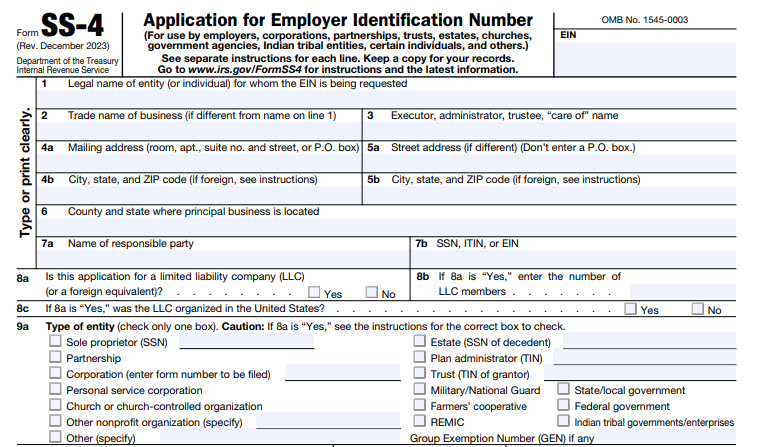
Form SS-4, Application for Employer Identification Number, lets you apply for an EIN by mail or fax. The IRS strongly recommends the free online application for faster processing—often instant.

This guide covers everything about IRS Form SS-4, including who needs an EIN, application methods, and step-by-step instructions based on the latest IRS guidelines as of 2025.

IRS Form SS-4 - Application for Employer Identification Number
IRS Form SS-4 – Application for Employer Identification Number


What Is an Employer Identification Number (EIN)?

The IRS assigns a nine-digit EIN (formatted as XX-XXXXXXX) to identify:

  • Employers
  • Sole proprietors
  • Corporations
  • Partnerships
  • Nonprofits
  • Trusts
  • Estates
  • Government agencies
  • Other entities

for tax purposes.

You use it on business tax returns, payroll filings, and forms sent to the IRS or Social Security Administration (SSA). An EIN applies only to business activities and cannot replace a personal SSN or ITIN.

The IRS issues EINs for free, and you can obtain one immediately online in many cases.

Who Needs an EIN?

You generally need an EIN if you:

  • Have employees
  • Operate as a partnership, LLC, or corporation
  • File employment, excise, or alcohol/tobacco/firearms tax returns
  • Withhold taxes on income paid to a non-resident alien
  • Administer trusts (except certain revocable grantor-owned trusts), estates, or retirement plans
  • Represent tax-exempt organizations, farmers’ cooperatives, or real estate mortgage investment conduits

Even without federal tax requirements, banks or states may require an EIN for accounts or licenses. Sole proprietors without employees might not need one for federal taxes but often get one for privacy or business needs.

Note: Entities should have only one EIN. You need a new one only for major ownership or structure changes.

How to Apply for an EIN

The IRS offers several application methods. Online remains the fastest and most popular.

The IRS online EIN assistant at IRS.gov/EIN is free and available if your principal business is in the U.S. or territories.

  • Eligibility — You must be the responsible party (owner or controller) with a valid SSN, ITIN, or EIN.
  • Hours — Monday–Friday, 7 a.m. to 10 p.m. Eastern Time.
  • Process — Answer questions, submit, and get your EIN immediately if approved. Print the confirmation letter.
  • Limits — One EIN per responsible party per day; complete in one session (times out after 15 minutes of inactivity).

Form your entity with your state first to avoid issues.

2. Apply Using Form SS-4 (Mail or Fax)

Download Form SS-4 (Rev. December 2023) from IRS.gov and use it for mail or fax applications.

  • Fax → Send to 855-641-6935 (U.S.) or 855-215-1627 (international). Expect your EIN in about 4 business days.
  • Mail → Send to Internal Revenue Service, Attn: EIN Operation, Cincinnati, OH 45999 (U.S.) or EIN International Operation for others. Processing takes 4–6 weeks.

3. Apply by Phone (International Applicants Only)

Call 267-941-1099 (Monday–Friday, 6 a.m.–11 p.m. ET). Domestic applicants cannot use this method.

Important: Limit one EIN per responsible party per day across all methods.

IRS Form SS-4 Download and Printable

Download and Print: IRS Form SS-4

Step-by-Step Guide to Completing IRS Form SS-4

Follow these key instructions when filling out Form SS-4 (based on December 2023 revision):

  1. Line 1: Enter the legal name of the entity or individual (exactly as on founding documents).
  2. Line 2: Enter trade name or DBA if different.
  3. Lines 4–6: Provide mailing address, physical address (if different), county, and state.
  4. Lines 7a–b: Name the responsible party (individual who controls the entity) and their SSN/ITIN/EIN.
  5. Lines 8a–c: Indicate if it’s an LLC, number of members, and classification.
  6. Line 9a: Check the entity type (e.g., sole proprietor, corporation, partnership, trust).
  7. Line 10: Specify the reason for applying (e.g., started new business, hired employees).
  8. Lines 11–12: Enter start date and accounting year closing month.
  9. Lines 13–15: Report expected employees, wages, and first payroll date.
  10. Line 16–17: Describe principal business activity and line of merchandise/services.
  11. Line 18: Indicate if you had a prior EIN.
  12. Third-Party Designee: Optional authorization for someone to discuss the application.
  13. Signature: Sign as an authorized person.

Use only allowed characters in names (A-Z, 0-9, -, &). Report changes to responsible party or address using Form 8822-B within 60 days.

Common Mistakes to Avoid When Applying for an EIN

  • Applying for multiple EINs for the same entity.
  • Using a nominee instead of the true responsible party.
  • Not forming the entity legally before applying.
  • Paying third-party services (EINs are always free from the IRS).

FAQs About Form SS-4 and EINs

How long does it take to get an EIN?
Instant online; 4 days by fax; 4–6 weeks by mail.

Can I use my EIN immediately?
Yes for most purposes (bank accounts, licenses). Wait 2 weeks for e-filing or TIN matching.

What if I lose my EIN?
Check old notices, bank records, or call 800-829-4933.

Do I need a new EIN if I change my business name?
No—just notify the IRS if needed.

For the latest Form SS-4, instructions, and online tool, visit IRS.gov. Always apply directly through official IRS channels to avoid scams.


IRS Form 1099-QA – Distributions From ABLE Accounts

IRS Form 1099-QA - Distributions From ABLE Accounts

IRS Form 1099-QA – Distributions From ABLE Accounts – If you’re a designated beneficiary of an Achieving a Better Life Experience (ABLE) account or a family member managing one, navigating tax reporting can feel overwhelming. Enter IRS Form 1099-QA—your key document for tracking distributions from these tax-advantaged savings accounts designed for people with disabilities. In this comprehensive guide, we’ll break down everything you need to know about Form 1099-QA, from its purpose and filing requirements to tax implications and 2025 updates. Whether you’re filing taxes for the first time or optimizing your ABLE strategy, this article will help you stay compliant and maximize benefits.

IRS Form 1099-QA - Distributions From ABLE Accounts
IRS Form 1099-QA – Distributions From ABLE Accounts


What Are ABLE Accounts? A Quick Overview

ABLE accounts, established under the ABLE Act of 2014, are state-sponsored savings plans (classified as 529A accounts) that allow individuals with disabilities and their families to save for qualified disability expenses without jeopardizing eligibility for means-tested government benefits like Supplemental Security Income (SSI) or Medicaid. These accounts function similarly to 529 college savings plans but focus on disability-related costs, such as housing, transportation, education, healthcare, and assistive technology.

Eligibility for ABLE Accounts

To open an ABLE account, the designated beneficiary must meet specific criteria:

  • Age of Onset: The disability must have occurred before the age of 26.
  • Certification: A physician or other qualified professional must certify the disability, confirming it substantially limits one or more major life activities.
  • One Account Per Person: Only one ABLE account is allowed per eligible individual, though rollovers from 529 plans are permitted under certain conditions.

Contributions are tax-deductible in some states, and earnings grow tax-free. The big perk? Distributions used for qualified disability expenses are entirely tax-free, making ABLE accounts a powerful tool for financial independence.

Who Files and Receives IRS Form 1099-QA?

Form 1099-QA is an information return used specifically to report distributions from ABLE accounts. It’s not filed by individuals but by the state agency, instrumentality, or contractor that administers the qualified ABLE program. These entities must submit the form to the IRS for every ABLE account that experiences a distribution or termination during the calendar year.

As the recipient, you’ll get a copy of Form 1099-QA by January 31 of the following year (e.g., January 31, 2026, for 2025 distributions). It’s typically mailed or available through your state’s ABLE program portal. Designated beneficiaries receive it for standard distributions, while contributors might get one if excess contributions are returned. Note: No form is issued for mere name changes if the new beneficiary is an eligible family member.

Key Information Reported on IRS Form 1099-QA

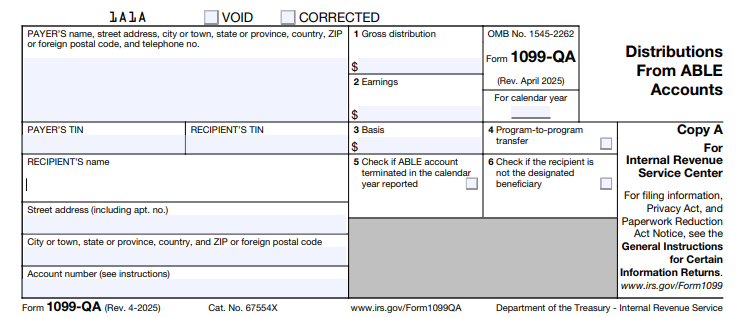
Form 1099-QA captures essential details to help the IRS and taxpayers track ABLE activity. It includes payer and recipient info, account numbers, and four main data boxes plus checkboxes for special circumstances.

Box-by-Box Breakdown of Form 1099-QA

Here’s a clear guide to what each box means:

  • Box 1: Gross Distribution
    This shows the total amount distributed from the ABLE account in the tax year, including rollovers (unless they’re direct program-to-program transfers). For returned excess contributions, it includes the contribution plus any earnings.
  • Box 2: Earnings
    The portion of the distribution attributable to investment growth. This amount is generally taxable as ordinary income unless the distribution qualifies as tax-free (e.g., used for qualified expenses or rolled over).
  • Box 3: Basis
    Represents the return of your original contributions (nontaxable). Calculate it as Box 1 minus Box 2. This is crucial for determining how much of your withdrawal is tax-free.
  • Box 4: Program-to-Program Transfer
    A checkbox indicating if the distribution was a direct transfer to another ABLE account. These aren’t taxable and don’t count toward your annual limits.
  • Box 5: ABLE Account Terminated
    Checked if the account was closed during the year, triggering a full distribution report.
  • Box 6: Distribution to Other Than Designated Beneficiary
    Marked for distributions like returned excess contributions to a contributor, not the beneficiary.

Payers must use the state’s Employer Identification Number (EIN) and include the program’s name if applicable. Recipients’ Social Security Numbers (SSNs) or Individual Taxpayer Identification Numbers (ITINs) are truncated on statements for privacy but fully reported to the IRS.

Tax Implications of ABLE Account Distributions

The beauty of ABLE accounts lies in their tax treatment: Contributions are made with after-tax dollars, earnings grow tax-deferred, and qualified distributions are tax-free. However, Form 1099-QA helps the IRS verify compliance.

  • Qualified Distributions: If funds go toward disability expenses (e.g., medical care, education, or employment support), the entire amount—including earnings—is nontaxable. No penalty applies.
  • Non-Qualified Distributions: Earnings (Box 2) are taxed as ordinary income, plus a 10% additional tax on those earnings (similar to early 529 withdrawals). Basis (Box 3) remains nontaxable.
  • Rollovers: You can roll over up to the full distribution to another ABLE account within 60 days, but only once per 12-month period per beneficiary. Report the rollover on your return but exclude it from taxable income.
  • Returned Excess Contributions: If contributions exceed limits, the excess plus earnings must be returned by your tax filing deadline (including extensions) to avoid a 6% excise tax. This is reported on Form 1099-QA, and earnings are taxable.

Pro tip: Track expenses meticulously with receipts to substantiate qualified use during an audit.

How to Report Form 1099-QA on Your Tax Return

Reporting is straightforward but requires attention to detail. Use the information from your 1099-QA to complete your Form 1040.

  1. Enter on Form 1040: Report the taxable portion (Box 2 earnings, minus any rollovers) on Line 8z of Schedule 1 (Additional Income and Adjustments to Income) as “Other income.” Describe it as “ABLE account earnings.”
  2. Calculate the 10% Penalty: If non-qualified, compute the penalty on Form 5329 (Additional Taxes on Qualified Plans) and add it to your tax owed.
  3. Claim the Saver’s Credit: Eligible beneficiaries can claim a non-refundable credit (up to 50% of contributions, max $2,000) on Form 8880 if income qualifies.
  4. State Taxes: Check your state’s rules—some offer deductions for contributions.

E-filing software like TurboTax or H&R Block often imports 1099-QA data directly. Always double-check against your records.

IRS Form 1099-QA Download and Printable

Download and Print: IRS Form 1099-QA

Common Mistakes to Avoid When Handling Form 1099-QA

Even seasoned taxpayers slip up. Here’s how to steer clear:

  • Ignoring the Form: Not reporting Box 2 earnings can trigger IRS notices and penalties.
  • Misclassifying Distributions: Assuming all withdrawals are qualified without documentation—keep logs!
  • Missing Rollovers: Forgetting to exclude rolled-over amounts leads to unnecessary taxes.
  • Overlooking Excess Returns: Delaying returns past deadlines incurs excise taxes.
  • TIN Errors: Ensure your SSN/ITIN matches IRS records to avoid backup withholding.

Consult a tax professional if your situation involves rollovers from 529 plans or employment contributions.

Recent Changes for 2025: What ABLE Users Need to Know

The IRS keeps ABLE rules evolving to support beneficiaries. Key 2025 updates include:

  • Contribution Limits: Base limit rises to $19,000 annually. Employed beneficiaries without certain retirement plan contributions can add up to $15,060 (continental U.S. poverty line) or more in Alaska/Hawaii.
  • E-Filing Threshold: Now just 10 returns for payers (down from 250), streamlining compliance.
  • Online Fillable Forms: Enhanced PDF tools for easier preparation.

No major form redesigns, but always download the latest from IRS.gov.

Frequently Asked Questions (FAQs) About IRS Form 1099-QA and ABLE Accounts

Q: Do I need to file Form 1099-QA myself?
A: No—the ABLE program files it with the IRS and sends you a copy. You use it to report on your personal return.

Q: What if I don’t receive my 1099-QA by January 31?
A: Contact your state ABLE administrator immediately. The IRS gets a copy, so delays could complicate your filing.

Q: Are ABLE distributions subject to the Net Investment Income Tax?
A: Generally no, as they’re not considered investment income if qualified.

Q: Can family members contribute to my ABLE account?
A: Yes, up to the annual limit, and it counts toward gift tax exclusions.

Q: How does Form 1099-QA differ from Form 1099-Q?
A: 1099-Q is for 529 education plans; 1099-QA is ABLE-specific.

For more FAQs, visit the IRS ABLE page.

Final Thoughts: Empower Your Financial Future with ABLE Accounts

IRS Form 1099-QA might seem like just another tax form, but it’s a gateway to tax-free savings that promote independence for people with disabilities. By understanding distributions, staying on top of reporting, and leveraging 2025’s updated limits, you can make the most of your ABLE account. Remember, tax laws change—bookmark IRS.gov for the latest. If in doubt, a certified tax advisor or enrolled agent can provide personalized guidance.

Ready to open or optimize an ABLE account? Check your state’s program today and start saving smarter.

This article is for informational purposes only and not tax advice. Consult a professional for your situation.


IRS Form 1099-OID – Original Issue Discount

IRS Form 1099-OID - Original Issue Discount

IRS Form 1099-OID – Original Issue Discount – In the world of tax reporting, few forms carry the weight of IRS Form 1099-OID, the key document for tracking Original Issue Discount (OID). If you’re an investor holding bonds, certificates of deposit (CDs), or other debt instruments sold at a discount, understanding Form 1099-OID is essential for accurate tax filing. This guide breaks down everything you need to know about OID, the form itself, reporting requirements, and 2025 updates to help you stay compliant and optimize your deductions.

Whether you’re a payer issuing the form or a recipient reporting income, mastering Form 1099-OID ensures you avoid penalties and maximize your financial strategy. Let’s dive in.

IRS Form 1099-OID - Original Issue Discount
IRS Form 1099-OID – Original Issue Discount


What Is Original Issue Discount (OID)?

Original Issue Discount (OID) is a type of interest income that arises when a debt instrument—such as a bond, note, or CD—is issued or purchased for less than its face value (stated redemption price at maturity). The difference between the discounted purchase price and the full repayment amount is treated as taxable interest, accrued over the instrument’s life using the constant yield method.

Key Characteristics of OID Instruments

  • Zero-Coupon Bonds: These pay no periodic interest but are redeemed at face value, making the entire discount OID.
  • Deep-Discount Bonds: Issued below par with minimal or no stated interest.
  • Stripped Bonds and Coupons: Separated principal and interest components, treated as separate OID instruments.
  • Inflation-Indexed Debt (e.g., TIPS): Adjustments for inflation can create OID.
  • Tax-Exempt Obligations: OID may be partially or fully nontaxable, but still reported.

OID is calculated daily and prorated for the portion of the year you hold the instrument. For example, if a $1,000 bond is bought for $800 with a 5-year maturity, the $200 discount is OID, spread evenly or via constant yield. Use IRS Publication 1212’s OID tables for publicly traded instruments to simplify calculations, available on IRS.gov with annual updates.

What Is IRS Form 1099-OID?

Form 1099-OID, or “Original Issue Discount,” is an information return used to report OID and related interest to the IRS and recipients. It’s filed by payers (like issuers or brokers) when OID reaches certain thresholds, ensuring the IRS tracks this hidden interest income.

Unlike Form 1099-INT (for straightforward interest), 1099-OID focuses on discounted debt, though it can include other periodic interest. For tax year 2025, the form remains largely unchanged from 2024, with no major regulatory shifts noted in IRS updates as of June 2025.

Who Must File Form 1099-OID and Who Receives It?

Who Files It?

Payers must issue Form 1099-OID if:

  • OID includible in the recipient’s gross income is $10 or more.
  • Any federal income tax was withheld under backup withholding rules (even if OID < $10).
  • Foreign tax was withheld and paid on OID.

Filers include:

  • Bond issuers with outstanding OID debt.
  • Financial institutions issuing CDs or time deposits over 1 year with OID.
  • Brokers or middlemen holding OID obligations as nominees.
  • Trustees of widely held fixed investment trusts (WHFITs) or mortgage trusts (WHMTs).
  • Real estate mortgage investment conduits (REMICs) or collateralized debt obligations (CDOs).

Exceptions: No filing for payments to corporations, tax-exempt organizations, IRAs, HSAs, government entities, or registered dealers. Short-term obligations (≤1 year) are reported on Form 1099-INT instead.

Who Receives It?

Recipients are holders of record for the OID instrument, typically individual investors or trusts. If you’re a nominee (e.g., broker), you report to the true owner. For 2025, expect delivery by January 31, 2026.

Breaking Down the Boxes on Form 1099-OID

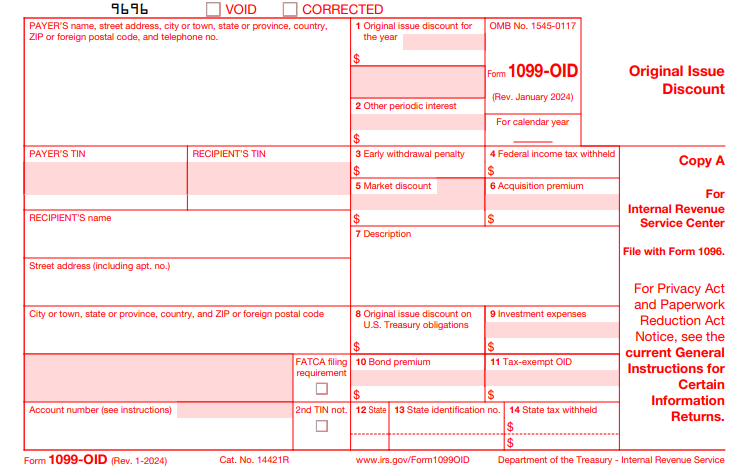
Form 1099-OID has 14 boxes, each capturing specific data. Here’s a quick reference table for tax year 2025:

Box Description Key Notes
1 Original Issue Discount Taxable OID for the year held (exclude box 8 amounts). Minimum $10 threshold.
2 Other Periodic Interest Qualified stated interest paid/credited (can report on 1099-INT instead).
3 Early Withdrawal Penalty Forfeited amount on early CD withdrawal (deductible by recipient).
4 Federal Income Tax Withheld Backup withholding (24% rate for 2025) on boxes 1, 2, 8.
5 Market Discount Accrued market discount ≥$10 on covered securities (constant yield method).
6 Acquisition Premium Amortization reducing OID (for covered securities).
7 Description CUSIP no., issuer details, maturity date.
8 OID on U.S. Treasury Obligations Specific OID for Treasuries (may be negative for deflation).
9 Investment Expenses Pro rata share for single-class REMICs (nondeductible).
10 Bond Premium Amortization on covered securities (reduces interest in box 2).
11 Tax-Exempt OID For tax-exempt obligations (covered securities post-2016).
12 State State abbreviation (optional).
13 State Payer’s ID State tax ID (optional).
14 State Tax Withheld State withholding (optional).

For covered securities (acquired after 2013/2016), boxes 5, 6, 10, and 11 are mandatory starting in 2025, aiding basis adjustments.

How to Report OID on Your 2025 Tax Return

As a recipient, include OID as interest income on your Form 1040:

  1. Locate OID: Use box 1 (taxable OID) + box 2 (periodic interest) + box 8 (Treasury OID). Add tax-exempt OID from box 11 to line 2a of Form 1040 (nontaxable interest).
  2. Adjust for Premiums/Discounts: Reduce OID by acquisition premium (box 6) or bond premium (box 10). Add market discount (box 5) if elected.
  3. Report on Schedule B: List payers and amounts on Part I, line 1. Note adjustments (e.g., “OID Adjustment”) and subtotal before entering on Form 1040, line 2b.
  4. Basis Tracking: Increase your basis by accrued OID annually to avoid double taxation on sale (report gains/losses on Form 8949/Schedule D).
  5. Special Cases:
    • Tax-Exempt: Report full OID but exclude taxable portion from income; adjust basis hypothetically.
    • Stripped Bonds: Treat as new issues; calculate OID from purchase date.
    • Sales/Redemptions: Report gain as interest income if OID instrument.

Even without a form, self-report if OID ≥$10. Use Publication 1212 for calculations if Form 1099-OID is inaccurate.

IRS Form 1099-OID Download and Printable

Download and Print: IRS Form 1099-OID

2025 Filing Deadlines and Requirements for Form 1099-OID

For tax year 2025:

  • Furnish to Recipients: January 31, 2026.
  • File with IRS: Paper by February 28, 2026; electronically by March 31, 2026 (via FIRE or IRIS systems).
  • Electronic Filing Mandate: Required if filing 10+ returns total (all 1099 types combined). Waivers via Form 8508.
  • Extensions: 30 days for IRS filing (Form 8809); recipient statements via Form 15397 (fax only).

Penalties for late/inaccurate filing start at $60 per return, escalating to $340 (with caps for small businesses). Backup withholding is 24%; report on Form 945 by February 10, 2026.

Common Mistakes to Avoid When Handling Form 1099-OID

  • Ignoring Thresholds: Filing for < $10 OID (unless withholding applies).
  • Misclassifying Short-Term Debt: Use 1099-INT for ≤1-year terms.
  • Forgetting Basis Adjustments: Leads to overreported gains on sale.
  • Overlooking Covered Securities: Mandatory premium/discount reporting post-2016.
  • Late E-Filing: Triggers automatic penalties if over 10 returns.

Pro Tip: Use tax software or consult a CPA for complex instruments like REMICs. Always verify CUSIP details in box 7.

Frequently Asked Questions (FAQs) About IRS Form 1099-OID

1. Do I need to file Form 1099-OID for tax-exempt bonds?

Yes, report tax-exempt OID in box 11, but it’s not taxable income.

2. What if my Form 1099-OID is wrong?

Contact the payer for a corrected form (marked “CORRECTED”). Self-adjust on your return with documentation.

3. Is OID reported differently for inflation-protected securities?

Yes, use the discount bond method; deflation reduces reportable OID.

4. Can I e-file Form 1099-OID for free?

Yes, through IRS-approved systems like TaxBandits or directly via FIRE for volumes under 250.

5. What’s new for 2025?

No substantive changes; focus on electronic mandates and updated OID tables in Pub. 1212 (rev. Jan. 2025).

Final Thoughts: Stay Ahead with Proper OID Reporting

IRS Form 1099-OID might seem niche, but it’s crucial for investors in discounted debt to report income accurately and adjust basis effectively. By understanding OID calculations, form boxes, and 2025 deadlines, you’ll minimize errors and penalties while optimizing your tax position.

For the latest forms and tables, visit IRS.gov. If your portfolio includes complex OID instruments, professional advice is invaluable. File on time, report correctly, and invest confidently.

This article is for informational purposes only and not tax advice. Consult a tax professional for personalized guidance.


IRS Form 1099-LTC – Long-Term Care and Accelerated Death Benefits

IRS Form 1099-LTC - Long-Term Care and Accelerated Death Benefits

IRS Form 1099-LTC – Long-Term Care and Accelerated Death Benefits – In an era where long-term care (LTC) insurance is becoming essential for many Americans planning for aging and health challenges, understanding IRS Form 1099-LTC is crucial. This form reports payments from long-term care insurance policies and accelerated death benefits, which can have significant tax implications. Whether you’re a policyholder receiving benefits or a payer distributing them, knowing the ins and outs of Form 1099-LTC ensures compliance and potential tax savings. In this comprehensive 2025 guide, we’ll break down what the form entails, who files it, tax treatments, and more—all based on the latest IRS guidelines.

IRS Form 1099-LTC - Long-Term Care and Accelerated Death Benefits
IRS Form 1099-LTC – Long-Term Care and Accelerated Death Benefits


What is IRS Form 1099-LTC?

IRS Form 1099-LTC, officially titled “Long-Term Care and Accelerated Death Benefits,” is an information return used to report distributions from qualified long-term care insurance contracts or life insurance policies that provide accelerated death benefits. Issued by the IRS, it helps the government track these payments, which are often related to chronic or terminal illnesses.

The form’s primary purpose is to disclose gross payments without determining their taxability—that responsibility falls to the recipient when filing their personal tax return. For tax year 2025, the form remains largely unchanged from prior years, with revisions effective April 2025 emphasizing electronic filing options due to low paper volume.

Long-term care benefits cover expenses like nursing home stays, home health aides, or assisted living, while accelerated death benefits allow terminally or chronically ill individuals to access a portion of their life insurance payout early.

Who Needs to File Form 1099-LTC?

Not everyone dealing with LTC policies must file this form. Payers—including insurance companies, governmental units (like state programs), and viatical settlement providers—are required to issue Form 1099-LTC if they distribute any reportable benefits to an individual policyholder.

Viatical settlement providers, who buy or assign life insurance contracts from terminally or chronically ill individuals, must also comply if they meet state licensing requirements. Payments are reportable even if made to third parties on behalf of the insured.

If you’re a recipient (policyholder or insured), you won’t file the form yourself but must use it to report income on your Form 1040. Always receive a copy by January 31, 2026, for 2025 payments.

Key Information Reported on Form 1099-LTC

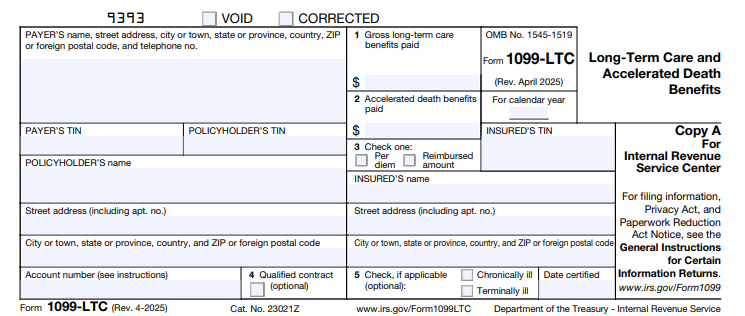
Form 1099-LTC is straightforward, with five main boxes capturing essential details. Here’s a breakdown for tax year 2025:

  • Box 1: Gross Long-Term Care Benefits Paid
    This reports the total LTC benefits paid during the year, excluding accelerated death benefits. Include per diem payments (fixed daily amounts) or reimbursements for actual expenses paid to the insured, policyholder, or third parties. No taxability assessment is needed here.
  • Box 2: Accelerated Death Benefits Paid
    Enter gross amounts from life insurance contracts paid to or for a certified terminally or chronically ill insured. This includes viatical settlements.
  • Box 3: Per Diem or Reimbursed Amount
    Check the appropriate box to indicate if payments were per diem (periodic, regardless of expenses) or reimbursed (based on actual costs). Skip this for terminal illness accelerated benefits.
  • Box 4: Qualified Contract (Optional)
    Check if benefits stem from a qualified LTC contract (post-1996 policies meeting IRC Section 7702B, or pre-1997 state-qualified policies).
  • Box 5: Chronically Ill or Terminally Ill (Optional)
    Mark the insured’s status and include the latest certification date if applicable.

Copies are distributed as follows: Copy B to the policyholder, Copy C to the insured (optional if the same person), and Copy A with Form 1096 to the IRS. Truncating the recipient’s TIN on statements is allowed for privacy.

Tax Implications of Long-Term Care and Accelerated Death Benefits

One of the biggest questions around Form 1099-LTC is: Are these payments taxable? The answer depends on the policy type and payment structure, but many qualify as tax-free.

Long-Term Care Benefits

  • Qualified Policies: Benefits from tax-qualified LTC contracts are generally excluded from income, up to certain limits. For per diem contracts in 2025, the daily exclusion limit is $420—meaning up to $153,300 annually ($420 x 365) can be tax-free, regardless of actual expenses. Excess amounts may be taxable unless offset by qualified expenses.
  • Reimbursed Contracts: These are tax-free only to the extent they cover actual LTC costs; any surplus is income.

Use IRS Form 8853 to calculate and report any taxable portion on your return.

Accelerated Death Benefits

These are typically tax-free if:

  • Paid under a qualified LTC rider.
  • The insured is terminally ill (life expectancy ≤24 months) or chronically ill (unable to perform two activities of daily living).
  • For viaticals, the provider must be licensed.

Non-qualified payments may count as taxable income, potentially triggering the 3.8% Net Investment Income Tax.

Premiums for qualified LTC policies may also be deductible as medical expenses, subject to AGI thresholds.

Filing Deadlines and Requirements for Form 1099-LTC in 2025

Timely filing is key to avoiding penalties. For tax year 2025:

  • Recipient Statements: Send Copies B and C by January 31, 2026.
  • IRS Filing: Paper returns due February 28, 2026; electronic by March 31, 2026. E-filing is required unless you qualify for a waiver (e.g., fewer than 10 returns).

Use the IRS’s online fillable forms for low-volume filers. Always include an account number for tracking.

IRS Form 1099-LTC Download and Printable

Download and Print: IRS Form 1099-LTC

How to Handle Form 1099-LTC on Your Tax Return

If you receive a 1099-LTC:

  1. Review Boxes 1–5 for accuracy.
  2. Complete Form 8853 to determine taxable amounts.
  3. Report any taxable income on Schedule 1 (Form 1040), line 8z (other income).
  4. Attach Form 8853 if claiming exclusions.

Consult a tax professional if your situation involves multiple policies or complex illnesses. Tools like TaxAct can simplify importing 1099-LTC data.

Frequently Asked Questions (FAQs) About IRS Form 1099-LTC

Is Form 1099-LTC always taxable?

No—many payments are tax-free under qualified contracts, but calculate using Form 8853.

What if I don’t receive my 1099-LTC by January 31?

Contact the payer immediately; the IRS expects you to report based on records.

Can I deduct LTC premiums on my 2025 taxes?

Yes, up to age-based limits (e.g., $5,880 for those 71+), as itemized medical expenses.

What’s the difference between per diem and reimbursed LTC benefits?

Per diem pays a fixed amount daily (tax-free up to $420/day in 2025), while reimbursed covers actual costs only.

Final Thoughts: Stay Compliant and Maximize Tax Benefits

Navigating IRS Form 1099-LTC doesn’t have to be overwhelming. By understanding its role in reporting long-term care and accelerated death benefits, you can ensure accurate tax filing and potentially exclude thousands in income. For the most current details, visit IRS.gov or consult a certified advisor. As healthcare costs rise, proactive planning with qualified LTC policies remains a smart financial move.

Last updated: December 2025. Always verify with official IRS resources for your specific situation.


IRS Form 1099-LS – Reportable Life Insurance Sale

IRS Form 1099-LS - Reportable Life Insurance Sale

IRS Form 1099-LS – Reportable Life Insurance Sale – In the evolving landscape of tax reporting, life insurance policy sales have gained new scrutiny under the Secure 2.0 Act. If you’ve sold or acquired a life insurance contract this year, IRS Form 1099-LS—Reportable Life Insurance Sale—could play a pivotal role in your 2025 tax filings. This form ensures transparency in transactions that might otherwise trigger taxable events, helping both sellers and buyers stay compliant. Whether you’re a policyholder considering a life settlement or an investor acquiring policies, this guide breaks down everything you need to know about Form 1099-LS, from filing requirements to tax impacts.

IRS Form 1099-LS - Reportable Life Insurance Sale
IRS Form 1099-LS – Reportable Life Insurance Sale


What Is IRS Form 1099-LS?

IRS Form 1099-LS is an information return used to report the acquisition of a life insurance contract (or any interest in one) during a reportable policy sale. Introduced to curb tax evasion in life settlements and viatical settlements, it mandates disclosure of sales where the buyer has no substantial ties to the insured. Unlike traditional 1099 forms for income, 1099-LS focuses on the transaction details rather than direct payments, though it does include the amount paid to the seller.

This form is relatively new, with the first filings required for sales after December 31, 2022, and it’s revised for April 2025 to reflect ongoing refinements in e-filing thresholds. For 2025, expect streamlined online options for Copies B and C.

Who Needs to File Form 1099-LS?

Primarily, the acquirer (buyer) of the life insurance policy or interest must file Form 1099-LS. This includes individuals, businesses, or entities purchasing policies through life settlement companies, viatical providers, or direct transfers. You don’t file if:

  • The transfer is gratuitous (e.g., a gift).
  • You’re a foreign person acquiring the policy.
  • It’s a tax-free Section 1035 exchange (like swapping one policy for another of the same type).
  • Another party handles unified reporting on your behalf.

Sellers (payment recipients) receive the form but do not file it. Issuers (insurance companies) may also get a copy for record-keeping.

What Constitutes a Reportable Policy Sale?

A reportable policy sale occurs when there’s a direct or indirect acquisition of a life insurance interest, and the acquirer lacks a “substantial family, business, or financial relationship” with the insured—beyond just the policy itself. Examples include:

  • Life settlements: Selling a policy to a third-party investor for cash, often when premiums become unaffordable.
  • Viatical settlements: Similar to life settlements but for terminally ill individuals, potentially qualifying for tax exclusions.
  • Business transfers: A company selling a key-person policy to an unrelated party.

Indirect acquisitions count too, like buying into a partnership or trust that owns the policy. Payments under $600 to non-sellers (e.g., brokers) are exempt from reporting.

Key Information Required on Form 1099-LS

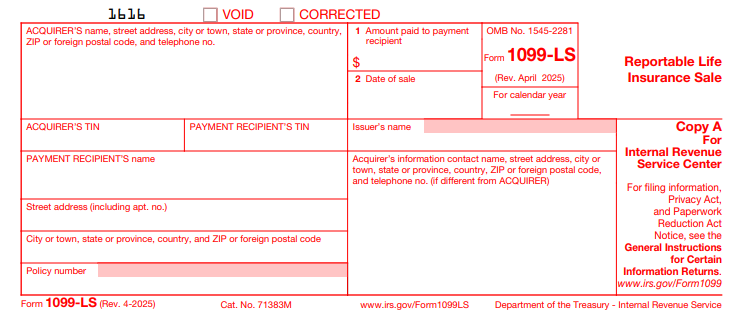
The form is straightforward, with just two main boxes plus identifying details:

  • Box 1: Amount Paid to Payment Recipient – The total cash or value transferred to the seller or intermediary (optional on the issuer’s copy).
  • Box 2: Date of Sale – The closing date of the transaction.

Additional fields include:

  • Acquirer’s name, address, phone, and TIN.
  • Payment recipient’s (seller’s) name, address, and TIN (truncatable on recipient copies for privacy).
  • Issuer’s name and policy number.
  • Contact info for questions.

A separate form is needed for each recipient and policy interest.

Filing and Furnishing Deadlines for Form 1099-LS in 2025

Timely compliance is crucial. For tax year 2025 sales:

Recipient Type Due Date
Payment Recipients (Sellers) February 17, 2026 (Copy B)
Issuers (Insurance Companies) January 15, 2026, or within 20 days of sale (whichever is later, but no later than Jan 15) – Copy C, for direct acquisitions only
IRS Filing February 28, 2026 (paper) or March 31, 2026 (electronic)

E-filing is mandatory if filing 10 or more returns (aggregated across all 1099s), thanks to the Taxpayer First Act. Use IRS-approved software or services like Tax1099 for seamless submission.

If a sale is rescinded, file and furnish corrections within 15 days of notice.

Tax Implications for Recipients of Form 1099-LS

Receiving a 1099-LS doesn’t automatically mean taxes are due—it signals a potential gain. Compare proceeds (Box 1) to your basis (premiums paid, often reported on Form 1099-SB from the issuer):

  • No gain: If proceeds ≤ basis, no tax.
  • Ordinary income: Excess up to cash surrender value.
  • Capital gain: Any remainder (short-term if held ≤1 year; long-term if >1 year).
  • Loss: If proceeds < basis, claim as capital loss to offset other gains.

Report on Schedule D (capital gains/losses) or Form 1040 Line 8 (other income). Viatical settlements for terminally ill may be tax-free under IRC Section 101(g). Always consult a tax pro, as state rules vary.

IRS Form 1099-LS Download and Printable

Download and Print: IRS Form 1099-LS

Common Exceptions and Exclusions

Not every policy transfer triggers a 1099-LS. Key exclusions per IRS regulations:

  • Transfers to family members or business partners with substantial ties.
  • Gratuitous transfers (gifts).
  • Section 1035 exchanges.
  • Foreign acquirers.
  • Unified reporting by a third-party contractor.

Review Reg. §1.6050Y-2(f) for full details.

How to File Form 1099-LS Electronically

  1. Gather details: Policy info, TINs (use IRS TIN Matching for accuracy).
  2. Download the form from IRS.gov (fillable PDFs available).
  3. Use e-file providers like TaxAct or Tax2eFile for bulk filing.
  4. Transmit via FIRE system; include Form 1096 transmittal summary.
  5. Mail Copies B/C or e-deliver as required.

For 2025, the lowered e-file threshold (10 returns) makes digital filing the norm.

Penalties for Non-Compliance with Form 1099-LS

Failure to file or furnish can sting: Up to $310 per form for late filing (2025 rate), escalating to $630 for intentional disregard. Reasonable cause waivers apply for errors like invalid TINs. Aggregate penalties cap at $4,018,500 for small businesses. (From General Instructions; specific to info returns.)

Frequently Asked Questions (FAQs) About IRS Form 1099-LS

Do I need a 1099-LS for every life insurance sale?

No, only reportable ones without substantial relationships qualify.

Can I truncate TINs on the form?

Yes, on recipient copies (last four digits), but not for IRS filings.

What if I receive multiple 1099-LS forms?

Aggregate proceeds and basis for tax calculation; report each on your return.

Is Form 1099-LS the same as 1099-SB?

No—1099-SB reports basis from issuers; 1099-LS covers sales from acquirers.

How has Form 1099-LS changed for 2025?

Minor updates for e-filing (threshold now 10) and online fillable forms; no major overhauls.

Final Thoughts: Stay Ahead on Life Insurance Tax Reporting

Navigating IRS Form 1099-LS ensures you’re not caught off-guard by reportable life insurance sales. With deadlines approaching in early 2026, review any 2025 transactions now—consult the official IRS instructions and a tax advisor for personalized advice. Proper reporting not only avoids penalties but also unlocks potential deductions or exclusions. For more tax tips, explore IRS.gov or tools like TaxAct.

Last updated: December 2025. Always verify with the latest IRS guidance.