IRS Form 4669 – Statement of Payments Received – In the complex world of tax compliance, understanding specific IRS forms can save businesses and individuals significant time and money. One such form is IRS Form 4669, the Statement of Payments Received. This document is essential for situations involving tax withholding relief, particularly when payers seek to avoid liability for taxes that should have been withheld but weren’t. Whether you’re a business owner dealing with backup withholding or an independent contractor certifying your tax payments, this guide covers everything you need to know about IRS Form 4669, including its purpose, how to fill it out, and related processes.
As of 2025, the form remains a key tool for requesting relief from certain withholding taxes, helping to ensure that double taxation is avoided when payees have already fulfilled their tax obligations. We’ll draw from official IRS sources to provide accurate, up-to-date information to optimize your tax strategy.
What Is IRS Form 4669?
IRS Form 4669 is officially titled the “Statement of Payments Received.” It serves as a certification from the recipient (payee) of certain payments that they have reported those payments on their tax return and paid any associated taxes in full. This form is not filed directly with the IRS by the payee; instead, it’s provided to the payer (such as an employer or business) who may use it to support their request for relief from withholding tax liabilities.
The form addresses scenarios where the payer failed to withhold the correct amount of taxes, such as income tax on wages, backup withholding on reportable payments, Additional Medicare Tax, or withholding on payments to foreign persons. By obtaining this statement, payers can demonstrate that the tax has already been paid by the payee, preventing the IRS from collecting the same tax twice.
Key scenarios where Form 4669 comes into play include:
- Backup withholding under Section 3406 of the Internal Revenue Code.
- Income tax withholding on wages (Section 3402).
- Additional Medicare Tax on wages exceeding $200,000 (Sections 3102 and 3202).
- Withholding on payments to foreign persons under Chapters 3 and 4.
This form helps maintain fairness in the tax system by allowing relief for payers while ensuring taxes are paid.
Purpose of IRS Form 4669
The primary purpose of IRS Form 4669 is to provide evidence that a payee has included specific payments in their taxable income and paid the required taxes. This certification allows the payer to request relief from their obligation to pay the withheld taxes they may have under-withheld or failed to remit.
For payers, failing to withhold taxes can lead to liabilities, penalties, and interest. However, if the payee can prove via Form 4669 that they’ve already handled the tax responsibility, the payer can submit this form along with IRS Form 4670 (Request for Relief from Payment of Certain Withholding Taxes) to seek exemption from those liabilities.
In essence, Form 4669 prevents double taxation and offers a pathway for compliance correction. It’s particularly useful for businesses dealing with independent contractors, vendors, or employees where withholding errors occurred.
Who Needs to Use IRS Form 4669?
- Payers (e.g., Businesses or Employers): They initiate the process by providing the form to payees when seeking relief from withholding tax payments. Payers must obtain a separate Form 4669 from each payee for each calendar year in question.
- Payees (e.g., Employees, Contractors, or Recipients): Payees complete and sign the form to certify their tax compliance. This includes individuals, businesses, or foreign entities who received payments subject to withholding.
You might need this form if you’ve been assessed for under-withheld taxes or if an IRS examination reveals withholding discrepancies. It’s not for routine tax filing but for specific relief requests.
How to Fill Out IRS Form 4669: Step-by-Step Guide
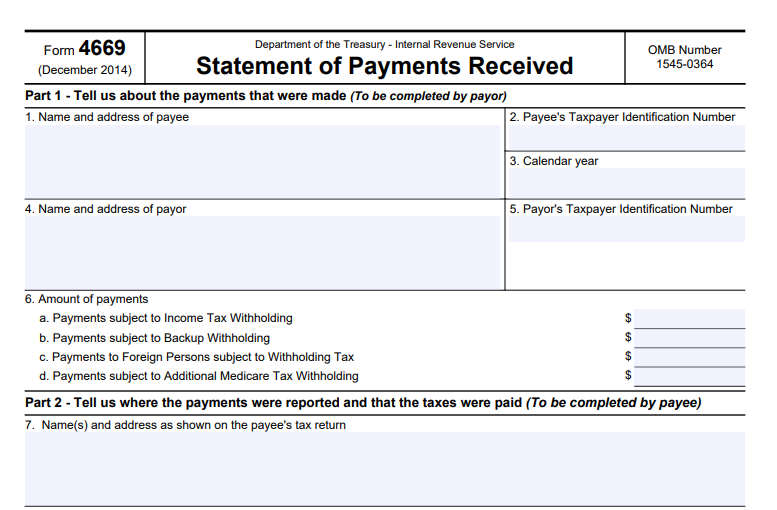
Filling out Form 4669 is straightforward but requires accuracy to avoid delays in relief processing. The form is divided into three parts.
Part 1: Payer Information (Completed by the Payer)
- Enter the payee’s name, address, and Taxpayer Identification Number (TIN).
- Provide the calendar year of the payments.
- Enter the payer’s name, address, and Employer Identification Number (EIN).
- Specify the amounts of payments subject to:
- Line 6a: Income tax withholding.
- Line 6b: Backup withholding.
- Line 6c: Withholding tax on foreign persons.
- Line 6d: Additional Medicare Tax withholding.
Part 2: Payee Certification (Completed by the Payee)
- Review and correct Part 1 if necessary.
- Indicate where the payments were reported on your tax return:
- Line 7: Form number (e.g., Form 1040 series, including 1040, 1040NR, etc.).
- Line 8a/8b: Line or schedule where payments and taxes are shown for income/backup/foreign withholding.
- Line 9a/9b: For Additional Medicare Tax, including any exemptions.
- Note the tax year if different from the calendar year.
Part 3: Payee Signature (Completed by the Payee)
- Sign under penalties of perjury.
- Print your name and title (if applicable).
- Provide a daytime phone number and date.
Tips for Completion:
- Use the latest version of the form (revised December 2014, still current as of 2025).
- Do not send Form 4669 directly to the IRS; return it to the payer.
- Retain copies for your records.
- Estimated time to complete: About 15 minutes, including recordkeeping and preparation.
If information is missing or incorrect, the payer should return the form for corrections.
IRS Form 4669 Download and Printable
Download and Print: IRS Form 4669
Related Forms: IRS Form 4670
Form 4669 is often paired with IRS Form 4670, which is the actual request for relief submitted by the payer to the IRS. Attach all completed Forms 4669 to Form 4670, along with any examination reports or amended returns. Submit Form 4670 to the IRS examiner if an audit is ongoing, or mail it to the appropriate IRS address based on your location.
A separate Form 4670 is needed for each tax form type and year. This process can help waive the payer’s liability but does not eliminate penalties for the failure to withhold.
Benefits of Using IRS Form 4669
- Avoids Double Taxation: Ensures taxes are only paid once.
- Provides Relief for Payers: Reduces financial burden from withholding errors.
- Supports Compliance: Helps during IRS audits or assessments.
- Cost-Effective: Prevents unnecessary payments and potential interest charges.
Common Mistakes to Avoid with IRS Form 4669
- Not obtaining a separate form for each payee and year.
- Incomplete or inaccurate payment amounts in Part 1.
- Failing to specify exact lines on the tax return in Part 2.
- Submitting directly to the IRS instead of the payer.
- Ignoring related publications like Pub. 15 (for withholding) or Pub. 515 (for foreign payments).
FAQs About IRS Form 4669
What if the payee refuses to complete Form 4669?
The payer may still be liable for the taxes, but they can explore other evidence during an IRS examination.
Is Form 4669 required for all withholding errors?
No, only when seeking specific relief under the mentioned code sections.
Where can I download IRS Form 4669?
From the official IRS website at irs.gov/forms-pubs.
Does Form 4669 apply to misclassified workers?
Yes, it can help gather info on whether workers paid taxes on payments received.
Is there a deadline for submitting Form 4669?
It’s tied to the timing of Form 4670; submit as early as possible to avoid collection actions.
Conclusion
IRS Form 4669 is a vital tool for navigating tax withholding challenges, offering a clear path to relief for payers while ensuring payees’ compliance is recognized. By understanding its purpose and proper use, you can avoid costly mistakes and maintain good standing with the IRS. Always consult a tax professional for personalized advice, and refer to official IRS resources for the most current guidance.
For more tax-related insights, explore topics like backup withholding rules or Additional Medicare Tax requirements to stay compliant in 2025 and beyond.