IRS Form 4255 – Certain Credit Recapture, Excessive Payments, and Penalties

IRS Form 4255 - Certain Credit Recapture, Excessive Payments, and Penalties

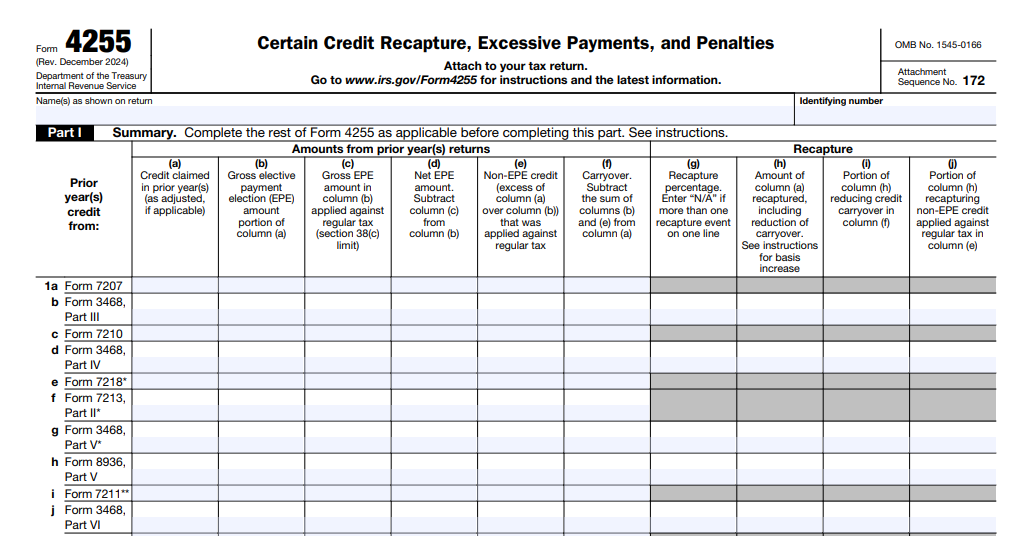
IRS Form 4255 – Certain Credit Recapture, Excessive Payments, and Penalties – IRS Form 4255, titled “Certain Credit Recapture, Excessive Payments, and Penalties,” is a key tax form for taxpayers who have claimed certain investment credits, particularly energy-related credits under the Inflation Reduction Act (IRA). The form calculates any increase in tax liability due to the recapture of previously claimed credits, excessive elective payments or credit transfers, and penalties related to prevailing wage and apprenticeship (PWA) requirements. As of December 2025, the latest revision (Rev. December 2024, applicable for many 2025 filings) reflects updates from the IRS to handle modern clean energy incentives.

According to the official IRS page, Form 4255 is used to figure the amount due for certain credit recaptures, excessive payments, excessive credit transfers, and prevailing wage and apprenticeship penalty amounts.
IRS Form 4255 - Certain Credit Recapture, Excessive Payments, and Penalties
IRS Form 4255 – Certain Credit Recapture, Excessive Payments, and Penalties


What Is Form 4255 Used For?

Taxpayers primarily use Form 4255 in these scenarios:

  1. Recapture of Investment Credits — Under IRC Section 50(a), if investment credit property (e.g., solar panels, wind turbines, or advanced manufacturing facilities) is disposed of, ceases to qualify, or experiences other triggering events before the end of its recapture period (typically 5 years), a portion of the previously claimed credit must be recaptured as additional tax.
  2. Excessive Elective Payments or Credit Transfers — For credits elected as direct payments (under Section 6417) or transferred to another taxpayer (under Section 6418), if the IRS determines the amount was excessive, the excess (plus a potential 20% penalty if no reasonable cause) is reported here.
  3. Prevailing Wage and Apprenticeship (PWA) Penalties — Many IRA-enhanced credits require compliance with prevailing wage rates and apprenticeship standards during construction. Failure can trigger penalties, which are now reported on Form 4255 to retain the increased (5x) credit amount.

The form attaches to your tax return (e.g., Form 1120, 1065, or 990-T for exempt entities) and increases your Chapter 1 tax liability.

When Do You Need to File Form 4255?

You must file Form 4255 if any of the following apply in the current tax year:

  • You disposed of or stopped using qualified investment credit property within the recapture period.
  • Nonqualified nonrecourse financing increased, reducing the qualified credit base.
  • An emissions tier change occurred for clean hydrogen facilities.
  • The IRS notified you of an excessive elective payment or credit transfer.
  • You incurred PWA penalties but wish to pay them to keep the enhanced credit.

Exceptions to recapture include certain transfers (e.g., due to death or within the same trade or business). Always consult the instructions for specifics.

IRS Form 4255 Download and Printable

Download and Print: IRS Form 4255

Key Parts of Form 4255

  • Part I: Summary — This aggregates recapture amounts, excessive payments, transfers, and PWA penalties across various credit types (e.g., from Form 3468 or 3800). Columns separate recapture from elective payments, transfers, and penalties.
  • Part II: Recapture Calculation — Detailed sections (B, C, D) for refiguring credits based on property type, disposition date, or other events. Worksheets in the instructions help compute unused credits that could offset the recapture.

The recapture percentage decreases over time: 100% in year 1, 80% in year 2, down to 0% after 5 full years.

How to Avoid or Minimize Recapture and Penalties

  • Hold qualified property for at least 5 years.
  • Ensure compliance with PWA requirements during construction (or cure failures promptly with payments and penalties).
  • Accurately register projects and claim credits to avoid excessive payment determinations.
  • Document basis adjustments under Section 50(c) for direct pay elections.

Recent Updates for 2025

The December 2024 revision expanded Part I to explicitly handle PWA penalties (column p) and refined columns for elective payments and transfers. Draft 2025 versions show minor clarifications, but the 2024 form applies for most 2025 filings unless updated guidance is issued.

For the latest form and instructions, visit IRS.gov/Form4255. Professional tax advice is recommended, as calculations can be complex, especially for partnerships/S corporations (which report certain amounts directly on their returns).

Understanding Form 4255 helps taxpayers navigate clean energy incentives while avoiding unexpected tax increases. Stay compliant to maximize benefits under current IRS rules.
 

IRS Form 4810 – Request for Prompt Assessment Under Internal Revenue Code Section 6501(d)

IRS Form 4810 - Request for Prompt Assessment Under Internal Revenue Code Section 6501(d)

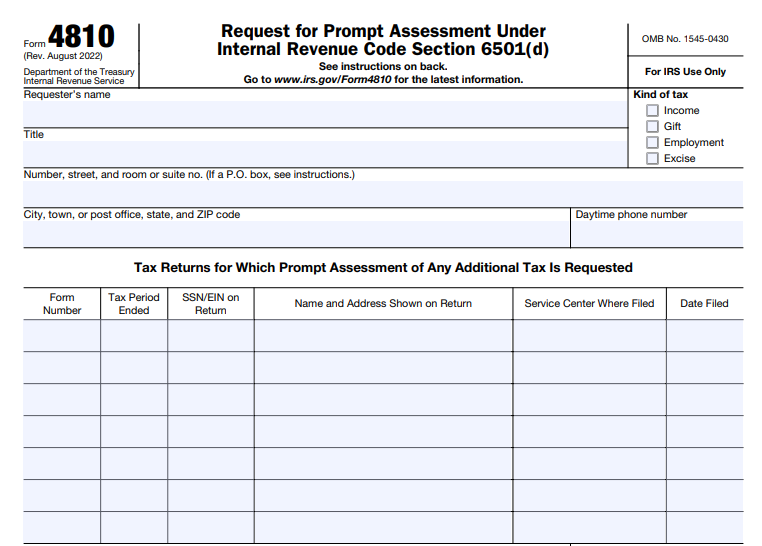
IRS Form 4810 – Request for Prompt Assessment Under Internal Revenue Code Section 6501(d) – In the complex world of tax administration, especially for estates and dissolving corporations, time is often of the essence. IRS Form 4810, officially titled “Request for Prompt Assessment Under Internal Revenue Code Section 6501(d),” offers a way to expedite the IRS’s review process for certain tax returns. This form can significantly shorten the standard statute of limitations for tax assessments, providing much-needed closure for fiduciaries and executors. Whether you’re handling a decedent’s estate or winding down a business, understanding how to use Form 4810 can help avoid prolonged uncertainty and potential liabilities.

In this comprehensive guide, we’ll cover everything you need to know about IRS Form 4810, including its purpose, eligibility, filing process, benefits, and more. We’ll draw from official IRS resources to ensure accuracy and relevance as of late 2025.

IRS Form 4810 - Request for Prompt Assessment Under Internal Revenue Code Section 6501(d)
IRS Form 4810 – Request for Prompt Assessment Under Internal Revenue Code Section 6501(d)


What Is IRS Form 4810?

IRS Form 4810 is a specialized document used to request an accelerated assessment of taxes under Internal Revenue Code (IRC) Section 6501(d). Normally, the IRS has three years from the filing date (or due date, whichever is later) to assess additional taxes on a return. By filing this form, you ask the IRS to limit this period to 18 months from the date they receive your request.

The form is particularly relevant for situations involving finality, such as closing an estate or dissolving a corporation. It’s a one-page form that requires basic information about the taxpayer, the returns in question, and supporting documentation. The current revision of the form is from August 2022, with updates and information available on the IRS website as of September 2025.

Purpose of Filing Form 4810

The primary goal of Form 4810 is to request a “prompt assessment” of any additional taxes owed on specific returns. This is authorized under IRC Section 6501(d), which allows the IRS to shorten the assessment period for certain fiduciaries. Once approved, the IRS will review the returns and either assess additional taxes or close the matter within the 18-month window, barring exceptions like fraud or substantial omissions.

This process provides certainty by limiting the time the IRS can come back with claims. It’s especially useful in estate administration, where executors need to distribute assets without the overhang of potential tax disputes. For dissolving corporations, it helps fiduciaries finalize affairs efficiently.

Who Can File IRS Form 4810?

Form 4810 is typically filed by a fiduciary, which includes:

  • Executors or personal representatives of a decedent’s estate.
  • Representatives of a dissolving corporation.

You must have the authority to act on behalf of the taxpayer, such as through letters testamentary or letters of administration. Individuals handling their own taxes generally don’t qualify, as the form is designed for representative roles in specific scenarios.

If you’re filing for a decedent, include details like the spouse’s name and Social Security Number (SSN) if applicable. For corporations, specify the status of dissolution—whether it’s completed, in progress, or planned.

When Should You File Form 4810?

You can only file Form 4810 after submitting the relevant tax returns. Do not submit it prematurely, as it must reference filed returns. Common timing includes:

  • After filing the decedent’s final Form 1040 (individual income tax return).
  • Following submission of Form 1041 (estate or trust income tax return).
  • During the dissolution process for corporate returns like Form 1120.

There’s no strict deadline, but filing sooner allows the 18-month clock to start earlier, speeding up resolution. Note that separate requests are needed for any returns filed after the initial Form 4810.

IRS Form 4810 Download and Printable

Download and Print: IRS Form 4810

How to Complete and File IRS Form 4810

Completing Form 4810 is straightforward but requires attention to detail. Here’s a step-by-step guide:

  1. Gather Information: Collect details on the requester (fiduciary), taxpayer’s name, address, SSN or Employer Identification Number (EIN), and the types of taxes (e.g., income, gift, employment, excise).
  2. Fill Out the Form:
    • Enter the requester’s name, title, address, and phone number.
    • Specify the kind of tax and periods covered.
    • List the form numbers (e.g., 1040, 1041), tax periods, SSN/EIN, name/address on the return, service center filed, and filing date.
    • For decedents, add spouse details if relevant.
    • For corporations, check the appropriate dissolution box.
  3. Attach Required Documents:
    • Copies of the tax returns (marked “COPY – DO NOT PROCESS AS ORIGINAL”).
    • Letters of administration or testamentary.
    • Any other supporting evidence, such as proof of authority.
  4. Sign and Certify: Sign under penalties of perjury, declaring the information true. Certify no prior fraud penalties; if unable, explain in an attachment.
  5. Mail the Form: Send to the IRS Service Center where the original returns were filed. For gift tax (Form 709), use the specific address in Florence, KY. Private delivery services are allowed, but not for P.O. boxes. Form 4810 cannot be e-filed; it must be printed and mailed.

If using tax software like TaxSlayer Pro, access the form through the miscellaneous menu, enter data, print, and mail separately.

What Taxes Does Form 4810 Apply To?

The form covers various taxes, including:

  • Income (e.g., Forms 1040, 1041, 1120).
  • Gift (Form 709).
  • Employment.
  • Excise.

It applies to returns already filed, and you must specify each type and period.

Effects and Benefits of Filing Form 4810

Filing triggers the IRS to review and assess within 18 months, providing:

  • Certainty and Finality: No further assessments after the period, except in cases of fraud or omission.
  • Faster Distribution: Executors can safely distribute assets without reserving funds for potential taxes.
  • Reduced Burden: Closes tax matters quicker, allowing fiduciaries to wrap up responsibilities.

However, it may invite scrutiny, potentially leading to an audit. It also shortens your window to amend returns. Weigh these risks, especially if returns have complexities.

Common Scenarios for Using Form 4810

  • Decedent’s Estates: After filing the final 1040 and any 1041, file to expedite closure and asset distribution.
  • Dissolving Corporations: Use during wind-down to limit liability periods on corporate returns.

In estate cases, it fast-tracks assessments, reducing complications with beneficiaries.

Frequently Asked Questions About IRS Form 4810

Can I file Form 4810 electronically?

No, it must be mailed to the appropriate IRS center.

What if I file additional returns later?

Submit a separate Form 4810 for those.

Does filing guarantee no additional taxes?

No, but it limits the time for assessment.

Where can I download Form 4810?

From the IRS website at www.irs.gov/Form4810.

Conclusion

IRS Form 4810 is a powerful tool for fiduciaries seeking prompt resolution of tax matters under IRC Section 6501(d). By shortening the assessment period to 18 months, it offers peace of mind and efficiency in estate and corporate dissolution processes. Always consult a tax professional to ensure it fits your situation, as improper use could lead to unintended audits or issues. For the latest updates, visit the official IRS resources.


IRS Form 2159 – Payroll Deduction Agreement

IRS Form 2159 - Payroll Deduction Agreement

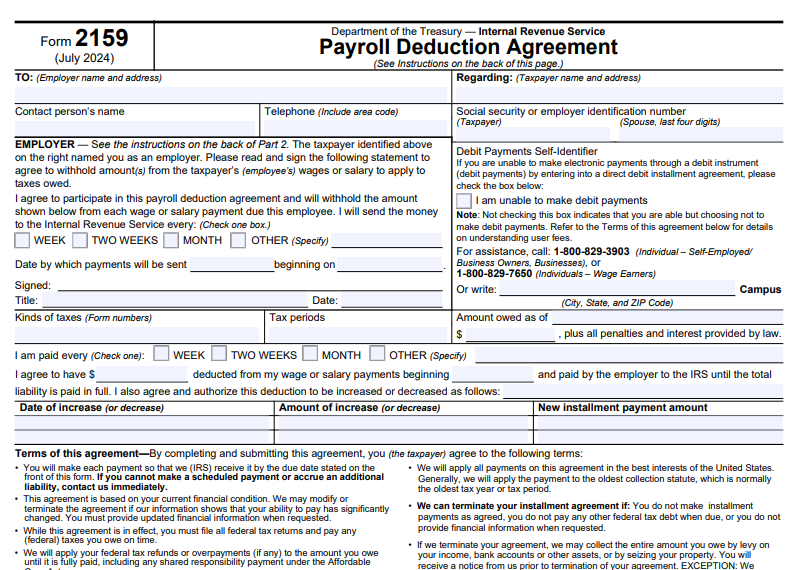
IRS Form 2159 – Payroll Deduction Agreement – If you’re facing tax debt and looking for a manageable way to repay it, IRS Form 2159 could be a valuable tool in your financial toolkit. This form allows taxpayers to set up a payroll deduction agreement, where your employer automatically withholds a portion of your wages to pay off your federal tax liabilities. In this comprehensive guide, we’ll explore everything you need to know about IRS Form 2159, including its purpose, how to fill it out, eligibility requirements, benefits, and alternatives. Whether you’re a wage earner dealing with back taxes or simply researching IRS installment options, this article will help you navigate the process with confidence.

IRS Form 2159 - Payroll Deduction Agreement
IRS Form 2159 – Payroll Deduction Agreement


What Is IRS Form 2159?

IRS Form 2159, officially titled the Payroll Deduction Agreement, is a document that establishes an agreement between a taxpayer, their employer, and the Internal Revenue Service (IRS) for repaying tax debts through regular payroll deductions. This form is particularly useful for wage earners who want to automate their payments, reducing the risk of missed deadlines and potential penalties.

The form facilitates a type of installment agreement known as a Payroll Deduction Installment Agreement (PDIA). Under this setup, your employer deducts a specified amount from each paycheck—weekly, bi-weekly, monthly, or otherwise—and sends it directly to the IRS. This applies to various federal taxes, including income taxes (Form 1040), employment taxes, or other liabilities, as long as the total owed, including penalties and interest, is outlined on the form.

Key features of Form 2159 include:

  • Three Copies: An acknowledgment copy for the IRS, an employer’s copy, and a taxpayer’s copy.
  • User Fees: A standard setup fee of $178, which may be reduced to $43 for low-income taxpayers (those at or below 250% of federal poverty guidelines). Fees can be waived or reimbursed under certain conditions, such as completing the agreement without default.
  • Compliance Requirements: While the agreement is active, you must file all federal tax returns on time and pay any new taxes owed promptly.

The latest revision of Form 2159 is from July 2024, ensuring it aligns with current IRS policies.

Who Should Use IRS Form 2159?

Form 2159 is ideal for employed individuals who prefer automated payments over manual ones. It’s especially recommended for:

  • Wage Earners with Tax Debt: If your total assessed balance (taxes, penalties, and interest) is $50,000 or less, you may qualify for a streamlined installment agreement that can incorporate payroll deductions.
  • Federal Employees: Federal agencies are required to participate in these agreements, making it a straightforward option for government workers.
  • Taxpayers with Past Defaults: If you’ve defaulted on previous installment plans, a payroll deduction can help demonstrate reliability and reduce default risks.
  • Businesses or Self-Employed: While primarily for employees, out-of-business sole proprietors or businesses owing non-trust fund taxes up to $50,000 may use it with payroll deductions if applicable.

However, it’s not suitable for everyone. For instance, seasonal or intermittent workers may find it challenging due to irregular income. Additionally, if your debt exceeds certain thresholds or involves trust fund taxes, you might need to explore other options like a Partial Payment Installment Agreement.

To qualify, you generally need to be current on your tax filings and unable to pay the full amount immediately. Low-income taxpayers may benefit from reduced fees by indicating their inability to make direct debit payments on the form.

How to Complete IRS Form 2159 Step by Step

Filling out Form 2159 is straightforward but requires attention to detail. Here’s a breakdown:

  1. Taxpayer Information: Enter your name, address, Social Security Number (SSN) or Employer Identification Number (EIN), and spouse’s details if it’s a joint liability.
  2. Employer Details: Provide your employer’s name, address, contact person, and phone number.
  3. Debt Details: Specify the types of taxes (e.g., Form 1040), tax periods, and total amount owed as of a specific date, plus accruing penalties and interest.
  4. Payment Terms: Indicate your pay frequency (weekly, bi-weekly, etc.), the deduction amount, start date, and any planned increases or decreases in payments.
  5. Debit Payments Self-Identifier: Check this box if you’re unable to make direct debit payments, which may qualify low-income taxpayers for fee reimbursements.
  6. Signatures: Sign and date the form (include spouse if joint). Then, have your employer sign, agreeing to withhold and remit payments.

The IRS section (for official use) includes fields for agreement locator numbers, review cycles, and lien determinations. Once completed, return the acknowledgment copy to the IRS address provided in your notice or on the form.

For assistance, taxpayers can call 1-800-829-7650, while businesses should use 1-800-829-3903.

Benefits of a Payroll Deduction Agreement

Opting for a payroll deduction via Form 2159 offers several advantages:

  • Automation and Reliability: Payments are deducted automatically, minimizing the chance of defaults and additional penalties.
  • Lower User Fees: Compared to other installment plans, payroll deductions often come with reduced setup costs, especially for low-income individuals.
  • Tax Refund Application: Any federal refunds will be applied to your debt, accelerating repayment.
  • Employer Involvement: For federal employees, participation is mandatory, ensuring smooth implementation.
  • Flexibility: Agreements can be modified if your financial situation changes significantly.

This method can also help avoid more aggressive collection actions, like levies or liens, as long as you stay compliant.

Potential Drawbacks and Cautions

While beneficial, there are some pitfalls:

  • Employer Discretion: Non-federal employers aren’t required to participate, so you’ll need their approval.
  • Third-Party Contact Rules: The IRS may need to contact your employer, requiring prior notice under IRC 7602(c).
  • Default Risks: If you change jobs or fail to comply, the agreement could terminate, leading to reinstatement fees of $89 (or $43 reduced).
  • Not for All Employment Types: Avoid for seasonal jobs or if you’re self-employed without a payroll system.
  • Lien Possibility: The IRS may file a Notice of Federal Tax Lien to protect its interests.

Always provide updated financial information if requested to avoid termination.

Alternatives to IRS Form 2159

If payroll deduction isn’t right for you, consider these IRS payment options:

  • Direct Debit Installment Agreement: Automatic bank withdrawals with potentially lower fees.
  • Online Payment Agreement: Apply via IRS.gov for streamlined plans if your debt is $50,000 or less.
  • Partial Payment Installment Agreement: For those unable to full-pay within the collection statute (usually 10 years), requiring financial statements.
  • Offer in Compromise: Settle for less if you qualify based on doubt as to collectibility.
  • Short-Term Payment Plan: Pay within 180 days without fees for debts under $100,000.

For businesses, options like In-Business Trust Fund Express Agreements may apply.

IRS Form 2159 Download and Printable

Download and Print: IRS Form 2159

How to Submit and Monitor Your Agreement

Submit the signed Form 2159 acknowledgment copy to the IRS address on your bill or notice. Use the Online Payment Agreement tool for initial requests, or mail Form 9465 if needed. Once approved, monitor your account via IRS.gov or by calling the provided numbers. Agreements are reviewed periodically, especially partial payment ones every two years.

In conclusion, IRS Form 2159 provides a structured, automated path to resolving tax debt for many taxpayers. By understanding its requirements and leveraging it correctly, you can regain financial stability while staying compliant with IRS rules. If your situation is complex, consult a tax professional for personalized advice.

Frequently Asked Questions (FAQs)

What happens if I default on my payroll deduction agreement?

The IRS may terminate the agreement, apply levies, and charge a reinstatement fee. You’ll need to reapply and provide updated financial info.

Can I change the deduction amount later?

Yes, you can authorize increases or decreases on the form, or contact the IRS if your financial condition changes significantly.

Is Form 2159 available in Spanish?

Yes, there’s a Spanish version (Form 2159-SP) for non-English speakers.

How do I know if I’m low-income for fee reductions?

Check if your adjusted gross income is at or below 250% of federal poverty guidelines; use Form 13844 to apply for waivers.

Does this affect my credit score?

Installment agreements themselves don’t directly impact credit, but unpaid taxes or liens might. Timely payments help avoid further issues.


IRS Form 12661 – Disputed Issue Verification

IRS Form 12661 - Disputed Issue Verification

IRS Form 12661 – Disputed Issue Verification – In the complex world of tax audits, disagreements with the Internal Revenue Service (IRS) findings can arise, leading to additional tax liabilities or disallowed credits. IRS Form 12661, officially titled “Disputed Issue Verification,” serves as a crucial tool for taxpayers seeking to challenge these outcomes through the audit reconsideration process. This form allows individuals and businesses to formally dispute specific issues from a closed audit by providing new or additional information that wasn’t considered initially. Whether you’re dealing with disallowed deductions, unreported income adjustments, or errors in credit calculations, understanding how to use Form 12661 can potentially reduce or eliminate your tax debt. In this guide, we’ll break down everything you need to know about IRS Form 12661, including when to use it, how to complete it, and tips for a successful submission, based on the latest IRS guidelines as of late 2025.

IRS Form 12661 - Disputed Issue Verification
IRS Form 12661 – Disputed Issue Verification

What is IRS Form 12661?

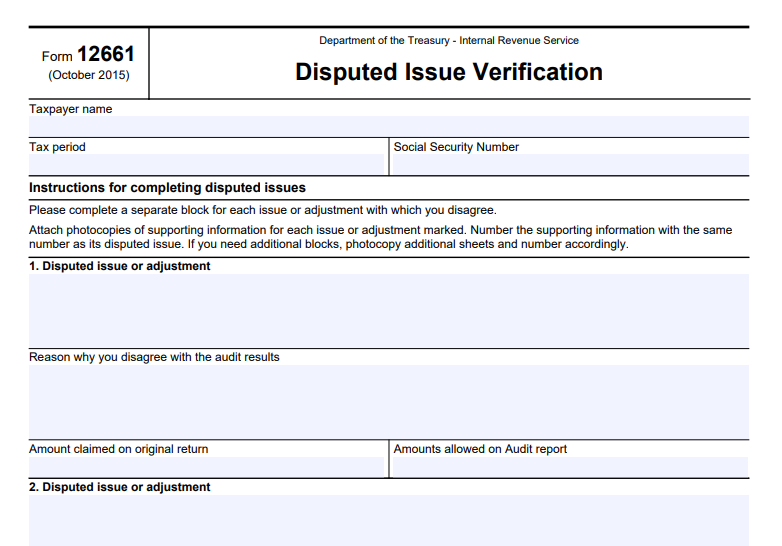
IRS Form 12661 is a one-page document designed to help taxpayers clearly outline and verify disputed issues from a prior IRS audit. Released by the Department of the Treasury and the Internal Revenue Service, the form includes fields for taxpayer identification—such as name, Social Security Number (or Employer Identification Number for businesses), and the relevant tax period—and dedicated blocks for detailing each disputed issue.

The form’s primary purpose is to facilitate the audit reconsideration process, which is available for correspondence examinations (audits conducted by mail) where the case has been closed, but the taxpayer disagrees with the results. It’s not mandatory; taxpayers can submit a written letter instead, but using Form 12661 streamlines the process by providing a structured format to explain disagreements. According to IRS Internal Revenue Manual (IRM) guidelines, this form is particularly recommended when contacting IRS representatives via phone or in-person, as it helps clarify the issues at hand.

Key elements of the form include:

  • Taxpayer Information: Enter your name, SSN, and the tax year in question.
  • Disputed Issue Blocks: Separate sections (numbered 1, 2, 3, etc.) for each issue, where you describe the disputed adjustment, explain why you disagree, state the amount claimed on your original return, and note the amount allowed in the audit report.
  • Instructions: Emphasize attaching photocopies of supporting documents, numbered to match each disputed issue, and a reminder not to send originals.

The latest revision of Form 12661 is from October 2015, but IRS procedures for its use have been updated as recently as December 2025 in the IRM.

When Should You Use IRS Form 12661?

Form 12661 is ideal for situations where you believe the IRS audit outcome was incorrect due to overlooked information or errors. Common scenarios include:

  • You didn’t respond to the initial audit or provide requested documents.
  • You moved and missed IRS correspondence.
  • New supporting evidence becomes available after the audit closes.
  • You disagree with the IRS’s interpretation of tax laws or calculations, such as in cases involving Earned Income Tax Credit (EITC) disallowances or penalties.

To qualify for audit reconsideration, your case must meet specific criteria: the return must have been filed, the assessment remains unpaid (or credits are disputed), you must identify the adjustments in question, and provide new information not previously reviewed. Note that this process doesn’t apply to open audits, math error notices, or cases already appealed—those have separate procedures. If your audit involved EITC bans (2-year or 10-year), Form 12661 can help explain why the ban should be lifted by addressing the underlying conduct.

Step-by-Step Guide: How to Complete IRS Form 12661

Filling out Form 12661 is straightforward but requires attention to detail to avoid delays. Here’s a step-by-step breakdown:

  1. Gather Your Documents: Review your audit report (Form 4549) to identify disputed items. Collect supporting evidence like receipts, bank statements, or Forms 1099.
  2. Enter Taxpayer Details: At the top, provide your full name, SSN, and the tax period (e.g., 2023).
  3. Detail Each Disputed Issue: Use a separate block for each issue.
    • Describe the issue (e.g., “Disallowed home office deduction”).
    • Explain your disagreement (e.g., “The space was used exclusively for business; attached logs prove eligibility”).
    • Note the original claimed amount and the audit-allowed amount. If you have more than three issues, photocopy the form and continue numbering.
  4. Attach Supporting Information: Number photocopies to match the issue blocks. Do not send originals, as they won’t be returned.
  5. Review for Completeness: Ensure all fields are filled accurately to prevent rejection.

What Supporting Documentation Do You Need?

The IRS emphasizes submitting only new or previously unconsidered information. Examples include:

  • Canceled checks or receipts for deductions.
  • Corrected Forms 1099 or W-2s.
  • Legal documents for dependency claims.
  • Explanations for EITC eligibility if a ban is in place.

If documentation is insufficient, the IRS may contact you for more details or issue a substantiation request letter, giving you 45 days to respond.

IRS Form 12661 Download and Printable

Download and Print: IRS Form 12661

How to Submit IRS Form 12661

Submission options include:

  • Digital Upload (Recommended): Use the IRS Document Upload Tool (DUT) at https://apps.irs.gov/app/digital-mailroom/cce/ for faster processing.
  • Mail: Send to the IRS office that conducted your audit (address on your audit letter). If unknown, call 866-897-0161 or 866-897-0177. Include a copy of Form 4549 if available.

Use certified mail for tracking and keep copies of everything submitted. The IRS aims to respond within 30 days but may send an interim letter if delayed.

What Happens After Submission?

Upon receipt, the IRS screens your request for eligibility. If accepted, an examiner reviews your Form 12661 and documents. Outcomes include:

  • Full Allowance: Tax adjustment reversed.
  • Partial Allowance: Some issues resolved.
  • Disallowance: No changes if unsubstantiated.

You’ll receive a letter explaining the decision, with appeal rights if disallowed. Processing times vary, but digital submissions expedite the process.

Tips for a Successful Audit Reconsideration Using Form 12661

  • Be Timely: Submit as soon as possible, especially if statutes of limitations apply.
  • Organize Clearly: Number documents and explanations to match form blocks.
  • Seek Professional Help: Consider consulting a tax professional for complex cases.
  • Check for Updates: IRS rules can change; verify on IRS.gov.
  • Avoid Common Pitfalls: Don’t resubmit old information or ignore response deadlines.

By properly using IRS Form 12661, you can effectively challenge audit findings and potentially save on taxes. For personalized advice, contact the IRS or a qualified tax advisor. This guide is based on official IRS resources current as of December 2025.


IRS Form 4669 – Statement of Payments Received

IRS Form 4669 - Statement of Payments Received

IRS Form 4669 – Statement of Payments Received – In the complex world of tax compliance, understanding specific IRS forms can save businesses and individuals significant time and money. One such form is IRS Form 4669, the Statement of Payments Received. This document is essential for situations involving tax withholding relief, particularly when payers seek to avoid liability for taxes that should have been withheld but weren’t. Whether you’re a business owner dealing with backup withholding or an independent contractor certifying your tax payments, this guide covers everything you need to know about IRS Form 4669, including its purpose, how to fill it out, and related processes.

As of 2025, the form remains a key tool for requesting relief from certain withholding taxes, helping to ensure that double taxation is avoided when payees have already fulfilled their tax obligations. We’ll draw from official IRS sources to provide accurate, up-to-date information to optimize your tax strategy.

IRS Form 4669 - Statement of Payments Received
IRS Form 4669 – Statement of Payments Received


What Is IRS Form 4669?

IRS Form 4669 is officially titled the “Statement of Payments Received.” It serves as a certification from the recipient (payee) of certain payments that they have reported those payments on their tax return and paid any associated taxes in full. This form is not filed directly with the IRS by the payee; instead, it’s provided to the payer (such as an employer or business) who may use it to support their request for relief from withholding tax liabilities.

The form addresses scenarios where the payer failed to withhold the correct amount of taxes, such as income tax on wages, backup withholding on reportable payments, Additional Medicare Tax, or withholding on payments to foreign persons. By obtaining this statement, payers can demonstrate that the tax has already been paid by the payee, preventing the IRS from collecting the same tax twice.

Key scenarios where Form 4669 comes into play include:

  • Backup withholding under Section 3406 of the Internal Revenue Code.
  • Income tax withholding on wages (Section 3402).
  • Additional Medicare Tax on wages exceeding $200,000 (Sections 3102 and 3202).
  • Withholding on payments to foreign persons under Chapters 3 and 4.

This form helps maintain fairness in the tax system by allowing relief for payers while ensuring taxes are paid.

Purpose of IRS Form 4669

The primary purpose of IRS Form 4669 is to provide evidence that a payee has included specific payments in their taxable income and paid the required taxes. This certification allows the payer to request relief from their obligation to pay the withheld taxes they may have under-withheld or failed to remit.

For payers, failing to withhold taxes can lead to liabilities, penalties, and interest. However, if the payee can prove via Form 4669 that they’ve already handled the tax responsibility, the payer can submit this form along with IRS Form 4670 (Request for Relief from Payment of Certain Withholding Taxes) to seek exemption from those liabilities.

In essence, Form 4669 prevents double taxation and offers a pathway for compliance correction. It’s particularly useful for businesses dealing with independent contractors, vendors, or employees where withholding errors occurred.

Who Needs to Use IRS Form 4669?

  • Payers (e.g., Businesses or Employers): They initiate the process by providing the form to payees when seeking relief from withholding tax payments. Payers must obtain a separate Form 4669 from each payee for each calendar year in question.
  • Payees (e.g., Employees, Contractors, or Recipients): Payees complete and sign the form to certify their tax compliance. This includes individuals, businesses, or foreign entities who received payments subject to withholding.

You might need this form if you’ve been assessed for under-withheld taxes or if an IRS examination reveals withholding discrepancies. It’s not for routine tax filing but for specific relief requests.

How to Fill Out IRS Form 4669: Step-by-Step Guide

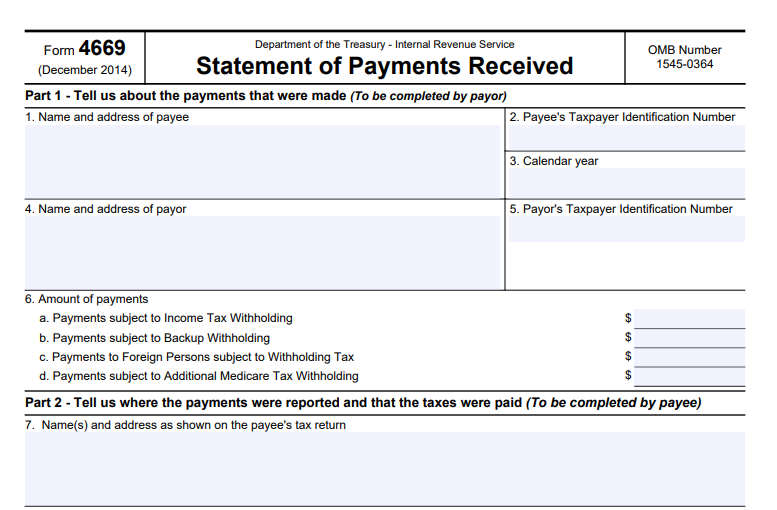
Filling out Form 4669 is straightforward but requires accuracy to avoid delays in relief processing. The form is divided into three parts.

Part 1: Payer Information (Completed by the Payer)

  • Enter the payee’s name, address, and Taxpayer Identification Number (TIN).
  • Provide the calendar year of the payments.
  • Enter the payer’s name, address, and Employer Identification Number (EIN).
  • Specify the amounts of payments subject to:
    • Line 6a: Income tax withholding.
    • Line 6b: Backup withholding.
    • Line 6c: Withholding tax on foreign persons.
    • Line 6d: Additional Medicare Tax withholding.

Part 2: Payee Certification (Completed by the Payee)

  • Review and correct Part 1 if necessary.
  • Indicate where the payments were reported on your tax return:
    • Line 7: Form number (e.g., Form 1040 series, including 1040, 1040NR, etc.).
    • Line 8a/8b: Line or schedule where payments and taxes are shown for income/backup/foreign withholding.
    • Line 9a/9b: For Additional Medicare Tax, including any exemptions.
  • Note the tax year if different from the calendar year.

Part 3: Payee Signature (Completed by the Payee)

  • Sign under penalties of perjury.
  • Print your name and title (if applicable).
  • Provide a daytime phone number and date.

Tips for Completion:

  • Use the latest version of the form (revised December 2014, still current as of 2025).
  • Do not send Form 4669 directly to the IRS; return it to the payer.
  • Retain copies for your records.
  • Estimated time to complete: About 15 minutes, including recordkeeping and preparation.

If information is missing or incorrect, the payer should return the form for corrections.

IRS Form 4669 Download and Printable

Download and Print: IRS Form 4669

Form 4669 is often paired with IRS Form 4670, which is the actual request for relief submitted by the payer to the IRS. Attach all completed Forms 4669 to Form 4670, along with any examination reports or amended returns. Submit Form 4670 to the IRS examiner if an audit is ongoing, or mail it to the appropriate IRS address based on your location.

A separate Form 4670 is needed for each tax form type and year. This process can help waive the payer’s liability but does not eliminate penalties for the failure to withhold.

Benefits of Using IRS Form 4669

  • Avoids Double Taxation: Ensures taxes are only paid once.
  • Provides Relief for Payers: Reduces financial burden from withholding errors.
  • Supports Compliance: Helps during IRS audits or assessments.
  • Cost-Effective: Prevents unnecessary payments and potential interest charges.

Common Mistakes to Avoid with IRS Form 4669

  • Not obtaining a separate form for each payee and year.
  • Incomplete or inaccurate payment amounts in Part 1.
  • Failing to specify exact lines on the tax return in Part 2.
  • Submitting directly to the IRS instead of the payer.
  • Ignoring related publications like Pub. 15 (for withholding) or Pub. 515 (for foreign payments).

FAQs About IRS Form 4669

What if the payee refuses to complete Form 4669?

The payer may still be liable for the taxes, but they can explore other evidence during an IRS examination.

Is Form 4669 required for all withholding errors?

No, only when seeking specific relief under the mentioned code sections.

Where can I download IRS Form 4669?

From the official IRS website at irs.gov/forms-pubs.

Does Form 4669 apply to misclassified workers?

Yes, it can help gather info on whether workers paid taxes on payments received.

Is there a deadline for submitting Form 4669?

It’s tied to the timing of Form 4670; submit as early as possible to avoid collection actions.

Conclusion

IRS Form 4669 is a vital tool for navigating tax withholding challenges, offering a clear path to relief for payers while ensuring payees’ compliance is recognized. By understanding its purpose and proper use, you can avoid costly mistakes and maintain good standing with the IRS. Always consult a tax professional for personalized advice, and refer to official IRS resources for the most current guidance.

For more tax-related insights, explore topics like backup withholding rules or Additional Medicare Tax requirements to stay compliant in 2025 and beyond.


IRS Form 14135 – Application for Certificate of Discharge of Property from Federal Tax Lien

IRS Form 14135 - Application for Certificate of Discharge of Property from Federal Tax Lien

IRS Form 14135 – Application for Certificate of Discharge of Property from Federal Tax Lien – If you’re dealing with a federal tax lien on your property and need to sell, refinance, or transfer it, IRS Form 14135 could be the key to removing that burden. This form, officially known as the Application for Certificate of Discharge of Property from Federal Tax Lien, allows eligible taxpayers or property owners to request the IRS to discharge a specific property from the lien under certain conditions. In this comprehensive guide, we’ll cover everything you need to know about Form 14135, including its purpose, eligibility, step-by-step filing instructions, and tips to avoid common pitfalls. Whether you’re a homeowner facing a tax debt or a third-party owner affected by someone else’s lien, understanding this process can help you navigate IRS requirements efficiently.

IRS Form 14135 - Application for Certificate of Discharge of Property from Federal Tax Lien
IRS Form 14135 – Application for Certificate of Discharge of Property from Federal Tax Lien


What Is a Federal Tax Lien?

A federal tax lien is a legal claim by the IRS against your property when you owe unpaid taxes. It’s filed publicly as a Notice of Federal Tax Lien (NFTL), alerting creditors and potential buyers to the government’s interest in your assets, including real estate, vehicles, and business equipment. This lien attaches to all your current and future property until the debt is paid in full or otherwise resolved. It can complicate property sales or loans because it prioritizes the IRS’s claim over other creditors in many cases.

What Is a Certificate of Discharge?

A Certificate of Discharge removes the federal tax lien from a specific piece of property, allowing you to sell or transfer it without the lien’s encumbrance. It’s not a full release of the lien—it only applies to the designated property, and the overall tax debt remains. The IRS issues this certificate under Internal Revenue Code (IRC) Section 6325(b) if you meet specific criteria, such as paying the government’s interest in the property or proving the lien has no value. Note that this differs from a lien release (which happens after full payment) or subordination (which allows another creditor priority).

Who Needs to File IRS Form 14135?

You should file Form 14135 if:

  • You’re the taxpayer named on the NFTL and want to discharge a property to facilitate a sale or refinance.
  • You’re a third-party owner (not liable for the tax) whose property is affected by the lien, such as in cases of tenancy by the entirety.
  • You’re selling property at a public auction or through escrow where proceeds can satisfy the IRS’s interest.
  • The remaining property subject to the lien is worth at least twice the tax liability plus senior encumbrances.

Third parties, like buyers or lenders, may also be involved in the application process. If you’re dealing with an estate tax lien under Section 6325(c), use Form 4422 instead.

Eligibility Criteria for Discharge

The IRS grants discharges based on these IRC provisions:

  • IRC 6325(b)(1): The value of your other property remaining under the lien is at least double the tax liability plus any senior encumbrances (e.g., mortgages).
  • IRC 6325(b)(2)(A): The IRS receives payment equal to its interest in the property, often from sale proceeds after senior claims.
  • IRC 6325(b)(2)(B): The government’s interest in the property is worthless (e.g., senior debts exceed the property’s value).
  • IRC 6325(b)(3): Sale proceeds are held in escrow and distributed according to priorities, with the IRS getting its share.
  • IRC 6325(b)(4): A third-party owner deposits or bonds an amount equal to the IRS’s interest and may challenge the determination in court.

For principal residences, you might qualify for relocation expense allowances if unable to pay the full amount. Eligibility requires proving the basis through appraisals, valuations, and documentation.

How to Complete IRS Form 14135 Step by Step

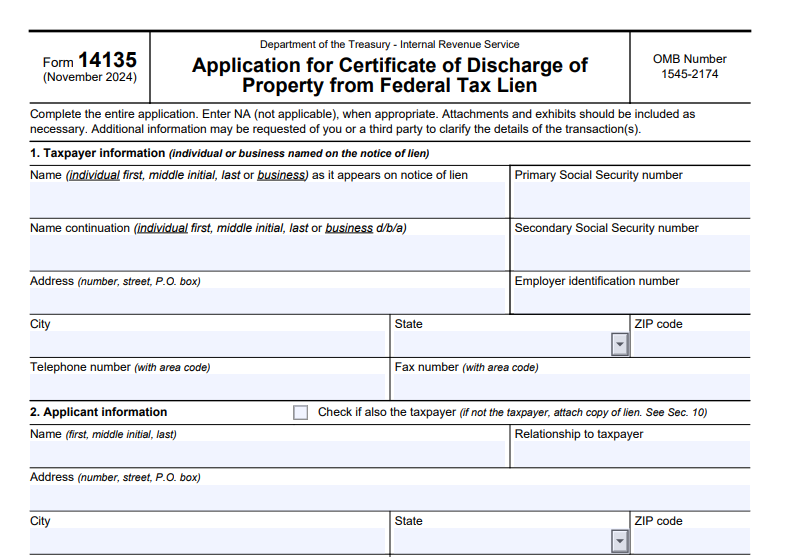
Form 14135 (revised November 2024) has 17 sections. Enter “NA” for not applicable items and attach supporting documents. Here’s a breakdown:

  • Section 1: Taxpayer Information – Provide name, address, last four digits of SSN/EIN, and contact details as they appear on the NFTL.
  • Section 2: Applicant Information – If you’re not the taxpayer, include your details and relationship; attach a copy of the lien.
  • Section 3: Purchaser/Transferee/New Owner – Detail the new owner’s info if applicable.
  • Section 4: Attorney/Representative – Include if using a rep; attach Form 2848 or 8821.
  • Section 5: Lender/Finance Company – For escrow-related applications under 6325(b)(3).
  • Section 6: Monetary Information – State proposed sale price and expected IRS proceeds.
  • Section 7: Basis for Discharge – Check the applicable IRC section.
  • Section 8: Description of Property – Give a detailed description (e.g., “3-bedroom house”) and address; attach deed/title.
  • Section 9: Appraisal and Valuations – Attach a professional appraisal plus one additional valuation (e.g., county assessment).
  • Section 10: Copy of Federal Tax Lien(s) – Attach or list serial numbers if applicant differs from taxpayer.
  • Section 11: Sales Contract – Attach or describe divestment.
  • Section 12: Title Report – Attach or list senior encumbrances.
  • Section 13: Closing Statement – Attach HUD-1 or itemize costs.
  • Section 14: Additional Information – Attach any relevant docs like affidavits.
  • Section 15: Escrow Agreement – For 6325(b)(3); attach draft.
  • Section 16: Waiver – Third parties waive certain rights if applying under 6325(b)(2).
  • Section 17: Declaration – Sign under penalties of perjury.

Always review Publication 783 for examples and detailed guidance.

Required Documents and Attachments

To avoid delays, include:

  • Copy of the NFTL (if applicant ≠ taxpayer).
  • Professional appraisal and one additional valuation.
  • Deed/title for the property (and remaining property for 6325(b)(1)).
  • Sales contract, title report, and closing statement (or equivalents).
  • Escrow agreement draft if applicable.
  • Forms 2848/8821 for representatives.

Incomplete applications may lead to requests for more info or denial.

IRS Form 14135 Download and Printable

Download and Print: IRS Form 14135

How to File Form 14135

Mail the completed form and attachments to: IRS Advisory Consolidated Receipts, 7940 Kentucky Drive, Stop 2850F, Florence, KY 41042. Submit at least 45 days before your transaction date. For questions, call 859-594-6090 or 800-913-6050 to check your balance. Do not send payments with the application—wait for IRS instructions.

Fees and Processing Time

There are no filing fees for Form 14135. Processing typically takes time for review by Advisory staff and approval by the Group Manager. For foreclosures, expect a conditional commitment letter within 30 days of a complete application. If denied, you’ll receive Form 9423 with appeal rights under the Collection Appeals Program.

Common Mistakes and Tips for Success

Avoid these pitfalls:

  • Submitting incomplete documentation, like missing appraisals or titles, which can delay or deny your request.
  • Not allowing enough time—file early to meet transaction deadlines.
  • Incorrectly selecting the basis for discharge; review IRC sections carefully.
  • Failing to verify lien details or amounts owed.

Tips:

  • Use certified mail for tracking.
  • Consult Publication 783 thoroughly.
  • If issues arise, contact the Taxpayer Advocate Service (TAS) for help, especially if facing financial hardship.
  • Pay in full if possible for a full lien release, but discharge is ideal for specific properties.

Frequently Asked Questions About IRS Form 14135

How long does it take to get a Certificate of Discharge?

Aim for at least 45 days, but it varies based on completeness and complexity.

Can I apply if I’m not the taxpayer?

Yes, third-party owners can apply, especially under 6325(b)(4), with court challenge options.

What if my application is denied?

Appeal via Form 9423; you have rights under the Taxpayer Bill of Rights.

Is there a fee to file Form 14135?

No, but you may need to pay the IRS’s interest in the property.

Where can I download Form 14135?

From the IRS website at irs.gov/forms.

Conclusion

Navigating a federal tax lien can be challenging, but IRS Form 14135 provides a structured way to discharge specific property and move forward with sales or refinances. By gathering the right documents, choosing the correct basis, and filing promptly, you increase your chances of approval. Always refer to official IRS resources for the most accurate guidance, and consider professional tax advice for complex situations. Resolving tax liens promptly can protect your credit and financial future—start by checking your lien status today.


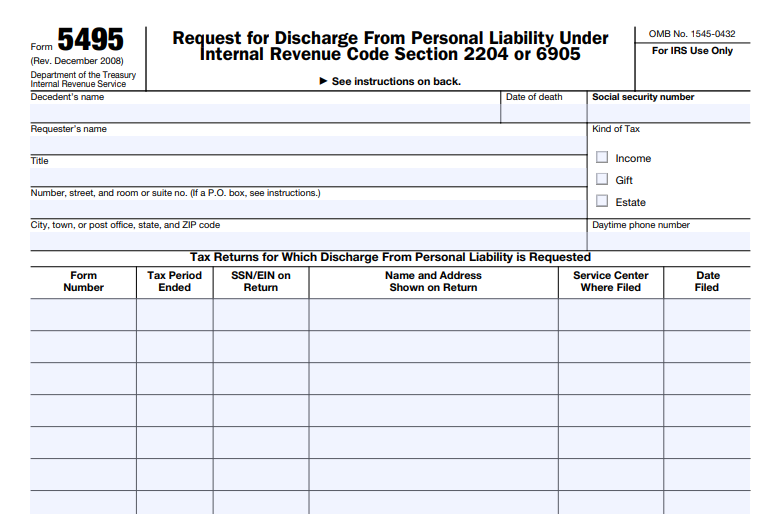
IRS Form 5495 – Request for Discharge from Personal Liability Under Internal Revenue Code Section 2204 or 6905

IRS Form 5495 - Request for Discharge from Personal Liability Under Internal Revenue Code Section 2204 or 6905

IRS Form 5495 – Request for Discharge from Personal Liability Under Internal Revenue Code Section 2204 or 6905 – In the complex world of estate and gift taxes, navigating personal liability can be daunting for executors, trustees, and other fiduciaries. IRS Form 5495, officially titled “Request for Discharge from Personal Liability Under Internal Revenue Code Section 2204 or 6905,” provides a crucial mechanism for seeking relief from such liabilities. This form allows certain individuals to request a discharge from personal responsibility for unpaid estate or gift taxes, ensuring they can distribute assets without lingering tax concerns. Whether you’re handling an estate after a loved one’s passing or managing gift tax obligations, understanding Form 5495 is essential for compliance and peace of mind.

In this comprehensive guide, we’ll break down what IRS Form 5495 is, who qualifies to file it, the filing process, and key considerations. We’ll draw from official IRS resources to ensure accuracy and timeliness as of 2025. If you’re searching for “IRS Form 5495 instructions” or “discharge from estate tax liability,” you’ve come to the right place.

IRS Form 5495 - Request for Discharge from Personal Liability Under Internal Revenue Code Section 2204 or 6905
IRS Form 5495 – Request for Discharge from Personal Liability Under Internal Revenue Code Section 2204 or 6905


What Is IRS Form 5495 and Its Purpose?

IRS Form 5495 is used to request a discharge from personal liability for estate taxes under Internal Revenue Code (IRC) Section 2204 or for gift taxes under IRC Section 6905. Essentially, it protects fiduciaries—like executors, administrators, or trustees—from being held personally accountable for any deficiencies in estate or gift tax payments after they’ve distributed the assets.

  • Under IRC Section 2204: This applies to estate taxes. It allows the executor or fiduciary to request discharge after filing the estate tax return (Form 706) and paying the reported tax. The IRS will review the request and, if approved, issue a certificate of discharge, limiting the fiduciary’s liability to the value of the property they received or distributed.
  • Under IRC Section 6905: This pertains to gift taxes. It enables the fiduciary to seek similar relief for unpaid gift taxes from a donor’s estate.

The form’s primary goal is to facilitate the timely distribution of estate assets while ensuring the IRS can still collect any owed taxes from the proper sources. According to the IRS, this process helps prevent undue delays in probate or trust administration.

Who Can File IRS Form 5495?

Not everyone involved in an estate or gift tax situation can file Form 5495. Eligibility is specific to roles and circumstances:

  • Executors and Administrators: Those appointed to manage a decedent’s estate under IRC Section 2204.
  • Trustees and Fiduciaries: Individuals or entities responsible for trusts or other assets subject to estate or gift taxes.
  • Transferees or Donees: In some cases, recipients of gifts or estate property who might face transferee liability under IRC Section 6905.

To qualify, you must have filed the relevant tax return (e.g., Form 706 for estates or Form 709 for gifts) and paid the tax shown as due. The request must be made within the specified time frames—typically within 18 months after the tax becomes due or after payment, whichever is later.

If you’re unsure about your eligibility, consult a tax professional or review the IRS instructions for Form 5495, which provide detailed examples.

Step-by-Step Guide: How to File IRS Form 5495

Filing IRS Form 5495 requires careful preparation to avoid delays or denials. Here’s a streamlined process based on current IRS guidelines:

  1. Gather Required Information: Collect details from the estate or gift tax return, including the decedent’s or donor’s name, Social Security Number (SSN), date of death or gift, and the amount of tax paid.
  2. Complete the Form:
    • Part I: Identify the requester and the type of discharge (Section 2204 or 6905).
    • Part II: Provide details about the estate or gift, including tax return filing dates and payments.
    • Part III: List any distributed property and its value.
    • Sign and date the form under penalty of perjury.
  3. Attach Supporting Documents: Include copies of the tax return, proof of payment, and any relevant fiduciary appointment documents (e.g., letters testamentary).
  4. Submit the Form: Mail it to the IRS address specified in the instructions—typically the service center where the original tax return was filed. Electronic filing is not currently available for Form 5495.
  5. Wait for IRS Response: The IRS generally processes these requests within 6-9 months. If approved, you’ll receive a certificate of discharge. If additional taxes are assessed, the fiduciary may still be liable up to the distributed amount.

Key Considerations and Common Mistakes to Avoid

While Form 5495 offers significant protections, there are pitfalls to watch for:

  • Timing Is Critical: Requests must be timely; late filings may result in automatic denial.
  • Incomplete Information: Failing to provide full details about distributed assets can lead to rejections.
  • Transferee Liability: Even with discharge, beneficiaries might still face liability if taxes remain unpaid.
  • Amended Returns: If you amend the original tax return after filing Form 5495, you may need to submit a new request.

Recent updates as of 2025 include clarifications on digital asset reporting in estates, which could impact Form 5495 filings involving cryptocurrencies or NFTs. Always check the latest IRS publications for changes.

IRS Form 5495 Download and Printable

Download and Print: IRS Form 5495

Frequently Asked Questions About IRS Form 5495

What happens if my Form 5495 request is denied?

If denied, you remain personally liable. You can appeal or provide additional information to the IRS.

Is there a fee for filing Form 5495?

No, there is no filing fee, but professional tax advice may incur costs.

Can I file Form 5495 for multiple estates?

Yes, but submit separate forms for each estate or gift tax situation.

Where can I download IRS Form 5495?

Visit the official IRS website to download the latest version of the form and instructions.

Conclusion: Secure Your Peace of Mind with IRS Form 5495

Handling estate or gift taxes doesn’t have to leave you exposed to personal liability. By properly using IRS Form 5495, you can request discharge under IRC Sections 2204 or 6905, allowing for efficient asset distribution. Stay compliant by relying on official IRS resources and consulting experts when needed. For more on “estate tax discharge” or related forms like Form 706, explore additional IRS guides.

This article is for informational purposes only and not tax advice. For personalized guidance, contact a qualified tax professional or the IRS directly.


IRS Form 8023 – Elections Under Section 338 for Corporations Making Qualified Stock Purchases

IRS Form 8023 - Elections Under Section 338 for Corporations Making Qualified Stock Purchases

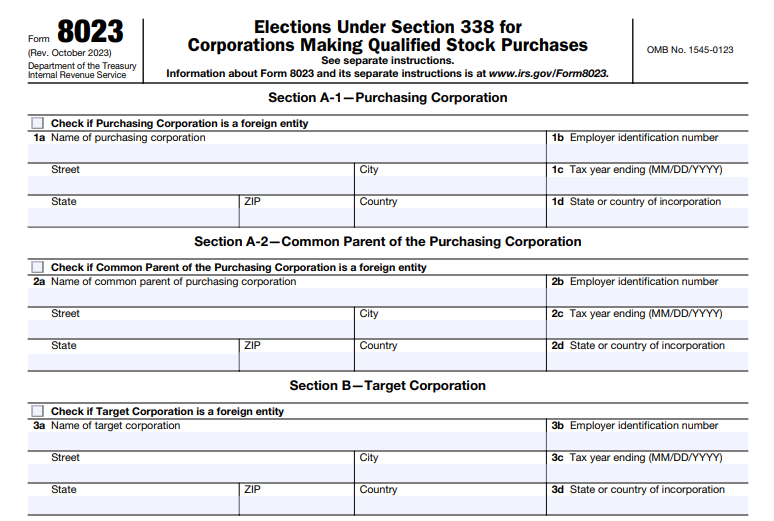
IRS Form 8023 – Elections Under Section 338 for Corporations Making Qualified Stock Purchases – In the complex world of corporate acquisitions, understanding tax elections can significantly impact your bottom line. IRS Form 8023 plays a crucial role in allowing corporations to make elections under Section 338 of the Internal Revenue Code following a qualified stock purchase (QSP). This election can transform a stock acquisition into a deemed asset sale, offering potential tax advantages like basis step-ups for depreciation and amortization. Whether you’re a purchasing corporation, tax professional, or business owner, this guide breaks down everything you need to know about Form 8023, including filing requirements, benefits, and recent updates as of 2025.

IRS Form 8023 - Elections Under Section 338 for Corporations Making Qualified Stock Purchases
IRS Form 8023 – Elections Under Section 338 for Corporations Making Qualified Stock Purchases


What Is IRS Form 8023?

IRS Form 8023, titled “Elections Under Section 338 for Corporations Making Qualified Stock Purchases,” is the official document used by purchasing corporations to elect special tax treatment for acquisitions. It enables the recharacterization of a stock purchase as an asset acquisition for federal income tax purposes. This form is essential when a corporation acquires control of another through a QSP, allowing the target company to be treated as if it sold its assets at fair market value.

The form was last revised in October 2023, with updates incorporating 2D barcode technology for faster processing and minor redesigns to improve digital intake. As of January 2025, no major legislative changes have been noted, but always check IRS.gov for the latest developments.

Understanding Section 338 Elections

Section 338 of the Internal Revenue Code permits certain stock purchases to be treated as asset acquisitions. There are two primary types of elections:

Section 338(g) Election

This election treats the target corporation as selling all its assets to a “new” target on the acquisition date, with the “old” target recognizing any gain or loss. The purchaser benefits from a stepped-up basis in the assets, which can lead to higher deductions for depreciation and amortization.

Section 338(h)(10) Election

Available only in specific scenarios, such as when the target is part of a selling consolidated group, an affiliate, or an S corporation, this joint election treats the transaction as an asset sale followed by a liquidation. The tax burden often shifts to the sellers, and it’s particularly useful for S corporations where all shareholders must consent.

A key requirement is that the election must follow a QSP, and for foreign targets like controlled foreign corporations (CFCs), additional notices to U.S. shareholders are mandatory to validate the election.

What Is a Qualified Stock Purchase (QSP)?

A QSP is the foundation for a Section 338 election. It occurs when a purchasing corporation acquires at least 80% of the target’s voting power and 80% of the value of its stock within a 12-month acquisition period. Preferred stock under Section 1504(a)(4) is excluded from these calculations. The acquisition date is the first day these thresholds are met, not necessarily the closing date.

Key QSP Elements Description
Voting Power Threshold At least 80%
Value Threshold At least 80%
Time Frame Within 12 months
Exclusions Certain preferred stock

Track step acquisitions, options, and affiliated purchases carefully, as they can affect eligibility.

IRS Form 8023 Download and Printable

Download and Print: IRS Form 8023

Who Must File Form 8023?

Typically, the purchasing corporation files Form 8023. For a Section 338(h)(10) election, it’s a joint filing requiring signatures from both the purchaser and the seller (e.g., the common parent of the selling group or all S corporation shareholders). In cases involving foreign purchasing corporations not filing U.S. returns, U.S. shareholders may make the election.

If multiple targets share the same acquisition date and affiliation, one form can cover them with attached schedules. Related forms include:

  • Form 8883: For asset allocation under Section 338 or 1060.
  • Form 5471: For foreign corporations.

How to File IRS Form 8023: Step-by-Step Instructions

Filing Form 8023 involves detailed information about the parties involved. Here’s a breakdown:

  1. Gather Details: Include EINs, tax year endings, countries of incorporation, and acquisition dates for the purchasing corporation, target, and any common parents or shareholders.
  2. Complete Sections:
    • Section A: Purchasing corporation and its common parent.
    • Section B: Target corporation.
    • Section C: Selling group, affiliate, or shareholders.
    • Section D: Acquisition details.
    • Section E: Specify the election type (338(g), 338(h)(10), or gain recognition).
  3. Attach Schedules: For multiple purchasers, targets, or signatures.
  4. Sign Under Penalties of Perjury: All required parties must sign, with attachments for multiples.
  5. Submit: Electronically fax to 844-253-9765 (with cover sheet) or mail to IRS in Ogden, UT.

Coordinate with Form 8883 for purchase price allocation using the residual method across asset classes (I-VII).

Deadlines and Penalties for Form 8023

File by the 15th day of the 9th month after the acquisition date. Late filings may qualify for automatic extensions or relief under Section 301.9100-3 if good faith is shown, but penalties and interest could apply. Recent IRS guidance emphasizes strict deadlines, and failures like untimely notices to U.S. shareholders can invalidate elections.

Benefits and Tax Implications of a Section 338 Election

Benefits

  • Basis Step-Up: Purchasers get fair market value basis in assets, boosting deductions.
  • Tax Shift: In 338(h)(10), sellers bear the gain recognition, often preferable for buyers.
  • Simplification: Maintains stock purchase legally while achieving asset treatment tax-wise.

Tax Implications

  • Gains/Losses: Target recognizes gains on deemed sale, potentially triggering recapture or ordinary income.
  • State Variations: Not all states conform to federal treatment.
  • Anti-Churning Rules: May limit amortization for pre-1993 intangibles.
  • Cross-Border: Interacts with GILTI, Subpart F, and foreign credits.

Special Considerations for 2025

As of December 2025, a recent IRS private letter ruling (PLR 202550011) highlights the importance of timely notices for foreign targets, granting extensions in good-faith cases. No broad changes to Section 338 have been enacted, but digital enhancements to Form 8023 improve processing. For S corporations or consolidated groups, early consent gathering is key to avoid pitfalls.

Conclusion: Navigating Form 8023 Successfully

Mastering IRS Form 8023 and Section 338 elections can optimize tax outcomes in corporate deals. Consult trusted sources like the IRS website and professional advisors to ensure compliance. By understanding QSP requirements, filing deadlines, and strategic benefits, you can make informed decisions that align with your business goals in 2025 and beyond. For the most current information, visit IRS.gov/Form8023.


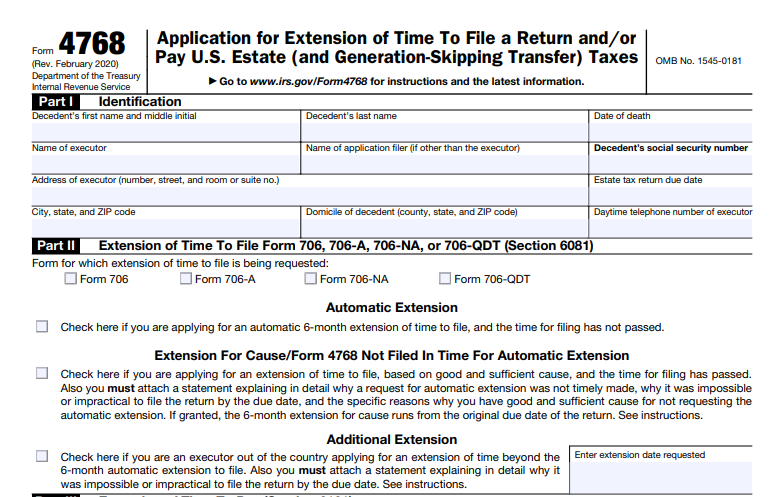
IRS Form 4768 – Application for Extension of Time To File a Return and/or Pay U.S. Estate (and Generation-Skipping Transfer) Taxes

IRS Form 4768 - Application for Extension of Time To File a Return and/or Pay U.S. Estate (and Generation-Skipping Transfer) Taxes

IRS Form 4768 – Application for Extension of Time To File a Return and/or Pay U.S. Estate (and Generation-Skipping Transfer) Taxes – In the complex world of estate planning and tax obligations, dealing with U.S. estate taxes and generation-skipping transfer (GST) taxes can be overwhelming, especially during a time of loss. IRS Form 4768 serves as a crucial tool for executors, trustees, and qualified heirs seeking additional time to file returns or pay taxes. This comprehensive guide explores everything you need to know about Form 4768, including its purpose, eligibility, filing process, and deadlines. Whether you’re an executor managing an estate or a tax professional assisting clients, understanding this form can help avoid penalties and ensure compliance with IRS regulations.

IRS Form 4768 - Application for Extension of Time To File a Return and/or Pay U.S. Estate (and Generation-Skipping Transfer) Taxes
IRS Form 4768 – Application for Extension of Time To File a Return and/or Pay U.S. Estate (and Generation-Skipping Transfer) Taxes


What Is IRS Form 4768?

IRS Form 4768, officially titled “Application for Extension of Time To File a Return and/or Pay U.S. Estate (and Generation-Skipping Transfer) Taxes,” allows individuals to request extensions for specific estate-related tax forms. It primarily applies to extensions for filing or paying taxes associated with:

  • Form 706: United States Estate (and Generation-Skipping Transfer) Tax Return
  • Form 706-A: United States Additional Estate Tax Return
  • Form 706-NA: United States Estate (and Generation-Skipping Transfer) Tax Return for nonresident non-citizens
  • Form 706-QDT: United States Estate Tax Return for Qualified Domestic Trusts

The form is divided into parts for different types of extensions: Part II for filing extensions under Section 6081, and Part III for payment extensions under Section 6161. Note that Form 4768 does not apply to extensions for Form 706-GS(T) or Form 706-GS(D); those require Form 7004 instead.

As of 2025, there are no significant legislative changes affecting Form 4768, but always check the IRS website for the latest revisions. The current version was last updated in February 2020, with the about page reviewed in January 2025.

Who Needs to File Form 4768?

Form 4768 is typically filed by:

  • Executors of estates required to submit Form 706 or Form 706-NA
  • Qualified heirs filing Form 706-A
  • Trustees or designated filers for Form 706-QDT

If multiple executors are involved, only one needs to sign the form. Authorized representatives, such as attorneys or CPAs, can also file on behalf of the estate with a valid power of attorney.

You should consider filing if you anticipate needing more time due to complexities like asset valuation, litigation, or international elements. For instance, estates with assets in multiple jurisdictions or those involving future payment rights (e.g., annuities) often qualify for extensions based on reasonable cause.

Key Deadlines for IRS Form 4768

Timing is critical when dealing with estate taxes. Here’s a breakdown of standard due dates and extension timelines:

Form Original Due Date Automatic Extension Period
Form 706 / 706-NA 9 months after decedent’s death 6 months
Form 706-A 6 months after taxable disposition or cessation of qualified use 6 months
Form 706-QDT April 15 of the year following a taxable event (or 9 months after surviving spouse’s death) 6 months
  • Automatic Filing Extension: File Form 4768 by the original due date of the return to get an automatic 6-month extension. No explanation is required unless you’re outside the U.S.
  • Extension for Cause: If you miss the automatic extension deadline, you can still apply within 6 months of the original due date by providing a detailed explanation of good cause.
  • Additional Extensions: Available only for executors outside the country, these can extend beyond the initial 6 months but require a separate Form 4768 and justification.
  • Payment Extensions: Initial requests cannot exceed 12 months, with possible annual renewals up to 10 years for reasonable cause. File as early as possible, ideally by the tax due date.

If the due date falls on a weekend or holiday, it shifts to the next business day. For 2025 filings, confirm any adjustments via the IRS website.

How to Complete and File IRS Form 4768

Filling out Form 4768 requires careful attention to detail. Download the latest PDF from the IRS website. Here’s a step-by-step overview:

  1. Part I: Identification: Enter the decedent’s name, Social Security Number (SSN), date of death, and details about the executor or filer.
  2. Part II: Filing Extension: Check the box for automatic, for-cause, or additional extension. For non-automatic requests, attach a written statement explaining the need.
  3. Part III: Payment Extension: Specify the requested extension date and complete Part IV, which includes tax estimates, cash shortages, and payment plans. Attach supporting documentation for reasonable cause.
  4. Signatures: Sign and date the form. Include contact information.

Filing Methods:

  • Mail to: Internal Revenue Service Center, Attn: Estate & Gift, Stop 824G, 7940 Kentucky Drive, Florence, KY 41042-2915.
  • Use certified mail or private delivery services for proof of timely filing.
  • Electronic filing is not available for Form 4768.

If an extension is granted for payment, the IRS will respond with Form 4768-A. Pay any taxes due with interest, and consider furnishing a bond if required.

Automatic vs. Additional Extensions: What’s the Difference?

  • Automatic Extensions: Simple and straightforward—file on time for a no-questions-asked 6-month delay in filing. This does not extend payment deadlines.
  • Additional or For-Cause Extensions: These require justification, such as impracticality due to asset liquidity issues or being out of the country. They can provide more time but are discretionary and reviewed by the IRS.

Remember, separate forms may be needed for different extensions or amended returns.

IRS Form 4768 Download and Printable

Download and Print: IRS Form 4768

Extensions for Payment: Handling Tax Liabilities

If you can’t pay the full tax by the due date, use Part III to request relief. Provide evidence of reasonable cause, like insufficient liquid assets or ongoing litigation. Pay as much as possible upfront to minimize interest. Extensions are granted in 12-month increments, with a cap of 10 years for estates.

For closely held businesses, consider elections under Section 6166 for deferred payments, but note that payments designated for this are non-refundable if liability persists.

Interest, Penalties, and Common Pitfalls

Even with an extension, interest accrues on unpaid taxes from the original due date. Failure to file or pay within the extended period can trigger penalties. To avoid issues:

  • File early and accurately.
  • If no return is ultimately required (e.g., estate value below thresholds), notify the IRS with a letter including probate details.
  • Consult a tax professional for complex estates.

Frequently Asked Questions About IRS Form 4768

Can I get an extension if I’m outside the U.S.?

Yes, additional extensions are specifically available for executors abroad, provided you explain the impracticality of timely filing.

Does Form 4768 extend both filing and payment?

No—filing and payment extensions are separate. You must request each individually.

What if my extension request is denied?

For payment extensions, appeal within 10 days using the instructions on Form 4768-A.

Are there state-specific requirements?

Some states, like the District of Columbia, require attaching Form 4768 to their estate tax forms. Check local rules.

How do I know if my estate needs Form 706?

If the gross estate exceeds the federal exemption (adjusted annually; check IRS for 2025 amounts), filing is required.

Final Thoughts on Managing Estate Tax Extensions

Navigating IRS Form 4768 can provide much-needed breathing room during estate administration. By understanding the form’s requirements and deadlines, you can ensure a smoother process and avoid costly errors. Always use the most current IRS resources and consider professional advice for personalized guidance. For the latest forms and instructions, visit the official IRS website.


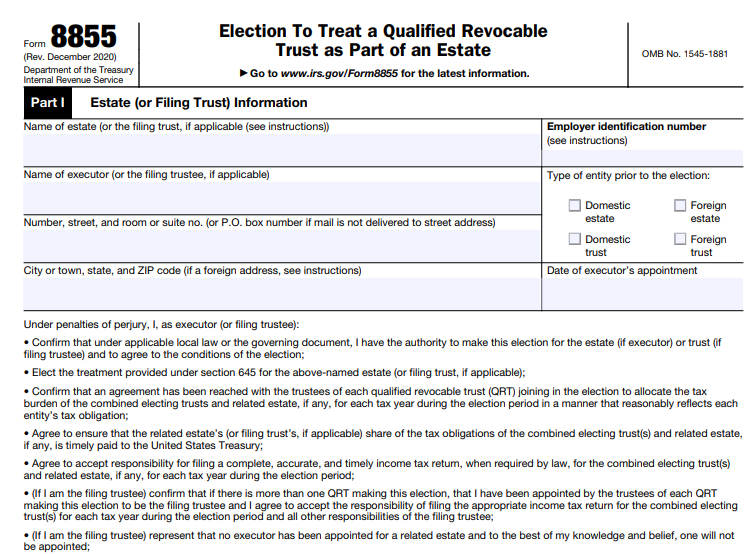
IRS Form 8855 – Election to Treat a Qualified Revocable Trust as Part of an Estate

IRS Form 8855 - Election to Treat a Qualified Revocable Trust as Part of an Estate

IRS Form 8855 – Election to Treat a Qualified Revocable Trust as Part of an Estate – In estate planning, navigating tax implications after a loved one’s passing can be complex. One valuable tool for simplifying this process is IRS Form 8855, which allows for the Section 645 election. This election treats a qualified revocable trust (QRT) as part of the decedent’s estate for federal income tax purposes, potentially streamlining reporting and offering tax advantages. If you’re an executor, trustee, or involved in estate administration, understanding Form 8855 is essential for optimizing tax outcomes.

IRS Form 8855 - Election to Treat a Qualified Revocable Trust as Part of an Estate
IRS Form 8855 – Election to Treat a Qualified Revocable Trust as Part of an Estate


What Is a Qualified Revocable Trust (QRT)?

A QRT is a trust that the decedent (grantor) could revoke or modify during their lifetime without needing approval from an adverse party. Typically, this includes revocable living trusts used in estate planning to avoid probate. Upon the grantor’s death, the trust becomes irrevocable, but under Section 645 of the Internal Revenue Code, it can be elected to be treated as part of the estate. To qualify, the trust must have been owned by the decedent under IRC Section 676 due to their revocation power.

Purpose of IRS Form 8855 and the Section 645 Election

Form 8855 is the official document used to make the Section 645 election, enabling the QRT to be taxed as part of the related estate rather than as a separate entity. This combines the trust and estate for income tax reporting, meaning only one Form 1041 (U.S. Income Tax Return for Estates and Trusts) needs to be filed instead of separate returns. The election applies during a specified period and helps manage assets like S corporation stock or charitable contributions more efficiently.

Who Can Make the Election?

The election is made jointly by the trustee(s) of the QRT and the executor of the estate, if one exists. If no executor is appointed (e.g., no probate estate), the trustee(s) can make the election alone. For multiple QRTs, all must participate, and one may be designated as the “filing trust.” Each QRT requires a new Employer Identification Number (EIN) after the decedent’s death.

Benefits of Making the Section 645 Election

Opting for this election offers several advantages:

  • Simplified Tax Filing: Combines reporting into a single Form 1041, reducing administrative burdens and costs.
  • Fiscal Year Flexibility: Allows the trust to adopt the estate’s fiscal year instead of a mandatory calendar year, potentially deferring income taxes.
  • Charitable Deductions: Enables deductions for amounts set aside for charities, not just those paid out.
  • S Corporation Stock Holding: Permits the trust to hold S corp shares without needing a Qualified Subchapter S Trust (QSST) or Electing Small Business Trust (ESBT) election during the period.
  • Estimated Tax Relief: Exempts the combined entity from estimated tax payments for up to two years post-death.
  • Passive Loss Rules: Waives the active participation requirement for passive activity losses under Section 469 for two years.
  • Higher Exemption: Provides a $600 personal exemption (estate level) versus $100–$300 for trusts.

These benefits are particularly useful in volatile markets or when managing complex estates.

IRS Form 8855 Download and Printable

Download and Print: IRS Form 8855

How to File IRS Form 8855

To complete Form 8855:

  1. Download the form from the IRS website.
  2. Fill in Part I with details about the electing trust and estate (names, EINs, addresses).
  3. If an executor exists, they complete Part II; trustees handle Part III.
  4. Sign and date the form—only one signature per role is typically needed unless required otherwise.
  5. Mail to the appropriate IRS center based on your state (e.g., Kansas City, MO, for eastern states; Ogden, UT, for western states).

Attach it to the initial Form 1041 if filing one. If an executor is appointed later, file a revised Form 8855 within 90 days.

Filing Deadlines for Form 8855

The form must be filed by the due date (including extensions) of the estate’s or QRT’s first Form 1041. Use Form 7004 for a 5.5-month extension. If no Form 706 (estate tax return) is required, the election period ends two years after death; if filed, it extends to six months after final estate tax determination or two years, whichever is later.

Irrevocability and Termination of the Election

Once made, the election is irrevocable. It terminates upon full asset distribution or at the end of the election period. After termination, the trust reverts to separate reporting on a calendar-year basis.

When Should You Consider the Section 645 Election?

This election is ideal for estates with S corp holdings, charitable intentions, or multiple trusts. It’s especially beneficial during economic downturns for better cash flow management. However, evaluate if the trust qualifies and consider the irrevocable nature—consult a tax professional to tailor it to your situation.

Conclusion

IRS Form 8855 and the Section 645 election provide a strategic way to simplify tax compliance and maximize benefits in estate administration. By treating a QRT as part of the estate, you can reduce paperwork, defer taxes, and access deductions that might otherwise be unavailable. Always use current IRS guidance and seek expert advice for your specific circumstances.

Frequently Asked Questions (FAQs)

What happens if I miss the filing deadline for Form 8855?

The election cannot be made late, so it’s critical to file by the Form 1041 due date (with extensions).

Can multiple trusts make the election together?

Yes, all QRTs related to the estate can join, with one designated as the filing trust.

Is the election available for foreign trusts?

It can apply, but reporting requirements may vary, such as using Form 1040-NR for foreign estates.

What if there’s no estate executor?

The trustee(s) can make the election independently.