Table of Contents
IRS Form 1099-QA – Distributions From ABLE Accounts – If you’re a designated beneficiary of an Achieving a Better Life Experience (ABLE) account or a family member managing one, navigating tax reporting can feel overwhelming. Enter IRS Form 1099-QA—your key document for tracking distributions from these tax-advantaged savings accounts designed for people with disabilities. In this comprehensive guide, we’ll break down everything you need to know about Form 1099-QA, from its purpose and filing requirements to tax implications and 2025 updates. Whether you’re filing taxes for the first time or optimizing your ABLE strategy, this article will help you stay compliant and maximize benefits.
What Are ABLE Accounts? A Quick Overview
ABLE accounts, established under the ABLE Act of 2014, are state-sponsored savings plans (classified as 529A accounts) that allow individuals with disabilities and their families to save for qualified disability expenses without jeopardizing eligibility for means-tested government benefits like Supplemental Security Income (SSI) or Medicaid. These accounts function similarly to 529 college savings plans but focus on disability-related costs, such as housing, transportation, education, healthcare, and assistive technology.
Eligibility for ABLE Accounts
To open an ABLE account, the designated beneficiary must meet specific criteria:
- Age of Onset: The disability must have occurred before the age of 26.
- Certification: A physician or other qualified professional must certify the disability, confirming it substantially limits one or more major life activities.
- One Account Per Person: Only one ABLE account is allowed per eligible individual, though rollovers from 529 plans are permitted under certain conditions.
Contributions are tax-deductible in some states, and earnings grow tax-free. The big perk? Distributions used for qualified disability expenses are entirely tax-free, making ABLE accounts a powerful tool for financial independence.
Who Files and Receives IRS Form 1099-QA?
Form 1099-QA is an information return used specifically to report distributions from ABLE accounts. It’s not filed by individuals but by the state agency, instrumentality, or contractor that administers the qualified ABLE program. These entities must submit the form to the IRS for every ABLE account that experiences a distribution or termination during the calendar year.
As the recipient, you’ll get a copy of Form 1099-QA by January 31 of the following year (e.g., January 31, 2026, for 2025 distributions). It’s typically mailed or available through your state’s ABLE program portal. Designated beneficiaries receive it for standard distributions, while contributors might get one if excess contributions are returned. Note: No form is issued for mere name changes if the new beneficiary is an eligible family member.
Key Information Reported on IRS Form 1099-QA
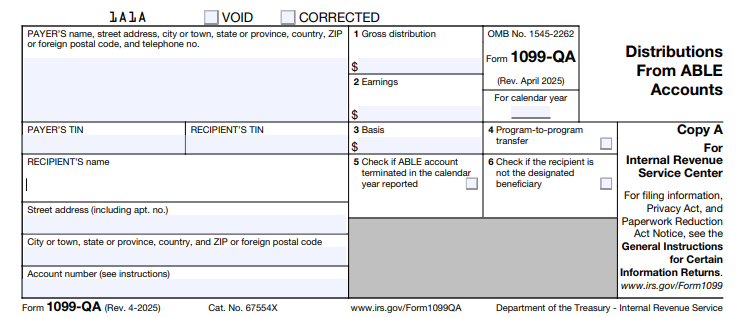
Form 1099-QA captures essential details to help the IRS and taxpayers track ABLE activity. It includes payer and recipient info, account numbers, and four main data boxes plus checkboxes for special circumstances.
Box-by-Box Breakdown of Form 1099-QA
Here’s a clear guide to what each box means:
- Box 1: Gross Distribution
This shows the total amount distributed from the ABLE account in the tax year, including rollovers (unless they’re direct program-to-program transfers). For returned excess contributions, it includes the contribution plus any earnings. - Box 2: Earnings
The portion of the distribution attributable to investment growth. This amount is generally taxable as ordinary income unless the distribution qualifies as tax-free (e.g., used for qualified expenses or rolled over). - Box 3: Basis
Represents the return of your original contributions (nontaxable). Calculate it as Box 1 minus Box 2. This is crucial for determining how much of your withdrawal is tax-free. - Box 4: Program-to-Program Transfer
A checkbox indicating if the distribution was a direct transfer to another ABLE account. These aren’t taxable and don’t count toward your annual limits. - Box 5: ABLE Account Terminated
Checked if the account was closed during the year, triggering a full distribution report. - Box 6: Distribution to Other Than Designated Beneficiary
Marked for distributions like returned excess contributions to a contributor, not the beneficiary.
Payers must use the state’s Employer Identification Number (EIN) and include the program’s name if applicable. Recipients’ Social Security Numbers (SSNs) or Individual Taxpayer Identification Numbers (ITINs) are truncated on statements for privacy but fully reported to the IRS.
Tax Implications of ABLE Account Distributions
The beauty of ABLE accounts lies in their tax treatment: Contributions are made with after-tax dollars, earnings grow tax-deferred, and qualified distributions are tax-free. However, Form 1099-QA helps the IRS verify compliance.
- Qualified Distributions: If funds go toward disability expenses (e.g., medical care, education, or employment support), the entire amount—including earnings—is nontaxable. No penalty applies.
- Non-Qualified Distributions: Earnings (Box 2) are taxed as ordinary income, plus a 10% additional tax on those earnings (similar to early 529 withdrawals). Basis (Box 3) remains nontaxable.
- Rollovers: You can roll over up to the full distribution to another ABLE account within 60 days, but only once per 12-month period per beneficiary. Report the rollover on your return but exclude it from taxable income.
- Returned Excess Contributions: If contributions exceed limits, the excess plus earnings must be returned by your tax filing deadline (including extensions) to avoid a 6% excise tax. This is reported on Form 1099-QA, and earnings are taxable.
Pro tip: Track expenses meticulously with receipts to substantiate qualified use during an audit.
How to Report Form 1099-QA on Your Tax Return
Reporting is straightforward but requires attention to detail. Use the information from your 1099-QA to complete your Form 1040.
- Enter on Form 1040: Report the taxable portion (Box 2 earnings, minus any rollovers) on Line 8z of Schedule 1 (Additional Income and Adjustments to Income) as “Other income.” Describe it as “ABLE account earnings.”
- Calculate the 10% Penalty: If non-qualified, compute the penalty on Form 5329 (Additional Taxes on Qualified Plans) and add it to your tax owed.
- Claim the Saver’s Credit: Eligible beneficiaries can claim a non-refundable credit (up to 50% of contributions, max $2,000) on Form 8880 if income qualifies.
- State Taxes: Check your state’s rules—some offer deductions for contributions.
E-filing software like TurboTax or H&R Block often imports 1099-QA data directly. Always double-check against your records.
IRS Form 1099-QA Download and Printable
Download and Print: IRS Form 1099-QA
Common Mistakes to Avoid When Handling Form 1099-QA
Even seasoned taxpayers slip up. Here’s how to steer clear:
- Ignoring the Form: Not reporting Box 2 earnings can trigger IRS notices and penalties.
- Misclassifying Distributions: Assuming all withdrawals are qualified without documentation—keep logs!
- Missing Rollovers: Forgetting to exclude rolled-over amounts leads to unnecessary taxes.
- Overlooking Excess Returns: Delaying returns past deadlines incurs excise taxes.
- TIN Errors: Ensure your SSN/ITIN matches IRS records to avoid backup withholding.
Consult a tax professional if your situation involves rollovers from 529 plans or employment contributions.
Recent Changes for 2025: What ABLE Users Need to Know
The IRS keeps ABLE rules evolving to support beneficiaries. Key 2025 updates include:
- Contribution Limits: Base limit rises to $19,000 annually. Employed beneficiaries without certain retirement plan contributions can add up to $15,060 (continental U.S. poverty line) or more in Alaska/Hawaii.
- E-Filing Threshold: Now just 10 returns for payers (down from 250), streamlining compliance.
- Online Fillable Forms: Enhanced PDF tools for easier preparation.
No major form redesigns, but always download the latest from IRS.gov.
Frequently Asked Questions (FAQs) About IRS Form 1099-QA and ABLE Accounts
Q: Do I need to file Form 1099-QA myself?
A: No—the ABLE program files it with the IRS and sends you a copy. You use it to report on your personal return.
Q: What if I don’t receive my 1099-QA by January 31?
A: Contact your state ABLE administrator immediately. The IRS gets a copy, so delays could complicate your filing.
Q: Are ABLE distributions subject to the Net Investment Income Tax?
A: Generally no, as they’re not considered investment income if qualified.
Q: Can family members contribute to my ABLE account?
A: Yes, up to the annual limit, and it counts toward gift tax exclusions.
Q: How does Form 1099-QA differ from Form 1099-Q?
A: 1099-Q is for 529 education plans; 1099-QA is ABLE-specific.
For more FAQs, visit the IRS ABLE page.
Final Thoughts: Empower Your Financial Future with ABLE Accounts
IRS Form 1099-QA might seem like just another tax form, but it’s a gateway to tax-free savings that promote independence for people with disabilities. By understanding distributions, staying on top of reporting, and leveraging 2025’s updated limits, you can make the most of your ABLE account. Remember, tax laws change—bookmark IRS.gov for the latest. If in doubt, a certified tax advisor or enrolled agent can provide personalized guidance.
Ready to open or optimize an ABLE account? Check your state’s program today and start saving smarter.
This article is for informational purposes only and not tax advice. Consult a professional for your situation.