Table of Contents
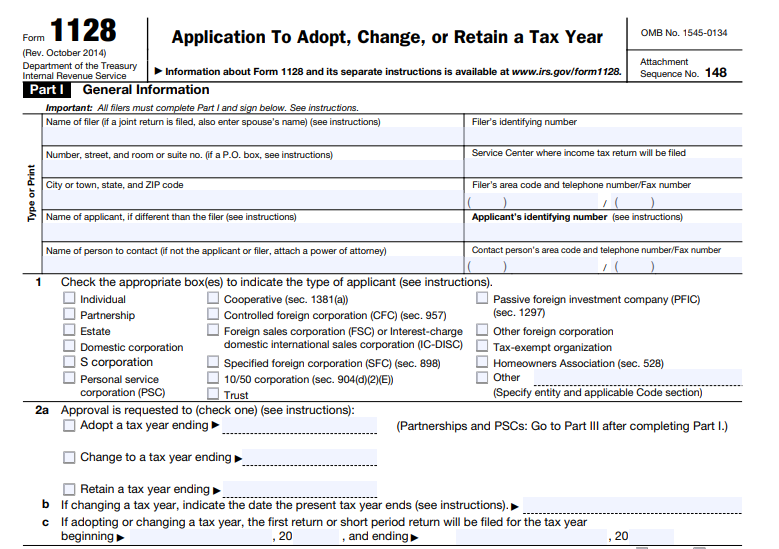
IRS Form 1128 – Application to Adopt, Change or Retain a Tax Year – Businesses, partnerships, S corporations, personal service corporations (PSCs), trusts, and certain tax-exempt organizations often need to align their tax year with operational or financial needs. IRS Form 1128, Application to Adopt, Change, or Retain a Tax Year, is the official document required to request IRS approval for such changes under Internal Revenue Code (IRC) Section 442.
As of December 2025, the latest version of Form 1128 remains the October 2014 revision, with instructions from November 2017. No major updates to the form or core procedures have been announced for 2025, though specific revenue procedures govern automatic approvals.
What Is IRS Form 1128?
Form 1128 allows taxpayers to request permission to:
- Adopt a new tax year (e.g., for a newly formed entity).
- Change an existing tax year (e.g., from fiscal to calendar year).
- Retain a non-required tax year.
Most entities default to a calendar year (January 1–December 31), but partnerships, S corporations, and PSCs have “required” tax years based on ownership or business purpose. Changing without approval can lead to compliance issues, penalties, or disallowed deductions.
According to the IRS, partnerships, S corporations, PSCs, and trusts “may be required to file Form 1128 to adopt or retain a certain tax year.”
Who Needs to File Form 1128?
Common filers include:
- Corporations (other than S corps or PSCs) seeking a change.
- Partnerships not meeting required year rules.
- S Corporations changing to or retaining a non-permitted year.
- Personal Service Corporations (PSCs).
- Trusts and estates.
- Tax-exempt organizations changing periods after prior changes.
- Controlled Foreign Corporations (CFCs) or similar entities (filed by controlling shareholders).
Exceptions: New corporations adopting their first tax year generally do not need to file. Sole proprietorships and single-member LLCs typically follow the owner’s calendar year without filing.
Automatic Approval vs. Ruling Request
Many changes qualify for automatic approval under revenue procedures like Rev. Proc. 2006-45 (corporations), Rev. Proc. 2006-46 (partnerships/S corps/PSCs), and Rev. Proc. 2002-39 (natural business year). These require completing Parts I and II of Form 1128.
- No user fee required for automatic approvals.
- Common automatic scenarios: Changing to a natural business year (25% gross receipts test) or aligning with majority ownership.
If automatic rules do not apply (e.g., business purpose demonstration needed), complete Part III for a ruling request. This may require a user fee (check current Rev. Proc. for amounts, typically thousands for non-automatic).
Filing Deadlines for 2025
File Form 1128 by the due date (excluding extensions) of the income tax return for the first effective year (the short period or new year).
- Do not file earlier than the day after the short period ends.
- Late filings (over 90 days past due) are rarely approved without compelling reasons.
Example: Changing to a calendar year ending December 31, 2025, requires filing by the due date of the 2025 return (e.g., March 15, 2026, for corporations).
IRS Form 1128 Download and Printable
Download and Print: IRS Form 1128
How to File Form 1128 in 2025
- Download the Form: Available on IRS.gov (search “Form 1128”).
- Complete Relevant Parts:
- Part I: General information.
- Part II: Automatic approval (most common).
- Part III: Ruling request (if needed).
- Where to File:
- Automatic: Mail to the service center where you file returns (Attention: Entity Control).
- Ruling: IRS National Office (specific address in instructions).
- Attach a copy to your tax return for the first effective year.
- Signature: Required by the taxpayer or authorized representative (attach Form 2848 if needed).
- User Fee: None for automatic; pay via pay.gov for rulings.
Common Reasons for Changing Tax Year
- Aligning with business cycles (e.g., retail fiscal year).
- Matching parent/subidiary years.
- Simplifying reporting for partnerships/S corps.
- Optimizing cash flow or deductions.
Tips for Successful Filing
- Verify eligibility for automatic approval first—it’s faster and fee-free.
- Attach required statements (e.g., gross receipts for natural business year).
- For S corp elections, coordinate with Form 2553.
- Consult a tax professional for complex cases, as errors can delay approval.
For the most current details, visit IRS.gov/Form1128 or review the instructions PDF. Proper filing ensures compliance and avoids IRS scrutiny.
Sources: IRS.gov (About Form 1128, Instructions for Form 1128 Rev. November 2017), relevant Revenue Procedures. Information accurate as of December 2025.