Table of Contents
IRS Form 12661 – Disputed Issue Verification – In the complex world of tax audits, disagreements with the Internal Revenue Service (IRS) findings can arise, leading to additional tax liabilities or disallowed credits. IRS Form 12661, officially titled “Disputed Issue Verification,” serves as a crucial tool for taxpayers seeking to challenge these outcomes through the audit reconsideration process. This form allows individuals and businesses to formally dispute specific issues from a closed audit by providing new or additional information that wasn’t considered initially. Whether you’re dealing with disallowed deductions, unreported income adjustments, or errors in credit calculations, understanding how to use Form 12661 can potentially reduce or eliminate your tax debt. In this guide, we’ll break down everything you need to know about IRS Form 12661, including when to use it, how to complete it, and tips for a successful submission, based on the latest IRS guidelines as of late 2025.
What is IRS Form 12661?
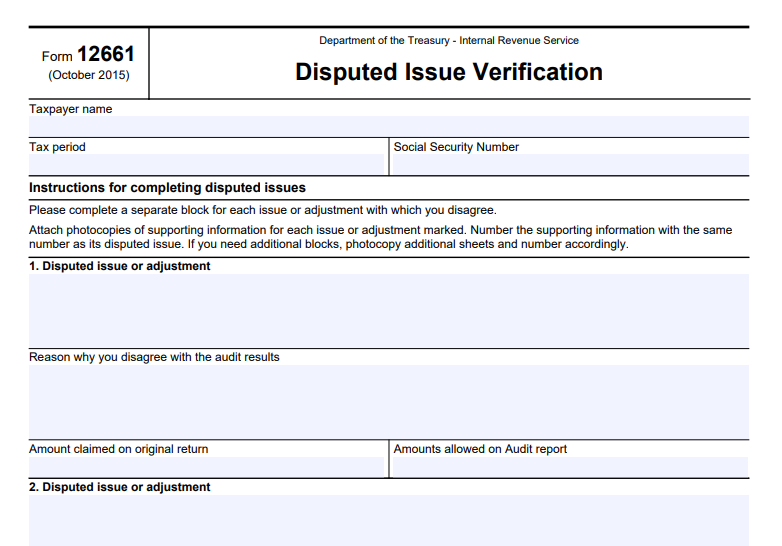
IRS Form 12661 is a one-page document designed to help taxpayers clearly outline and verify disputed issues from a prior IRS audit. Released by the Department of the Treasury and the Internal Revenue Service, the form includes fields for taxpayer identification—such as name, Social Security Number (or Employer Identification Number for businesses), and the relevant tax period—and dedicated blocks for detailing each disputed issue.
The form’s primary purpose is to facilitate the audit reconsideration process, which is available for correspondence examinations (audits conducted by mail) where the case has been closed, but the taxpayer disagrees with the results. It’s not mandatory; taxpayers can submit a written letter instead, but using Form 12661 streamlines the process by providing a structured format to explain disagreements. According to IRS Internal Revenue Manual (IRM) guidelines, this form is particularly recommended when contacting IRS representatives via phone or in-person, as it helps clarify the issues at hand.
Key elements of the form include:
- Taxpayer Information: Enter your name, SSN, and the tax year in question.
- Disputed Issue Blocks: Separate sections (numbered 1, 2, 3, etc.) for each issue, where you describe the disputed adjustment, explain why you disagree, state the amount claimed on your original return, and note the amount allowed in the audit report.
- Instructions: Emphasize attaching photocopies of supporting documents, numbered to match each disputed issue, and a reminder not to send originals.
The latest revision of Form 12661 is from October 2015, but IRS procedures for its use have been updated as recently as December 2025 in the IRM.
When Should You Use IRS Form 12661?
Form 12661 is ideal for situations where you believe the IRS audit outcome was incorrect due to overlooked information or errors. Common scenarios include:
- You didn’t respond to the initial audit or provide requested documents.
- You moved and missed IRS correspondence.
- New supporting evidence becomes available after the audit closes.
- You disagree with the IRS’s interpretation of tax laws or calculations, such as in cases involving Earned Income Tax Credit (EITC) disallowances or penalties.
To qualify for audit reconsideration, your case must meet specific criteria: the return must have been filed, the assessment remains unpaid (or credits are disputed), you must identify the adjustments in question, and provide new information not previously reviewed. Note that this process doesn’t apply to open audits, math error notices, or cases already appealed—those have separate procedures. If your audit involved EITC bans (2-year or 10-year), Form 12661 can help explain why the ban should be lifted by addressing the underlying conduct.
Step-by-Step Guide: How to Complete IRS Form 12661
Filling out Form 12661 is straightforward but requires attention to detail to avoid delays. Here’s a step-by-step breakdown:
- Gather Your Documents: Review your audit report (Form 4549) to identify disputed items. Collect supporting evidence like receipts, bank statements, or Forms 1099.
- Enter Taxpayer Details: At the top, provide your full name, SSN, and the tax period (e.g., 2023).
- Detail Each Disputed Issue: Use a separate block for each issue.
- Describe the issue (e.g., “Disallowed home office deduction”).
- Explain your disagreement (e.g., “The space was used exclusively for business; attached logs prove eligibility”).
- Note the original claimed amount and the audit-allowed amount. If you have more than three issues, photocopy the form and continue numbering.
- Attach Supporting Information: Number photocopies to match the issue blocks. Do not send originals, as they won’t be returned.
- Review for Completeness: Ensure all fields are filled accurately to prevent rejection.
What Supporting Documentation Do You Need?
The IRS emphasizes submitting only new or previously unconsidered information. Examples include:
- Canceled checks or receipts for deductions.
- Corrected Forms 1099 or W-2s.
- Legal documents for dependency claims.
- Explanations for EITC eligibility if a ban is in place.
If documentation is insufficient, the IRS may contact you for more details or issue a substantiation request letter, giving you 45 days to respond.
IRS Form 12661 Download and Printable
Download and Print: IRS Form 12661
How to Submit IRS Form 12661
Submission options include:
- Digital Upload (Recommended): Use the IRS Document Upload Tool (DUT) at https://apps.irs.gov/app/digital-mailroom/cce/ for faster processing.
- Mail: Send to the IRS office that conducted your audit (address on your audit letter). If unknown, call 866-897-0161 or 866-897-0177. Include a copy of Form 4549 if available.
Use certified mail for tracking and keep copies of everything submitted. The IRS aims to respond within 30 days but may send an interim letter if delayed.
What Happens After Submission?
Upon receipt, the IRS screens your request for eligibility. If accepted, an examiner reviews your Form 12661 and documents. Outcomes include:
- Full Allowance: Tax adjustment reversed.
- Partial Allowance: Some issues resolved.
- Disallowance: No changes if unsubstantiated.
You’ll receive a letter explaining the decision, with appeal rights if disallowed. Processing times vary, but digital submissions expedite the process.
Tips for a Successful Audit Reconsideration Using Form 12661
- Be Timely: Submit as soon as possible, especially if statutes of limitations apply.
- Organize Clearly: Number documents and explanations to match form blocks.
- Seek Professional Help: Consider consulting a tax professional for complex cases.
- Check for Updates: IRS rules can change; verify on IRS.gov.
- Avoid Common Pitfalls: Don’t resubmit old information or ignore response deadlines.
By properly using IRS Form 12661, you can effectively challenge audit findings and potentially save on taxes. For personalized advice, contact the IRS or a qualified tax advisor. This guide is based on official IRS resources current as of December 2025.