Table of Contents
IRS Form 2624 – Consent for Third Party Contact – In the complex world of tax compliance, sometimes you need the IRS to verify information directly from third parties like banks, employers, or other payers. That’s where IRS Form 2624, Consent for Third Party Contact, comes into play. This form allows taxpayers to authorize the IRS to reach out to specific entities for records related to information returns, helping resolve discrepancies in income reporting. Updated as of 2025, this guide covers everything you need to know about Form 2624, including its purpose, how to fill it out, and when to use it. Whether you’re dealing with an audit or simply correcting your tax return, understanding this form can save you time and hassle.
What is IRS Form 2624?
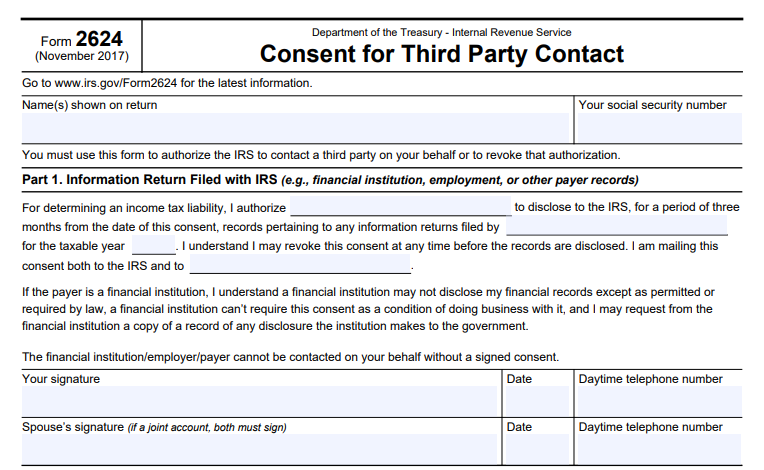
IRS Form 2624 is an official document from the Department of the Treasury that grants the IRS permission to contact a third party on your behalf. Specifically, it’s used to authorize the disclosure of records pertaining to information returns (such as Form 1099 or W-2) for a particular tax year. This consent is limited to a three-month period from the date of signing, ensuring controlled access to your financial details.
The form also includes a section for revoking previous consents, giving you flexibility if circumstances change. Unlike broader authorizations like Form 2848 (Power of Attorney) or Form 8821 (Tax Information Authorization), Form 2624 is narrowly focused on verifying income for tax liability purposes. It’s particularly useful when you’ve requested corrections from a payer but haven’t received them, allowing the IRS to step in.
Key features of Form 2624:
- Purpose: Authorize IRS contact with payers for income verification.
- Duration: Valid for three months unless revoked earlier.
- Scope: Limited to information returns for a specific tax year.
- Signatures Required: Both spouses must sign if it’s a joint account.
This form ensures compliance with privacy laws, as financial institutions cannot disclose your records without explicit consent.
When Should You Use IRS Form 2624?
You might need to file Form 2624 in situations where there’s a mismatch between your reported income and what the IRS has on file from third-party reports. Common scenarios include:
- Disputing incorrect income amounts on Form 1099-INT (interest income) or Form 1099-MISC (miscellaneous income).
- Resolving underreported income during an IRS audit or automated underreporter (AUR) process.
- When a payer (e.g., a bank or employer) fails to provide corrected statements despite your requests.
Before using this form, always try to obtain the necessary information directly from the payer. If that’s not possible, Form 2624 empowers the IRS to request it for you. Note that this form doesn’t grant the third party any authority to represent you—it’s strictly for information disclosure.
In 2025, with increased IRS scrutiny on digital reporting and gig economy income, this form remains relevant for taxpayers navigating complex financial records.
How to Fill Out IRS Form 2624: Step-by-Step Instructions
Filling out Form 2624 is straightforward, but accuracy is crucial to avoid delays. The form is divided into three parts. Download the latest version from the IRS website (revised November 2017, still in use as of 2025). Here’s a breakdown:
Part 1: Information Return Filed with IRS
This section authorizes the disclosure. Fill in:
- The name of the third party (e.g., “Pine Bank”).
- The tax year in question (e.g., “2024”).
- Sign and date the form, including a daytime phone number.
- If it’s a joint account, your spouse must also sign.
Example statement: “For determining an income tax liability, I authorize [Payer Name] to disclose to the IRS, for a period of three months from the date of this consent, records pertaining to any information returns filed by [Payer Name] for the taxable year [Year].”
Mail copies to both the IRS and the payer.
Part 2: Provide Information to Associate Your Consent with Records
Help the IRS link your consent to their system by providing:
- Line 1: Taxpayer identification number (SSN or EIN).
- Line 2: Payer’s name.
- Line 3: Account number (if applicable).
- Line 4: Payer’s street address.
- Line 5: Payer’s city, state, and ZIP code.
This ensures the consent is properly matched.
Part 3: Revoking Consent
If you need to cancel a previous authorization:
- Fill in the payer’s name and the tax year.
- Sign and date, with spouse’s signature if joint.
- Submit to the IRS office from your most recent notice.
Always keep a copy for your records.
IRS Form 2624 Download and Printable
Download and Print: IRS Form 2624
Important Considerations and Privacy Notes
- Privacy Act Compliance: Financial institutions can’t require this consent as a condition of business, and you can request records of any disclosures they make.
- Limitations: This form doesn’t allow the third party to discuss your tax matters broadly—use Form 2848 for representation.
- Submission: Send the signed form to the IRS address on your latest correspondence or notice.
- Revocation Timing: You can revoke anytime before disclosure occurs.
If you’re unsure, consult a tax professional to avoid unintended disclosures.
Where to Get and Submit IRS Form 2624
Download Form 2624 directly from the IRS website. Submit it via mail to the specified IRS office. Electronic submission isn’t available for this form as of 2025.
Frequently Asked Questions About IRS Form 2624
What’s the difference between Form 2624 and Form 8821?
Form 2624 is for specific third-party contact for income verification, while Form 8821 allows broader access to your tax information without representation rights.
Can I use Form 2624 for multiple tax years?
No, it’s limited to one tax year per form. File separate forms if needed.
Is Form 2624 required for all third-party contacts?
Only when you want the IRS to request information on your behalf after direct attempts fail.
What if I make a mistake on the form?
Contact the IRS immediately or submit a revocation and a new form.
For personalized advice, consider reaching out to a certified tax advisor. This guide is for informational purposes only and reflects information available as of December 2025. Always verify with official IRS sources for the latest updates.