Table of Contents
IRS Form 5498-QA – ABLE Account Contribution Information – For individuals with disabilities and their families, Achieving a Better Life Experience (ABLE) accounts offer a tax-advantaged way to save for qualified disability expenses without jeopardizing eligibility for means-tested benefits like SSI or Medicaid. A key part of ABLE compliance is IRS Form 5498-QA, the ABLE Account Contribution Information form, which reports annual contributions, rollovers, and account details to the IRS. As 2025 draws to a close, understanding this form is essential—especially with the annual contribution limit rising to $19,000 from $18,000 in 2024.
This SEO-optimized guide, based on the latest 2025 IRS instructions released in late 2024, covers everything from the form’s purpose and eligibility to step-by-step filing instructions, deadlines, and common errors. Whether you’re an ABLE program administrator or a beneficiary tracking contributions, this resource ensures compliance and maximizes tax benefits. Let’s explore how Form 5498-QA supports ABLE account holders in building financial independence.
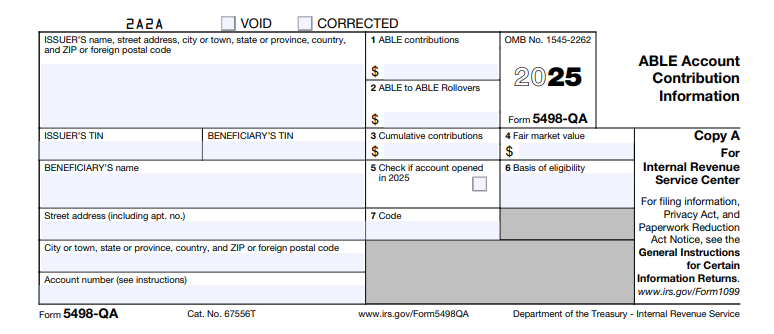
What Is IRS Form 5498-QA?
Form 5498-QA is an informational tax form used to report contributions to qualified ABLE accounts under Section 529A of the Internal Revenue Code. ABLE accounts allow tax-free growth and withdrawals for disability-related expenses like housing, transportation, and healthcare, while protecting up to $100,000 from SSI resource limits.
Issued by state-sponsored ABLE programs, the form details:
- Total cash contributions and rollovers.
- Cumulative contributions to date.
- Fair market value (FMV) as of December 31.
- Account opening status and beneficiary eligibility.
Unlike Form 1099-QA (which reports distributions), Form 5498-QA focuses on inflows, helping the IRS verify compliance with annual limits and prevent excess contributions that could trigger 6% excise taxes. For 2025, the form includes updated fields for the ABLE to Work provision, allowing employed beneficiaries an extra contribution up to $15,060 (continental U.S.).
Key Fact: No tax is due on ABLE contributions or earnings if used for qualified expenses—making accurate reporting via Form 5498-QA crucial for audits and benefit preservation.
Who Must File and Receive Form 5498-QA?
Form 5498-QA is filed by any state, agency, or instrumentality maintaining a qualified ABLE program for each ABLE account opened or receiving contributions in 2025—even if no distributions occurred. This includes programs like PA ABLE, Maryland ABLE, or ABLEnow.
Recipients:
- The IRS: For compliance verification.
- Designated Beneficiary: A copy (or substitute statement) must be furnished by May 31, 2026, to help track lifetime limits and support tax filings.
Exceptions: No form is required for accounts with zero contributions in 2025 or if the program isn’t IRS-qualified. Beneficiaries don’t file the form themselves but use it for record-keeping, especially for rollovers from 529 plans (which count toward the $19,000 limit).
Employed beneficiaries under the ABLE to Work Act receive enhanced reporting to document additional contributions from earnings, provided they don’t participate in an employer retirement plan.
Step-by-Step Guide: How to Complete IRS Form 5498-QA for 2025
ABLE program administrators must use the 2025 version of Form 5498-QA, available on IRS.gov. Software like TaxBandits or program-specific tools can automate calculations, but manual filers should aggregate data from account statements. Always include an account number for tracking.
1. Gather Required Data
- Review 2025 contributions: Cash, 529-to-ABLE rollovers, and program-to-program transfers.
- Calculate cumulative totals since account opening.
- Determine FMV on December 31, 2025.
- Verify beneficiary’s disability onset (before age 26 for 2025) and type code.
2. Complete the Header and Beneficiary Info
- Issuer’s Name/Address/TIN: Enter the program’s details; do not truncate TINs.
- Beneficiary’s TIN/Name/Address: Full Social Security Number and contact info.
- Account Number: Optional but recommended for multiple accounts.
3. Fill in Contribution Boxes (1–3)
- Box 1 (ABLE Contributions): Total cash and non-rollover contributions (up to $19,000 standard + ABLE to Work amount).
- Box 2 (ABLE to ABLE Rollovers): Report direct trustee-to-trustee rollovers (not counted in Box 1).
- Box 3 (Cumulative Contributions): Running total of all prior-year contributions + 2025 amounts.
4. Report Account Value and Status (Boxes 4–7)
- Box 4 (Fair Market Value): Account balance as of 12/31/2025.
- Box 5 (Account Opened Checkbox): Check if opened in 2025.
- Box 6 (Basis of Eligibility): Describe how beneficiary qualifies (e.g., SSI recipient).
- Box 7 (Type of Disability Code): Enter code (e.g., 1 for blindness, 2 for other impairments).
5. Review and Correct
- Check for “Corrected” box if amending prior filings.
- Sign and date if paper-filing; retain copies for 3 years.
Pro Tip: For excess contributions returned before the due date, report the full amount in Box 1 but note the return separately to avoid penalties.
Deadlines and Filing Methods for Form 5498-QA in 2025
Timing is critical for ABLE reporting. For 2025 activity:
- Furnish to Beneficiary: By May 31, 2026 (or next business day).
- File with IRS:
- Paper: May 31, 2026 (with Form 1096 transmittal).
- Electronic: June 1, 2026 (mandatory for 10+ forms; use IRS FIRE system).
Mail paper forms to the IRS address in the General Instructions for Certain Information Returns. Extensions aren’t available, but reasonable cause (e.g., disaster) may waive penalties.
Common Mistakes to Avoid When Filing Form 5498-QA
Errors in ABLE reporting can lead to IRS notices or 6% excise taxes on excess contributions. Here’s a table of frequent pitfalls based on 2025 IRS guidance:
| Mistake | Why It Happens | How to Fix/Avoid | Potential Penalty |
|---|---|---|---|
| Omitting Cumulative Contributions (Box 3) | Forgetting prior-year totals. | Track lifetime contributions via program software; update annually. | Excise tax on overages; IRS audit. |
| Misclassifying Rollovers | Counting ABLE-to-ABLE in Box 1 instead of Box 2. | Review transaction types; rollovers don’t count toward annual limits. | Inflated limits; 6% tax on excess. |
| Incorrect FMV (Box 4) | Using opening balance vs. 12/31 value. | Pull year-end statements; include unrealized gains/losses. | Mismatch with Form 1099-QA; correction required. |
| Missing Disability Code (Box 7) | Overlooking eligibility verification. | Confirm onset before age 26; use codes from instructions. | Form rejection; delayed processing. |
| Late Furnishing to Beneficiary | Missing May 31 deadline. | Automate mailings; set reminders for 2026. | $60–$680 per form (intentional disregard up to $1,400). |
| Truncating TINs on IRS Copy | Attempting privacy on filed forms. | Full TINs required for IRS; truncate only on beneficiary statements. | $60 per incorrect form. |
Amend errors with a corrected Form 5498-QA marked “Corrected.”
IRS Form 5498-QA Download and Printable
Download and Print: IRS Form 5498-QA
2025 Updates and Special Considerations for Form 5498-QA
The IRS’s 2025 instructions (Rev. December 2024) highlight inflation adjustments and expanded rollovers:
- Contribution Limits: $19,000 standard; up to $34,060 total for ABLE to Work (lesser of compensation or federal poverty level: $15,060 continental U.S., $18,810 Alaska, $17,310 Hawaii).
- Rollovers: 529-to-ABLE transfers now fully count toward limits; report in Box 1.
- E-Filing Mandate: Required for 10+ forms; FIRE system updates emphasize secure TIN transmission.
- ABLE Age Adjustment Act: Pending legislation could raise eligibility onset to age 46—monitor for mid-2025 changes.
For excess returns, file Form 5329 if taxes apply.
Final Thoughts: Empower Financial Security with Form 5498-QA
IRS Form 5498-QA is more than paperwork—it’s a cornerstone of ABLE account compliance, enabling tax-free savings up to $19,000 (or more) in 2025 while safeguarding benefits. By filing accurately and on time, programs and beneficiaries avoid penalties and support long-term independence. Download the 2025 form and instructions from IRS.gov today, and consult a tax advisor for personalized strategies.
This article is for informational purposes only and not tax advice. Always refer to official IRS guidance.
FAQs About IRS Form 5498-QA
What is the 2025 ABLE contribution limit?
The standard limit is $19,000, with up to $15,060 additional for working beneficiaries under ABLE to Work.
When is Form 5498-QA due for 2025?
Furnish to beneficiaries by May 31, 2026; file with IRS by June 1, 2026 (electronic).
Does Form 5498-QA affect my taxes?
No—it’s informational, but inaccuracies can trigger audits or excise taxes on excess contributions.
Who gets a copy of Form 5498-QA?
The beneficiary and IRS; programs handle filing.