Table of Contents
IRS Form 706 (Schedule PC) – Protective Claim for Refund – In the complex world of estate planning and taxation, protecting your right to a potential refund can make all the difference. If you’re handling an estate tax return for a loved one who passed away after December 31, 2011, IRS Form 706 Schedule PC—officially known as the Protective Claim for Refund—could be a crucial tool. This schedule allows executors to safeguard deductions under section 2053 of the Internal Revenue Code for unresolved claims or expenses that aren’t yet payable, ensuring the estate isn’t shortchanged by time-sensitive deadlines.
Whether you’re navigating funeral costs, administration expenses, or contested debts, a protective claim helps preserve refund rights even when payments are delayed due to litigation or other contingencies. In this comprehensive guide, we’ll break down everything you need to know about IRS Form 706 Schedule PC, from eligibility to step-by-step filing instructions, based on the latest 2025 updates from the IRS.
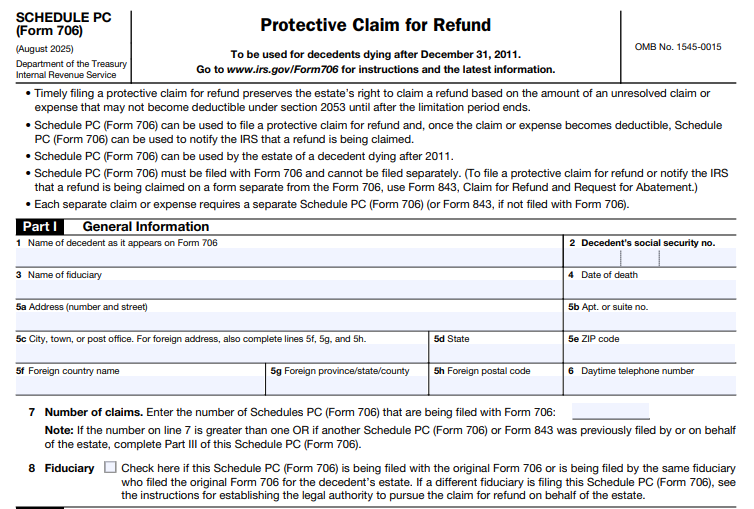
What Is IRS Form 706 Schedule PC?
IRS Form 706 is the United States Estate (and Generation-Skipping Transfer) Tax Return, used to calculate and report federal estate taxes on a decedent’s assets. Schedule PC attaches to this form specifically for protective claims for refund related to section 2053 deductions. These deductions cover expenses like funeral costs, estate administration fees, debts, mortgages, liens, and net losses—but only if they’re not deductible at the time of filing due to unresolved issues.
The purpose of Schedule PC is twofold:
- Preserve refund rights: It locks in the estate’s ability to claim a refund later, once the expense becomes deductible, even after the standard three-year statute of limitations under section 6511(a) expires.
- Notify the IRS of resolutions: It also serves to inform the IRS when a claim is partially or fully resolved, triggering a refund calculation.
This schedule is essential for estates facing uncertainties, such as ongoing lawsuits or delayed payments, preventing the loss of potentially significant tax savings. For decedents dying after December 31, 2011, it’s the go-to form for these scenarios, as outlined in Revenue Procedure 2011-48.
Who Should File Schedule PC (Form 706)?
Not every estate tax return requires Schedule PC, but it’s vital if your situation involves delayed or contingent deductions. You should consider filing if:
- The estate includes unresolved claims or expenses under section 2053, such as:
- Funeral and administration expenses (reported on Schedule J).
- Debts, mortgages, or liens (Schedule K).
- Net losses or non-claim expenses (Schedule L).
- These items can’t be deducted on the initial Form 706 because payment is postponed—e.g., due to litigation, counterclaims, or regulatory contingencies like those in Treas. Reg. § 20.2053-1(d)(4) for ascertainable amounts or § 20.2053-4 for claims under $500,000.
- The decedent died after December 31, 2011, and the protective claim must be filed before the section 6511(a) limitations period ends (typically three years from the Form 706 filing date or two years from tax payment).
The executor or authorized fiduciary files it, but if a different person is handling the claim, attach proof of authority (e.g., letters testamentary or Form 56). Each separate claim or expense needs its own Schedule PC—don’t lump them together.
Ancillary costs, like legal fees, court costs, or appraisals tied to resolving the claim, are automatically included if they qualify under section 2053, without needing separate substantiation.
When to File a Protective Claim for Refund
Timing is everything with IRS deadlines. File Schedule PC with your original Form 706 to avoid complications—separate filings require Form 843 instead. Key triggers include:
- Initial protective claim: When the expense isn’t yet deductible but will likely become so after the limitations period. This preserves your position without immediate payment.
- Partial refund: For recurring or ongoing expenses where only part of the amount is resolved (e.g., interim payments in a multi-year lawsuit).
- Full and final refund: Once the entire claim is settled, notify the IRS within 90 days of payment or resolution to claim the overpaid tax.
Under Rev. Proc. 2011-48, the IRS will acknowledge initial claims within 180 days; if not, contact them at 866-699-4083. Filing doesn’t pause IRS audits or closing letters, so proceed with your return as normal, entering zero in the deduction column on Schedules J, K, or L.
For 2025 filers, note that the revised Schedule PC (dated August 2025) emphasizes clear identification of claims to prevent rejection for inadequate descriptions.
IRS Form 706 (Schedule PC) Download and Printable
Download and Print: IRS Form 706 (Schedule PC)
How to Complete IRS Form 706 Schedule PC: Step-by-Step Guide
Filling out Schedule PC is straightforward but requires precision to avoid rejection. Use the August 2025 version, available on IRS.gov. Here’s a breakdown:
Part I: General Information
- Enter the decedent’s name, Social Security Number, date of death, your details as fiduciary, and the number of Schedules PC attached (Line 7).
- If you’re not the original executor, attach authority documents.
Part II: Claim Information
- Line 9a: Check for an initial protective claim and enter the amount in contest.
- Line 10a: For partial refunds, include the prior filing date and resolved amount.
- Line 11a: For full refunds, detail the final payment.
- Line 12: This is the meat—specify the Form 706 schedule/line (e.g., Schedule J, Line 2 for funeral expenses), claimant details, basis for the claim, reasons for delay (e.g., “Pending litigation in [court]”), current status, any previously deducted amounts, the full deduction now claimed, ancillary expenses (agreed, paid, or estimated), and the resulting tax refund.
Attach supporting docs like pleadings or court filings.
Part III: Other Claims
- List any prior Schedules PC or Forms 843 filed by the estate, including dates and types (protective, partial, or full).
Sign under penalty of perjury. For resolutions, file a supplemental Form 706 or updated Form 843 within 90 days, noting “Notification for Consideration of Section 2053 Protective Claim” and attaching the original.
Pro tip: Report protective expenses on the relevant schedules without values in the final column to signal the IRS they’re contingent.
Key Updates for 2025: What’s New in Schedule PC?
The IRS revised Form 706 and Schedule PC in August 2025 to align with ongoing regulatory tweaks. Highlights include:
- Enhanced guidance on ancillary expenses, presuming their inclusion for qualifying claims.
- Clearer instructions for recurring payments, limiting partial claims to currently resolved amounts.
- Updated contact info and processing timelines, with emphasis on curing defects within 45 days of IRS notice.
These changes streamline filings for estates dealing with post-2011 decedents, but always download the latest PDF from IRS.gov to ensure compliance.
Common Mistakes to Avoid When Filing Schedule PC
Even seasoned estate professionals slip up—don’t let these trip you:
- Vague descriptions: Clearly identify the claim (e.g., “Breach of contract lawsuit by XYZ Creditor for $X”) or risk rejection.
- Missing attachments: Include proof of fiduciary authority and supporting docs.
- Late notifications: Resolve and notify within 90 days, or explain reasonable cause.
- Overlooking ancillaries: Factor in related costs like attorney fees—they’re deductible but must tie back to the claim.
- Using the wrong form: Stick to Schedule PC with Form 706; Form 843 is for standalone claims.
Frequently Asked Questions (FAQs) About Protective Claims for Refund
Can I file Schedule PC after submitting Form 706?
No—attach it initially or use Form 843 for late protective claims. Resolutions can use supplements.
What if my claim is under $500,000?
It still qualifies under Treas. Reg. § 20.2053-4(c), but disclose any prior deductions.
Does filing affect the estate’s audit?
No, it doesn’t suspend IRS review—expect standard processing.
How long does it take to get a refund after resolution?
Once notified, the IRS recomputes the liability; processing varies but can take months.
Final Thoughts: Protect Your Estate’s Tax Position Today
IRS Form 706 Schedule PC is a powerful safeguard for estates facing uncertain deductions, ensuring you don’t forfeit refunds due to timing hurdles. By filing proactively, you comply with section 2053 rules and Revenue Procedure 2011-48, potentially saving thousands in overpaid taxes.
This guide is for informational purposes only and based on 2025 IRS publications—estate tax laws are intricate, so consult a tax professional or estate attorney for personalized advice. Ready to file? Download the forms at IRS.gov and get started.
Disclaimer: This article is not tax advice. Always verify with official IRS resources.