Table of Contents
IRS Form 8453-FE – U.S. Estate or Trust Declaration for an IRS e-file Return – Navigating estate and trust taxation requires precision, especially when e-filing to meet deadlines and ensure secure transmission. IRS Form 8453-FE, “U.S. Estate or Trust Declaration for an IRS e-file Return,” serves as the critical authentication document for electronic submissions of Form 1041, U.S. Income Tax Return for Estates and Trusts. For the 2025 tax year, with e-filing mandates expanding and direct debit options streamlined, this form not only verifies your return but also authorizes payments and third-party transmissions—potentially saving time and reducing errors.
This SEO-optimized guide, drawn from the latest IRS draft and official resources, covers Form 8453-FE for filings due by April 15, 2026 (or the 15th day of the fourth month after year-end). Fiduciaries, executors, and tax professionals will find step-by-step instructions, eligibility details, and tips to avoid penalties. Download the draft 2025 Form 8453-FE from IRS.gov to prepare your electronic return today.
What Is IRS Form 8453-FE?
IRS Form 8453-FE is the declaration required for estates and trusts e-filing Form 1041. It authenticates the electronic return, authorizes the electronic return originator (ERO) or third-party transmitter to submit it, and permits electronic funds withdrawal (direct debit) for tax payments. Unlike paper filings, this form ensures IRS compliance for digital submissions, integrating seamlessly with tax software for faster processing and refunds.
Core purposes include:
- Authentication: Verifies the fiduciary’s approval of the e-filed Form 1041 data.
- Authorization: Permits EROs (e.g., tax preparers) to handle transmission.
- Payment Facilitation: Enables ACH debit from your bank account for balances due.
For 2025, the form remains electronic-only—no paper versions accepted. It’s part of the Modernized e-File (MeF) system, supporting refunds via direct deposit and estimated completion time of about 2 hours 52 minutes (including recordkeeping).
Who Needs to File IRS Form 8453-FE in 2025?
Estates and trusts must file Form 8453-FE if they:
- Elect to e-file Form 1041 for tax year 2025 (recommended for faster processing; mandatory for certain large filers).
- Have a fiduciary (executor, trustee) authorizing the return and any payments.
- Use an ERO or paid preparer for electronic submission.
Exemptions: Pure paper filers of Form 1041 skip this form, but e-filing is encouraged for all to avoid delays. Grantor trusts or those with no tax liability still e-file if income exceeds thresholds. Attach it electronically with Form 1041—no separate mailing.
Fiduciaries sign under penalties of perjury; EROs and preparers certify accuracy. For decedents’ estates, the executor typically signs.
Key Components of IRS Form 8453-FE
The 2025 draft form is concise, divided into three parts for clarity:
| Part | Description | Key Elements |
|---|---|---|
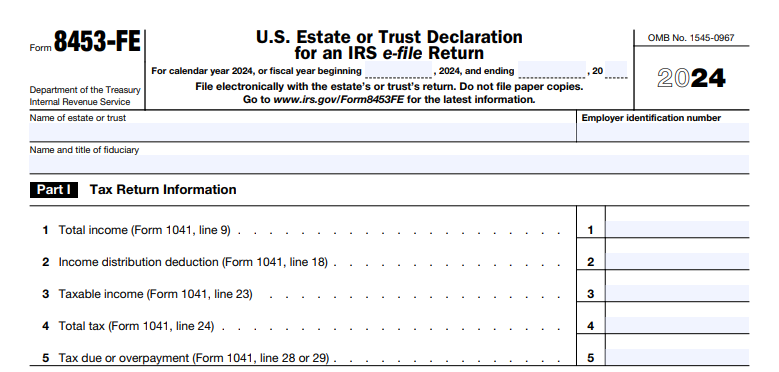
| Part I: Tax Return Information | Transfers key figures from Form 1041 to verify e-file data. | Lines 1–5: Total income (line 9), distribution deduction (line 18), taxable income (line 23), total tax (line 24), tax due/overpayment (lines 28/29). |
| Part II: Declaration of Fiduciary | Fiduciary’s signature and payment authorization. | Line 6: Check box for ACH debit; includes bank details from software. |
| Part III: Declaration of ERO and Paid Preparer | Certifications by professionals involved. | ERO PTIN/SSN, preparer PTIN, firm info; confirms review of return. |
No attachments required beyond the e-filed Form 1041; retain copies for 3 years.
IRS Form 8453-FE Download and Printable
Download and Print: IRS Form 8453-FE
How to Complete IRS Form 8453-FE: Step-by-Step Guide for 2025
Use tax preparation software (e.g., TurboTax Business, H&R Block) to auto-populate from Form 1041. Manual filers: Download the draft PDF and follow these steps.
Step 1: Gather Documents
- Completed draft Form 1041 with all schedules (e.g., K-1s for beneficiaries).
- Bank info for direct debit (routing/account numbers).
- Fiduciary and ERO/preparer details (PTINs).
Step 2: Fill Part I (Lines 1–5)
- Enter exact amounts from Form 1041:
- Line 1: Total income (Form 1041, line 9).
- Line 2: Income distribution deduction (line 18).
- Line 3: Taxable income before NOL/special deductions (line 23).
- Line 4: Total tax (line 24).
- Line 5: Tax due (line 28) or overpayment (line 29).
- Ensure matches e-file transmission to avoid rejection.
Step 3: Complete Part II (Fiduciary Declaration)
- Line 6: Check if authorizing ACH debit (enter date and amount from software; revocable up to 2 business days prior via 1-888-353-4537).
- Fiduciary signs electronically, declaring accuracy under perjury penalties.
- Date: Must be before transmission.
Step 4: Handle Part III (ERO/Preparer)
- ERO enters PTIN or SSN; preparer adds PTIN, firm EIN, address.
- Both certify they’ve reviewed the return and it’s complete/accurate.
- If self-prepared, fiduciary completes all.
Step 5: Transmit and Retain
- Submit via MeF with Form 1041 (no paper filing).
- Retain signed PDF for records; IRS doesn’t return it.
- For payments: Use EFTPS.gov or direct debit; overpayments go to direct deposit.
Example: An estate with $50,000 taxable income (line 3) and $10,000 tax due (line 5) checks line 6 for debit, signs, and transmits—processed in 48 hours.
Key Changes to IRS Form 8453-FE for 2025
The September 29, 2025, draft introduces no major structural shifts from 2024, maintaining electronic focus. Notable updates:
- E-Filing Enhancements: Expanded MeF support for trusts with international elements (e.g., Form 8833 integration).
- Payment Revocation: Clarified 2-business-day window for ACH debit cancellations.
- Draft Status: Subject to final revisions; check IRS.gov/Form8453FE for updates on legislation like OBBBA impacts on trusts.
- Burden Estimate: Unchanged at ~2 hr. 52 min.; no new lines.
Future developments: Monitor for AI-assisted e-filing pilots in 2026.
Common Mistakes to Avoid When Filing Form 8453-FE
- Data Mismatches: Line entries not aligning with Form 1041—causes e-file rejection (10% of errors).
- Missing Signatures: Unsigned fiduciary/ERO sections void the declaration.
- Payment Errors: Forgetting to check line 6 for debit or using outdated bank info—delays processing.
- Paper Submission: Attempting to mail—IRS rejects; always electronic.
- Preparer Oversights: EROs skipping PTIN entry; triggers compliance checks.
Per IRS guidelines, correct via amended Form 1041-X with updated 8453-FE.
Tips for Estates and Trusts Filing IRS Form 8453-FE in 2025
- Go Digital Early: E-file by March 15, 2026, for calendar-year trusts; extensions via Form 7004 don’t extend payment.
- Use Software: Tools like ProSeries auto-generate and transmit; integrate with EFTPS for seamless debits.
- Coordinate with Beneficiaries: Ensure K-1s are ready before e-filing to avoid holds.
- Authorize Wisely: Only check line 6 if confident in amount; use EFTPS for flexibility.
- Seek Pro Help: CPAs handle complex trusts (e.g., with foreign assets); worth the fee for accuracy.
- Track Refunds: Direct deposit standard—speeds up overpayments by weeks.
This form streamlines compliance, potentially cutting processing time by 50%.
Final Thoughts: Simplify E-Filing for Estates and Trusts with IRS Form 8453-FE in 2025
IRS Form 8453-FE is more than a formality—it’s the gateway to efficient, secure e-filing for Form 1041, ensuring your estate or trust meets 2025 deadlines without paper hassles. By authenticating returns and enabling direct payments, it supports fiduciaries in focusing on beneficiary needs over bureaucracy.
For the official draft 2025 Form 8453-FE and instructions, visit IRS.gov/Form8453FE. Complex estates? Consult a tax advisor. Start reviewing your Form 1041 draft now for a stress-free April 2026.