Table of Contents
IRS Form 8821 – Tax Information Authorization – In the world of U.S. taxes, protecting your confidential information while allowing trusted professionals to access it is crucial. Enter IRS Form 8821, the Tax Information Authorization form that lets you grant specific access to your tax records without handing over full decision-making power. Whether you’re working with a CPA, attorney, or financial advisor, understanding how to use Form 8821 can streamline audits, loan applications, or routine tax prep.
As of December 2025, the IRS continues to emphasize secure, digital submissions for faster processing. This guide breaks down everything you need to know about IRS Form 8821—from its purpose to step-by-step filing instructions—based on the latest official guidance. Let’s dive in.
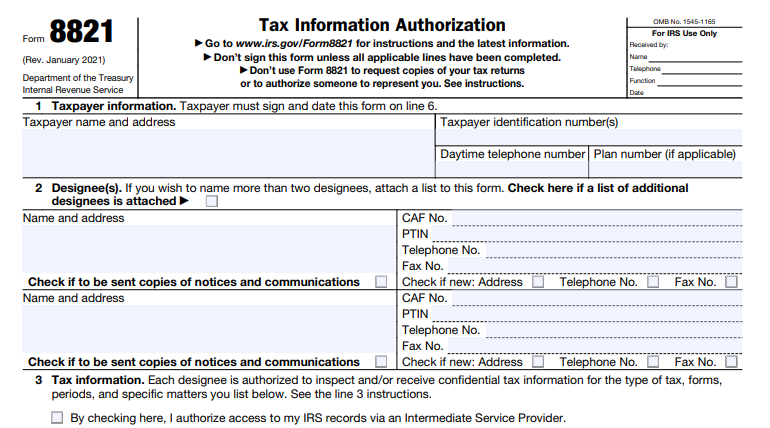
What Is IRS Form 8821?
IRS Form 8821 is a one-page document that authorizes designated individuals, corporations, firms, organizations, or partnerships to inspect and/or receive your confidential tax information. This includes verbal or written disclosures for specific tax types, forms, years, or periods you specify.
Unlike representation forms, Form 8821 does not allow designees to act on your behalf—such as signing documents, negotiating with the IRS, or endorsing refund checks. It’s purely for information access, making it ideal for scenarios where you need transparency without delegation.
Key features include:
- Automatic revocation: Submitting a new Form 8821 revokes prior authorizations unless you opt to retain them.
- CAF recording: Most authorizations are logged in the IRS’s Centralized Authorization File (CAF) for quick reference.
- No cost: Filing is free, and it’s valid for up to three years from the end of the tax year specified.
The form was last revised in January 2021, with instructions updated in September 2021. No major changes have been noted as of August 2025, but the IRS now promotes online submissions via Tax Pro Account for immediate processing.
When Should You Use IRS Form 8821?
You don’t need Form 8821 for every tax interaction—it’s targeted for information-sharing needs. Common use cases include:
- Tax preparation or audits: Allowing your accountant to review transcripts without representing you.
- Loan or mortgage applications: Sharing income verification with lenders (specific-use only, not recorded on CAF).
- State or federal investigations: Authorizing disclosures to investigators for specific matters.
- Employee plans or exempt organizations: Granting access to plan administrators for Form 5500 or 990 reviews.
- Joint returns: Spouses filing separately to authorize individual access.
How to Fill Out IRS Form 8821: Line-by-Line Instructions
Filling out Form 8821 takes about 44 minutes, per IRS estimates, but it’s straightforward with these steps. Download the latest PDF from IRS.gov. Use black ink for paper forms, and ensure all lines are complete—unsigned or blank forms get returned.
Line 1: Taxpayer Information
- Enter your full name, Taxpayer Identification Number (TIN: SSN, ITIN, or EIN), address, daytime phone, and plan number (if applicable, e.g., for employee plans).
- For joint filers: Submit separate forms for each spouse.
- Businesses: Use legal name, EIN, and business address.
- Estates/trusts: Include trustee/executor details and relevant IDs.
Warning: This doesn’t update your IRS address—use Form 8822 for that.
Line 2: Designee(s)
- List up to two designees’ full names, addresses, CAF numbers (or “NONE”), phone/fax, and PTIN (if applicable).
- Check boxes if you want them to receive IRS notices/communications (limited to two per matter).
- For more than two: Check the attachment box and include a list.
- Mark if their contact info is new since CAF issuance.
Designees can be anyone, but they must use their exact name on IRS interactions.
Line 3: Tax Information Authorization
This is the core section. Use columns to specify:
- (a) Type of Tax Information: E.g., “Income,” “Excise,” “Civil Penalty.”
- (b) Tax Form Number: E.g., “1040,” “941.”
- (c) Year(s) or Period(s): E.g., “2024,” “01/2024 – 12/2025.” Limit to three years ahead.
- (d) Specific Tax Matters: E.g., “Balance due on 2023 Form 1040” or “N/A.”
Check the Intermediate Service Provider box if allowing indirect access via e-Services.
For penalties (e.g., failure-to-file), list explicitly—no automatic inclusion.
Line 4: Specific Use Not Recorded on CAF
Check this for one-off needs like lender verifications or Form W-2 disclosures. Skip Line 5 and send to the relevant IRS office.
Line 5: Retention/Revocation of Prior Authorizations
If Line 4 is unchecked, priors are revoked automatically. To keep them, check the box and attach copies.
To revoke without a new form: Write “REVOKE” across the top, sign/date, and specify details.
Line 6: Taxpayer Signature
- Sign and date by hand (electronic only for online filing).
- For entities: Include title (e.g., “CEO”) and certify authority.
- Joint returns require both signatures if authorizing jointly.
Security note: Under Section 6103(c), designees face penalties for unauthorized use or redisclosure—protect your data by choosing wisely.
Where and How to Submit IRS Form 8821
Speed matters—online is best for 2025 filings:
- Online: Use IRS.gov/Submit8821 or Tax Pro Account. Requires Secure Access login; electronic signatures accepted (including scanned images with ID verification).
- Fax/Mail: Use state-specific numbers/addresses (e.g., Ogden, UT for West Coast). Specific-use forms go to the handling office.
- Deadline: Within 120 days for non-tax matters; no limit for tax-related.
Track status via your IRS online account. For bulk submissions, tax pros can use e-Services.
IRS Form 8821 Download and Printable
Download and Print: IRS Form 8821
IRS Form 8821 vs. Form 2848: Key Differences
| Feature | Form 8821 (Tax Information Authorization) | Form 2848 (Power of Attorney) |
|---|---|---|
| Purpose | Inspect/receive info only | Full representation |
| Actions Allowed | View transcripts, notices | Sign docs, negotiate, appeal |
| Revocation | Automatic on new form | Explicit revocation required |
| CAF Recording | Yes (except specific use) | Yes |
| Best For | Accountants, lenders | Attorneys, enrolled agents |
Choose based on needs—many use both for comprehensive coverage.
Revoking or Updating a Tax Information Authorization
To revoke:
- Submit a new Form 8821 (auto-revokes priors).
- Or, mark an old form “REVOKE,” sign/date, and mail to your filing center.
Updates? File a new form with revised details. Designees can notify address changes separately.
FAQs About IRS Form 8821
Can I use Form 8821 for future tax years?
Yes, up to three years ahead, but specify exact periods.
Does Form 8821 allow access to refund checks?
No—designees can’t endorse or receive direct deposits.
What if my designee is a business?
List the firm name and a contact person; include EIN if applicable.
Is there a fee to file?
No, but expect processing delays for paper submissions (up to 120 days).
How do I confirm my authorization is active?
Check via IRS Tax Pro Account or call 800-829-1040.
For the most current details, visit IRS.gov/Form8821. Always consult a tax professional for personalized advice—this guide isn’t a substitute.
Last updated: December 2025. Sources: Official IRS publications.