Table of Contents
IRS Form 8879-F – IRS e-file Signature Authorization for Form 1041 – Navigating estate and trust taxes can be complex, especially when electronic filing streamlines the process. IRS Form 8879-F, the IRS e-file Signature Authorization for Form 1041, is your key to authorizing secure, paperless submission of an estate’s or trust’s income tax return. This one-page form replaces wet signatures, ensuring compliance while speeding up refunds or payments.
In this SEO-optimized guide, updated for the 2025 tax year (filed in 2026), we’ll cover everything from eligibility and step-by-step instructions to deadlines and pitfalls. Whether you’re a fiduciary managing a family trust or an executor handling an estate, mastering Form 8879-F ensures accurate e-filing of Form 1041. Drawing from official IRS resources like the 2025 Form 8879-F PDF and Publication 4163, this article equips you for seamless tax season.
What Is IRS Form 8879-F?
IRS Form 8879-F authorizes the electronic filing (e-file) of Form 1041, U.S. Income Tax Return for Estates and Trusts, using a Personal Identification Number (PIN) as your electronic signature. It also allows consent for direct electronic funds withdrawal for any balance due.
Under the IRS’s Modernized e-File (MeF) system, this form enables fiduciaries—such as trustees, executors, or administrators—to approve transmission without mailing a physical signature. The Electronic Return Originator (ERO), typically your tax professional or software provider, retains the form; it isn’t submitted to the IRS unless requested.
Key benefit: E-filing Form 1041 via Form 8879-F reduces errors, accelerates processing (refunds in as little as 21 days), and meets mandatory e-file requirements for estates and trusts with total assets over $10 million or gross receipts over $250,000. For smaller entities, it’s optional but highly recommended for efficiency.
Who Must File IRS Form 8879-F?
Form 8879-F is required when e-filing Form 1041 using the PIN method. Primary users include:
- Fiduciaries of estates or trusts (e.g., executors, trustees) authorizing an ERO to enter their PIN.
- EROs (tax preparers or software transmitters) handling the estate’s or trust’s return.
You don’t need it if:
- The fiduciary enters the PIN directly into the software.
- You’re paper-filing Form 1041 (though e-filing is encouraged).
All Form 1041 filers must e-file if they meet the above asset/receipt thresholds; otherwise, it’s voluntary. Spousal or joint fiduciaries may need separate authorizations—check IRS Pub. 4163 for details.
Pro tip: Confirm your ERO’s participation in the IRS e-file program via Pub. 3112.
IRS Form 8879-F Download and Printable
Download and Print: IRS Form 8879-F
Step-by-Step Instructions: How to Complete IRS Form 8879-F
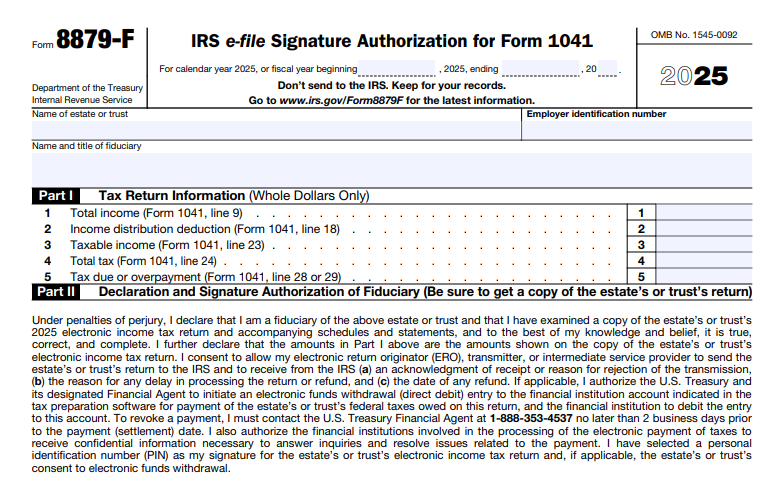
Download the 2025 Form 8879-F from IRS.gov (available late 2025). It’s a simple one-page form with three parts. Your ERO typically prepares it, but review thoroughly before signing. Here’s a line-by-line guide based on the official instructions:
Preparer and Taxpayer Info (Top Section)
- Enter the estate’s or trust’s name, address, and Employer Identification Number (EIN) as on Form 1041.
- Include the Submission ID (SIDN) if provided by the ERO—unique to the electronic transmission.
Part I: Tax Return Information
Pull figures directly from your completed Form 1041:
- Line 1: Total income (Form 1041, Line 9).
- Line 2: Total tax (Form 1041, Line 24).
- Line 3: Amount of refund (Form 1041, Line 25a, if applicable).
- Line 4: Income distribution deduction (Form 1041, Line 18).
- Line 5: Check if consenting to electronic funds withdrawal (optional; include bank details if yes).
These verify the return’s accuracy—mismatches can reject the e-file.
Part II: Declaration and Signature Authorization
- Fiduciary’s PIN: Enter a self-selected 5-digit PIN (not all zeros). This acts as your electronic signature under penalties of perjury.
- Options:
- Check Box A if authorizing the ERO to enter your PIN.
- Or enter it yourself.
- Sign and date (electronic or wet signature). Print your name and title (e.g., “Trustee”).
- Declare you’ve reviewed the return and it’s true, correct, and complete.
Part III: ERO Responsibilities
- The ERO enters their EFIN (6-digit Electronic Filer Identification Number) and 5-digit PIN.
- They sign and date, confirming compliance with Pub. 4164 (MeF Guide).
Return the form to your ERO before transmission. They retain it for 3 years (electronic retention OK per Rev. Proc. 97-22).
Filing Deadlines and E-File Process for Form 8879-F
Form 8879-F aligns with Form 1041 deadlines:
- Due April 15, 2026, for calendar-year estates/trusts (2025 tax year).
- Automatic 5.5-month extension to September 30 via Form 7004 (no separate extension for 8879-F).
E-file through an IRS-approved provider. Steps:
- Prepare Form 1041 and 8879-F.
- Transmit electronically—IRS acknowledges receipt within 48 hours.
- Retain records; no mailing required.
For direct deposit refunds, include routing/account numbers on Form 1041. Changes after signing? Notify your ERO for a corrected 8879-F.
Common Mistakes to Avoid When Using Form 8879-F
Steer clear of these pitfalls to prevent rejections or audits:
- PIN Errors: Using all zeros or forgetting to authorize ERO entry—must be 5 unique digits.
- Data Mismatches: Lines in Part I not matching Form 1041 exactly.
- Missing Consent: Forgetting electronic withdrawal box if paying via ACH debit.
- Retention Lapses: EROs must keep for 3 years; fiduciaries should get a copy.
- Unsigned Forms: Both fiduciary and ERO must sign before transmission.
Penalties? Up to $290 per return for improper e-filing, plus interest on late payments. Always verify with IRS.gov.
Recent Changes to IRS Form 8879-F (2024-2025)
No major structural updates for 2025—it mirrors the 2024 version with year-specific references (e.g., “2025 electronic income tax return”). However, broader IRS e-file enhancements include improved MeF security and faster acknowledgments. Inflation adjustments may affect Form 1041 brackets (e.g., exemption amounts), but 8879-F remains unchanged. Check IRS.gov/Form8879-F for post-release revisions, last updated December 3, 2024. Note: The Health Coverage Tax Credit phase-out from prior years doesn’t impact this form.
FAQs About IRS Form 8879-F and Form 1041 E-Filing
Do all estates and trusts need Form 8879-F?
No—only for PIN-based e-filing of Form 1041. Paper filers use Form 8453-FE instead.
Can I e-file Form 1041 without a tax professional?
Yes, via self-prepared software, but you’ll enter the PIN directly—no 8879-F needed.
What if the estate owes taxes—how does Form 8879-F help?
It authorizes direct debit, avoiding checks and delays.
How does Form 8879-F differ from Form 8879?
8879 is for individual Form 1040; 8879-F is estate/trust-specific for 1041.
Final Thoughts: Streamline Your Estate and Trust Taxes with Form 8879-F
IRS Form 8879-F simplifies e-filing for Form 1041, saving time and reducing errors for fiduciaries. With deadlines approaching April 15, 2026, download the form, collaborate with your ERO, and file confidently.
For tailored advice, consult a tax pro or call IRS at 1-800-829-1040. Stay current at IRS.gov—e-file mandates evolve, but your compliance doesn’t have to.
This article is informational only, not tax advice. Always reference official IRS sources.