Table of Contents
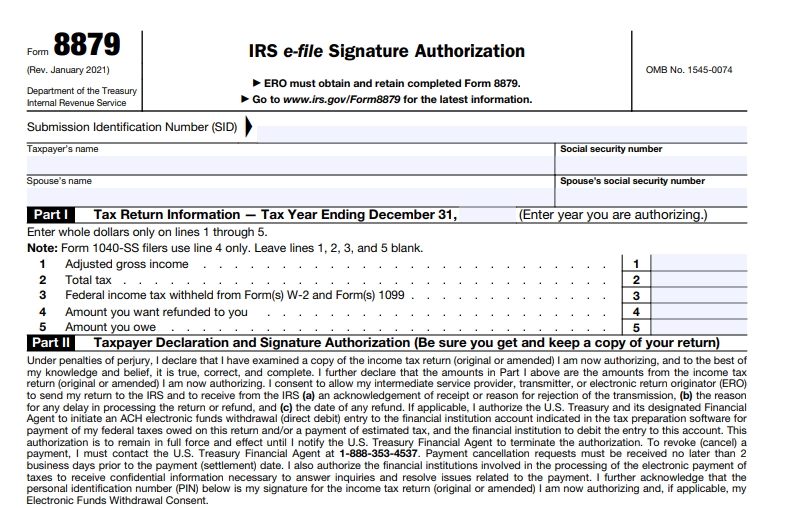
IRS Form 8879 – IRS e-file Signature Authorization – In the digital age of tax filing, electronic submission has become the norm for millions of Americans. If you’re e-filing your individual income tax return through a professional preparer, you may encounter IRS Form 8879, the IRS e-file Signature Authorization. This essential document allows taxpayers to authorize electronic filing and use a personal identification number (PIN) as their signature.
As of 2025, Form 8879 (Rev. January 2021) remains the current version for most individual returns, with no major revisions noted by the IRS. Understanding this form is crucial for smooth e-filing, avoiding delays, and ensuring compliance.
What Is IRS Form 8879?
IRS Form 8879, officially titled “IRS e-file Signature Authorization,” is a declaration and authorization document used when an Electronic Return Originator (ERO)—such as a tax professional or software provider—prepares and electronically files your tax return.
The form serves as your official permission for the ERO to:
- Submit your return electronically to the IRS.
- Enter or generate your PIN, which acts as your electronic signature.
It applies primarily to individual income tax returns, including Form 1040, 1040-SR, 1040-NR, 1040-SS, and amended returns (Form 1040-X) for tax years 2019 and later.
Note: There are specialized variants like Form 8879-S (for S corporations) or Form 8879-F (for fiduciaries), but this guide focuses on the standard Form 8879 for individual taxpayers.
Purpose of Form 8879
The primary purpose of Form 8879 is to:
- Authorize the e-filing of your tax return.
- Allow the use of a PIN as your electronic signature instead of a handwritten one.
- Consent to electronic funds withdrawal for any taxes owed or direct deposit of refunds.
Without this signed authorization, your ERO cannot transmit your return to the IRS. It’s a safeguard ensuring you review and approve the return’s accuracy before submission.
Who Needs to Use IRS Form 8879?
You need Form 8879 if:
- An ERO is e-filing your individual income tax return.
- You’re using the Practitioner PIN method or authorizing the ERO to enter/generate your PIN.
You do not need it if:
- You self-prepare and e-file directly (e.g., through IRS Free File or commercial software where you enter your own PIN).
- The ERO is not involved in PIN entry.
For married filing jointly, both spouses generally sign, though specific rules apply for PIN entry.
IRS Form 8879 Download and Printable
Download and Print: IRS Form 8879
How to Complete IRS Form 8879: Step-by-Step
Completing Form 8879 is straightforward but requires attention to detail. The ERO typically prepares it, but taxpayers must review, sign, and return it before transmission.
Key Steps for Taxpayers
- Verify your tax return details for accuracy, including direct deposit information.
- Choose whether to enter your own PIN or authorize the ERO to do so.
- Sign and date the form (handwritten or electronic).
- Return it to your ERO via approved methods (hand delivery, mail, email, fax, etc.).
Key Steps for EROs
- Enter taxpayer information and return amounts in Part I.
- Obtain signed authorization before filing.
- Retain the form for 3 years.
Parts of Form 8879 Explained
- Part I: Tax Return Information – Includes key figures like adjusted gross income, total tax, withholding, refund, or amount owed (in whole dollars).
- Part II: Taxpayer Declaration and Signature Authorization – Where you declare the return’s accuracy under penalty of perjury and authorize the PIN.
- Part III: Certification and Authentication – Used only for the Practitioner PIN method; completed by the ERO.
PIN Rules: Your PIN must be five digits (not all zeros). It serves as your electronic signature.
E-Signature Options for Form 8879 (2025 Updates)
In 2025, taxpayers can use electronic signatures for Form 8879 when e-filing through an ERO with supporting software. Methods include:
- Stylus on a screen.
- Typed name.
- PIN or password.
- Digital signature.
ERO software verifies identity (often via knowledge-based questions). Handwritten signatures remain an option.
Retention and Submission Rules
- Do not send Form 8879 to the IRS unless requested.
- EROs retain completed forms for 3 years (electronically or paper).
- Provide taxpayers a copy upon request.
Common FAQs About IRS Form 8879
Can I e-file without Form 8879?
Yes, if you self-prepare and enter your own PIN.
What if changes are made after signing?
Your ERO must provide a corrected Form 8879 for re-signature.
How do I check my refund status?
Use IRS.gov/Refunds or call 800-829-1954 after acknowledgment.
For the latest details, visit the official IRS page or download the form PDF.
Final Thoughts
IRS Form 8879 streamlines electronic tax filing while protecting your signature authority. Always review your return carefully before signing. Consult a tax professional or the IRS website for personalized advice.
This guide is based on official IRS information as of December 2025. Tax laws can change; verify with IRS.gov.