Table of Contents
IRS Form 13715 – Volunteer Site Information Sheet – Are you a site coordinator for a volunteer tax preparation program? Navigating IRS Form 13715, the Volunteer Site Information Sheet, is essential for ensuring your VITA (Volunteer Income Tax Assistance) or TCE (Tax Counseling for the Elderly) site reaches those who need free tax help the most. Updated in October 2025, this form helps the IRS promote your site through tools like the VITA Site Locator on IRS.gov. In this comprehensive guide, we’ll break down everything you need to know about IRS Form 13715—from its purpose to step-by-step filling instructions—so you can keep your volunteer tax site visible and effective.
Whether you’re new to IRS volunteer programs or updating your existing site, understanding Form 13715 can streamline operations and maximize taxpayer outreach. Let’s dive in.
What Is IRS Form 13715?
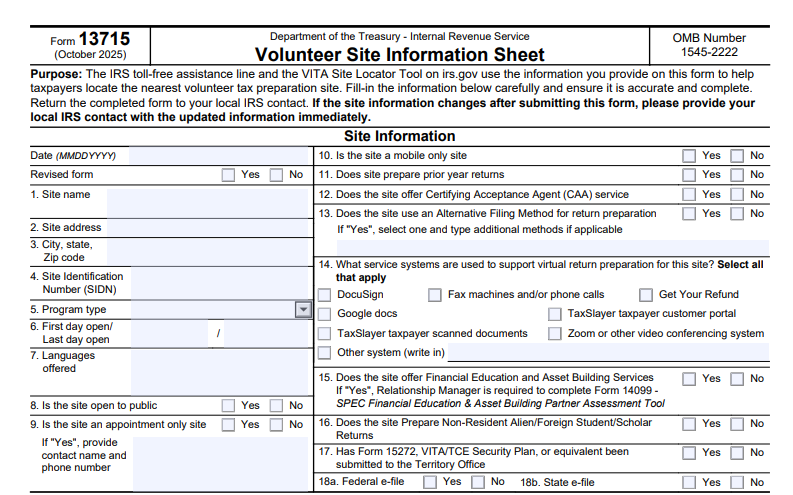
IRS Form 13715, officially titled the Volunteer Site Information Sheet, is a one-page document designed to capture key details about volunteer tax preparation sites. Released with revision date October 2025 (Catalog Number 43863F), it’s used by the IRS to maintain an up-to-date database of sites offering free or low-cost tax assistance. This information powers the IRS toll-free helpline and online locator tools, making it easier for eligible taxpayers—such as low-income individuals, seniors, and those with disabilities—to find nearby help.
The form’s OMB Number is 1545-2222, and it’s estimated to take just 30 minutes to complete. As part of broader IRS initiatives like VITA and TCE, Form 13715 ensures volunteer efforts align with national tax season goals, supporting millions of returns annually.
Who Needs to Complete IRS Form 13715?
Primarily, site coordinators, managers, or designated contacts for VITA, TCE, or other IRS-approved volunteer programs must fill out this form. If your organization runs a tax preparation site—whether in-person, virtual, or mobile—you’ll use it to register or update your location. It’s voluntary but crucial; without it, your site won’t appear in IRS directories, potentially limiting your impact.
This includes:
- Community centers, libraries, or churches hosting tax clinics.
- Virtual sites using tools like TaxSlayer or Zoom for remote preparation.
- Mobile units serving underserved areas.
New sites submit upon setup, while existing ones update annually or after changes (e.g., new hours or services). Always check with your local IRS Territory Office for specifics.
Purpose and Benefits of IRS Form 13715
The core purpose of IRS Form 13715 is to provide accurate, current data that helps taxpayers locate volunteer assistance quickly. By submitting, you enable the IRS to:
- Direct calls from the toll-free line (1-800-906-9887) to your site.
- Feature your location on the interactive VITA Locator Tool.
Benefits for coordinators include:
- Increased Visibility: Reach more clients, boosting your site’s return volume.
- Streamlined Operations: Pre-populated IRS systems reduce manual tracking.
- Program Compliance: Supports IRS quality standards and funding eligibility.
- Community Impact: Helps underserved groups claim refunds like the Earned Income Tax Credit (EITC).
In 2025, with rising demand for virtual options post-pandemic, accurate Volunteer Site Information Sheet submissions are more vital than ever.
Step-by-Step Guide: How to Fill Out IRS Form 13715
Filling out IRS Form 13715 is straightforward. Download the PDF from IRS.gov and use black ink or type digitally. Here’s a quick walkthrough:
- Gather Your Info: Collect site details, hours, and coordinator contacts beforehand.
- Enter the Date: Use MMDDYYYY format at the top.
- Mark if Revised: Indicate “Yes” or “No” for updates.
- Complete Core Fields: Cover name, address, program type, and services (detailed below).
- List Hours: Use the table for weekly schedule, noting holidays.
- Add Coordinator Details: Include name, phone, email, and best contact time.
- Review and Submit: Double-check for accuracy, then send to your local IRS contact.
Pro Tip: For virtual sites, specify tools like DocuSign or TaxSlayer in Field 14 to highlight tech capabilities.
Key Sections of IRS Form 13715 Explained
The form is divided into logical sections for easy navigation. Here’s a breakdown:
Site Information (Fields 1-13)
- Basic Details (1-4): Site name, full address (street, city, state, ZIP), and Site Identification Number (SIDN).
- Operations (5-7): Program type (e.g., VITA), open/close dates, and languages (English, Spanish, etc.).
- Accessibility (8-12): Public access? Appointment-only? Mobile? Prior-year returns? CAA services?
Service Systems and Additional Offerings (Fields 14-18)
- Virtual Tools (14): Select from options like Fax, Google Docs, or “Other” for custom systems.
- Extras (15-18): Financial education? Non-resident returns? Security plan submitted? E-file for federal/state?
Operating Hours
A weekly table (Monday-Sunday) with open/close times and comments (e.g., “Closed Veterans Day”).
Coordinator/Contact Info
Full name, address, phone, AM/PM preference, and email.
IRS Use Only
Leave blank—this is for Territory Office processing, including SPECTRM updates and approvals.
Submission Process for Form 13715
Once completed, email or fax the form to your local IRS contact (find via IRS.gov’s Territory Office list). The office will:
- Enter data into SPECTRM (Stakeholder Programs, Events, Communications, Training, and Relationship Management).
- Approve and activate your listing.
Notify them immediately of changes to avoid outdated info. Expect confirmation within weeks, ensuring your site goes live for tax season.
Privacy, Security, and Important Notes
Your submission is protected under IRS privacy rules (5 U.S.C. 301; 26 U.S.C. 7801, 7803). Data may be shared with volunteers, media, or the public for promotion but not for unrelated purposes. Routine uses are outlined in Federal Register notices (Vol. 80, No. 173, Sept. 8, 2015).
Key Notes:
- Incomplete forms delay processing—fill everything.
- For security, ensure Form 15272 (VITA/TCE Security Plan) is on file.
- 2025 Update: Enhanced virtual service fields reflect growing online demand.
Frequently Asked Questions (FAQs) About IRS Form 13715
What if my site is virtual or mobile?
Select “Yes” in relevant fields and describe tools/services. Virtual sites are fully supported.
How often should I update Form 13715?
Annually or after any changes (e.g., new coordinator).
Where can I download the latest version?
From IRS.gov—search “Form 13715” for the October 2025 PDF.
Does submitting help with IRS funding?
Indirectly, yes—higher visibility correlates with more returns and potential grants.
Who do I contact for help?
Your local IRS Volunteer Program coordinator via IRS.gov.
Conclusion: Empower Your Volunteer Tax Site with Form 13715
IRS Form 13715 is more than paperwork—it’s a gateway to connecting taxpayers with vital free services through VITA and TCE. By keeping your Volunteer Site Information Sheet current, you’re not just complying; you’re amplifying community support during tax season. Download it today from IRS.gov, complete it accurately, and watch your site’s reach grow.
Ready to get started? Visit the IRS Site Coordinator Corner for training and resources. If you’re a taxpayer seeking help, use the VITA Locator Tool now.
This article is for informational purposes only and not official IRS advice. Consult IRS.gov or a professional for personalized guidance.
IRS Form 13715 Download and Printable
Download and Print: IRS Form 13715