IRS Form 5330 – Return of Excise Taxes Related to Employee Benefit Plans – In the complex world of employee benefit plans, staying compliant with IRS regulations is crucial for employers, plan sponsors, and other involved parties. One key form that often comes into play is IRS Form 5330, which deals specifically with excise taxes related to these plans. Whether you’re dealing with prohibited transactions, funding deficiencies, or other compliance issues, this form ensures that any applicable taxes are reported and paid accurately. In this guide, we’ll break down everything you need to know about Form 5330, including who must file it, the taxes it covers, filing instructions, deadlines, and penalties. By understanding these details, you can avoid costly mistakes and maintain your plan’s good standing.
What Is IRS Form 5330?
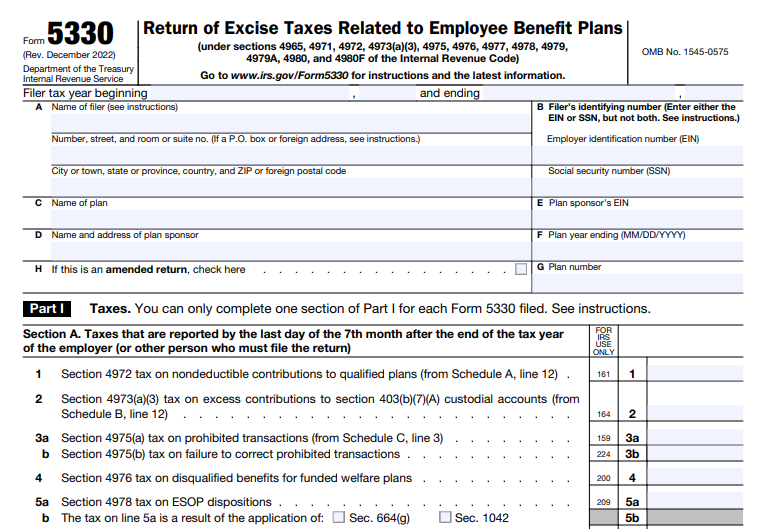
IRS Form 5330, titled “Return of Excise Taxes Related to Employee Benefit Plans,” is a tax return used to report and pay various excise taxes imposed on employee benefit plans under the Internal Revenue Code. These taxes are typically triggered by non-compliance events, such as failing to meet minimum funding standards or engaging in prohibited transactions. The form helps the IRS enforce rules that protect plan participants and ensure fair administration of retirement and welfare benefit plans.
Unlike standard income tax returns, Form 5330 focuses solely on excise taxes, which are penalty-like fees designed to discourage violations. It’s essential for maintaining the tax-qualified status of plans like 401(k)s, pensions, and ESOPs (Employee Stock Ownership Plans). If you’re an employer or plan administrator, familiarizing yourself with this form can prevent unexpected liabilities.
Who Needs to File Form 5330?
Not everyone involved in employee benefits will need to file Form 5330—it’s required only when specific excise taxes apply. According to IRS guidelines, the following parties may be obligated to file:
- Employers: Liable for taxes related to minimum funding deficiencies (section 4971), liquidity shortfalls (section 4971(f)), or failures in multiemployer plans under sections 4971(g) and (h).
- Plan Sponsors: Including multiemployer plan sponsors for failures to adopt rehabilitation or funding restoration plans.
- Disqualified Persons: Individuals or entities involved in prohibited transactions under section 4975, such as fiduciaries or parties in interest.
- Individuals: For excess contributions to certain custodial accounts (section 4973(a)(3)) or other personal liabilities.
- Plan Entity Managers: For prohibited tax shelter transactions under section 4965.
- Other Entities: Such as employers paying excess fringe benefits (section 4977) or those with ESOP dispositions (section 4978).
A separate form is generally required for each plan if taxes stem from multiple plans, but you can consolidate taxes with the same due date on one form. Financial institutions handling multiple IRAs or plans in prohibited transactions can file a single form with an attached list of affected accounts.
If no excise tax is due, you don’t need to file. However, if a violation occurs, filing promptly is key to minimizing penalties.
Types of Excise Taxes Reported on Form 5330
Form 5330 covers a wide array of excise taxes, each tied to specific sections of the Internal Revenue Code. Here’s a breakdown of the main ones:
- Section 4965: Taxes on prohibited tax shelter transactions involving tax-exempt entities.
- Section 4971: Penalties for minimum funding deficiencies, liquidity shortfalls, and failures in endangered or critical status plans.
- Section 4972: Nondeductible contributions to qualified plans.
- Section 4973(a)(3): Excess contributions to 403(b)(7)(A) custodial accounts.
- Section 4975: Prohibited transactions, often the most common trigger, with a 15% initial tax and up to 100% if not corrected.
- Section 4976: Disqualified benefits from funded welfare plans.
- Section 4977: Excess fringe benefits.
- Section 4978: Certain ESOP dispositions.
- Section 4979: Excess contributions to cash or deferred arrangements.
- Section 4979A: Prohibited allocations of qualified securities by ESOPs.
- Section 4980: Reversions of qualified plan assets to employers.
- Section 4980F: Failure to provide notice of benefit accrual reductions.
Each tax has its own rate and calculation method— for example, prohibited transactions under section 4975 are based on the “amount involved,” which is the greater of the fair market value given or received. Always refer to the form’s schedules (A through L) for the specific tax you’re reporting.
How to File IRS Form 5330: Step-by-Step
Filing Form 5330 can be done electronically or on paper, depending on your situation. Here’s how:
- Gather Information: Collect details on the plan (including EIN or SSN, plan number), the excise tax type, and calculations.
- Complete the Form: Use the appropriate schedules for your tax (e.g., Schedule C for prohibited transactions). Include attachments for uncorrected issues or explanations.
- Electronic Filing: Required for filers submitting 10 or more returns in the calendar year (for tax years ending after December 31, 2023). Use the IRS Modernized e-File (MeF) system via an authorized provider. As of 2024, there’s only one provider, allowing paper filing with documentation of hardship due to limited options—check for 2025 updates.
- Paper Filing: Mail to Department of the Treasury, Internal Revenue Service Center, Ogden, UT 84201. Use designated private delivery services if needed.
- Pay the Tax: Attach a check or money order payable to “United States Treasury,” noting the form, section, and plan details.
- Extensions: File Form 8868 for up to a 6-month extension, but pay any estimated tax with it.
Common errors include omitting the plan number, using incorrect identifying numbers, or failing to attach required statements. Double-check everything to avoid delays.
IRS Form 5330 Download and Printable
Download and Print: IRS Form 5330
Filing Deadlines for Form 5330
Deadlines vary by the excise tax type—refer to Table 1 in the Form 5330 Instructions for specifics. Generally:
- For prohibited transactions (section 4975), file by the last day of the 7th month after the end of the tax year.
- For minimum funding issues (section 4971), due by the last day of the 7th month after the plan year ends.
- Other taxes may align with your fiscal year or specific event dates.
If the due date falls on a weekend or holiday, it shifts to the next business day. Late filings incur penalties, so mark your calendar.
Penalties for Late Filing or Non-Compliance
Failing to file or pay on time can be expensive:
- Late Filing Penalty: 5% of the unpaid tax per month (or part thereof), up to 25%.
- Late Payment Penalty: 0.5% per month, up to 25%, plus interest.
- Additional Taxes: For uncorrected prohibited transactions, a 100% tax may apply.
Penalties can be waived for reasonable cause—attach an explanation to your form. Participating in voluntary correction programs like the Employee Plans Compliance Resolution System (EPCRS) can help rectify issues before they escalate.
Tips for Successfully Filing Form 5330
- Consolidate Where Possible: Report multiple taxes with the same deadline on one form to simplify.
- Seek Professional Help: Consult a tax advisor or ERISA attorney for complex plans.
- Stay Updated: Check IRS.gov for annual adjustments, like inflation-indexed amounts.
- Use Resources: Download the latest form and instructions from IRS.gov. For electronic filing waivers, document hardships like the limited number of providers.
By proactively managing your employee benefit plans, you can minimize the need for Form 5330 altogether.
Conclusion
IRS Form 5330 plays a vital role in enforcing compliance for employee benefit plans, helping protect workers’ retirement security. Whether you’re an employer facing a funding shortfall or a fiduciary correcting a prohibited transaction, understanding this form is essential. Always use the most current IRS resources to ensure accuracy, and consider professional guidance to navigate these rules effectively. For more details, visit the official IRS website or consult a tax expert. Staying informed not only avoids penalties but also supports a robust benefits program for your team.